Most static site generators expect you to own the site: a src/ folder, layouts, a framework config and a dependency list that you keep up to date. A decision log is maintained by many people who are not front-end developers. They should only touch Markdown and one config file, and an upgrade should be npm update. Zudoku solved this for API docs by shipping the whole app inside the package and running it from a CLI; Inkan needed the same shape for decisions.
Inkan is one npm package, @tilaven/inkan, with an inkan binary. The package contains the complete site (an Astro application in app/), the built-in templates and the starter files. Your repository holds content and inkan.config.* and nothing else. The CLI runs Astro programmatically with the app folder inside the package as the Astro root and your folder as the source of content and config.
Your config reaches the app through virtual modules, the same model Zudoku uses with Vite. There is no generated code in your repository, no src/ and no framework config to maintain.
The package requires Node.js 22.22 or newer. Astro, Pagefind, Mermaid, KaTeX and Expressive Code are dependencies of the package; you do not install them yourself.
Starts the dev server with hot reload, by default on http://localhost:4321. With authentication, --public shows what anonymous visitors see.
inkan build
Builds the static site into dist/ next to the config file. Fails on invalid config or front matter.
inkan preview
Serves the built dist/ locally, including the search index. When dist-protected/ exists it starts the sign-in server instead.
inkan serve
Production server for a built site: dist/ as static files, and sign-in for protected pages when the site was built with authentication. Default port 8080. See Sign-in and protected projects.
Writes every current decision to one self-contained HTML file, or an A4 PDF. See Print and export.
inkan mcp [--url <site>]
Serves the records to AI agents over the Model Context Protocol on stdio. See MCP server for agents.
inkan --version, -v
Prints the package version.
inkan, help, --help
Prints the usage text. An unknown command prints it and exits with code 1.
init adds dev, build, preview, new, status, supersede and check as npm scripts, so npm run dev, npm run check and npm run new -- adr sre "Title" do the same thing.
dev, build, preview and init live in bin/cli.mjs; every other command is a module in lib/commands/<name>.mjs that exports run({ args, flags, root }) and returns the exit code. An error thrown by a command is printed on stderr and exits with code 1.
Next review date; review interval; the review date instead of today; preview.
--within <days>, --all, --json
reviews
Due-soon window; list every scheduled record; JSON output.
--project, --type, --format, --dry-run
import
Target project and type, source dialect, preview.
--strict, --format json
check
Fail on warnings; print a JSON report.
--out <file>, --pdf, --no-build
export
Output path, PDF instead of HTML, reuse the existing dist/.
--url <site>
mcp
Read a published site instead of the local content folder.
Flags take their value from --port 3000 or --port=3000; --root, --out, --project, --url and --author must have one. --date takes the next argument as its value when there is one, so write it after the positionals (inkan status sre/adr/1 accepted --date), and an argument the command does not expect is refused. Example:
Terminal window
1
npxinkandev--rootdocs--port3000--host
This is how the Inkan repository builds this site: the config is docs/inkan.config.ts, so the root is docs.
The CLI sets INKAN_ROOT to the resolved root. When sources lists repo entries, build fetches every one of them first (unless --offline) and dev fetches the missing ones. Then it calls Astro’s dev, build or preview with root pointing at the app inside the package.
app/astro.config.mjs loads and validates your config, then registers a Vite plugin that serves it as virtual modules:
virtual:inkan/config: the resolved config as JSON (plugins stripped).
virtual:inkan/assets: your logo and favicon as asset URLs.
virtual:inkan/user-css: imports of every file in customCss.
virtual:inkan/mdx-components: your mdxComponents module, or an empty map.
virtual:inkan/components/<Name>: your override of a component, the built-in one, or an empty slot.
Content collections read from your contentDir and pagesDir. Vite is allowed to read files from your repository root, so images and CSS next to your records work.
Output goes to <root>/dist; caches go to <root>/node_modules/.inkan (including sources/<project> clones) and .vite-inkan. Astro’s telemetry and dev toolbar are off.
The dev server watches the config file and restarts when it changes. Files the config points at (components, CSS, the MDX components module) hot-reload on their own.
Because the site is inside the package, a new version brings new pages, styles and fixes without any change to your repository. Options that were removed or renamed are reported by the config validation, with a hint, the next time you run dev or build.
Zero site code in your repository. Content authors see only Markdown and one config file.
Upgrades are a version bump. Breaking config changes surface as validation errors, not silent misbehaviour.
Customisation goes through defined seams: config, customCss, component overrides, MDX components and plugins. You cannot edit the app’s own files; if a seam is missing, that is a feature request.
The CLI wraps Astro’s programmatic API, so Astro’s own CLI flags beyond --port and --host are not exposed.
--root must point at the folder with the config. Running inkan dev from a different folder without it finds no config and builds a site with the defaults and an empty decisions/ folder.
The install is heavier than a Markdown linter because the full toolchain (Astro, Mermaid, KaTeX, Pagefind) is a dependency, even if you never use diagrams or math.
A tool that needs “only Markdown and one config file” still has a first five minutes: a config with the right import, a project folder with a _project.yml, one record that shows the format, npm scripts, a .gitignore, and a CI workflow so the site is published from day one. Writing these by hand from the README is slow and error-prone, and a decision log often starts inside an existing repository that already has a package.json.
inkan init [dir] copies a starter repository from the package and wires up package.json. It never overwrites a file that already exists, so it is safe to run inside an existing repository. npm create @tilaven/inkan is a thin wrapper, published as create-inkan, that runs the same init in a new folder.
The starter is complete: it builds and deploys without edits. Everything in it is a plain file you can change or delete afterwards.
npm create @tilaven/inkan [dir] resolves the @tilaven/inkan package it depends on and runs inkan init <dir>. When you give no folder name it uses decisions-site. After init you still run npm install yourself; the output ends with the exact next commands.
Without an argument init targets the current folder (or --root). With npx inkan init docs the files land in docs/, which is how this site is laid out. Run the CLI from that folder afterwards, or pass --root docs.
A first ADR with a Mermaid diagram, so the site is not empty.
AGENTS.md
Instructions for coding agents: where records live, how to create one, what statuses mean.
.github/workflows/decisions.yml
Builds every pull request and publishes main to GitHub Pages.
.gitlab-ci.yml
Builds merge requests and publishes the default branch to GitLab Pages.
Dockerfile, nginx.conf, .dockerignore
Two-stage image: build with Node, serve dist/ with nginx.
.gitignore
node_modules/ and dist/.
package.json
Created, or updated in place (see below).
The dotfiles are stored in the package as _gitignore and _dockerignore and renamed on copy, because npm drops .gitignore from published packages. init prints every file it added with a + and marks package.json with ~.
The four scripts are added. Scripts you already have, including ones with the same names, are kept as they are.
"type": "module" is set only when type is missing. The config file is an ES module, so a repository that uses CommonJS keeps .ts for the config and is otherwise unaffected.
@tilaven/inkan is added to devDependencies at the installed version, unless it is already in dependencies.
Nothing else in the file is touched, and key order of your existing fields is preserved.
init skips any file that already exists at the destination and keeps going. Running it twice is harmless. This also means a second init does not refresh an old workflow file: delete it first if you want the current one.
Set title, url and repo in inkan.config.ts. repo enables the edit and “New ADR” buttons; url is used in feeds and llms.txt.
Rename the platform folder or add your own projects. A folder with records is enough; _project.yml adds the display name.
Push. The GitHub workflow needs Pages set to “GitHub Actions” as the source; the GitLab pipeline publishes to Pages on the default branch. Both set BASE_PATH=/<repository name> for project pages; remove that line for a custom domain. See GitHub and GitLab Pages.
Optional: docker build -t decisions . for a self-hosted image. See Docker and nginx.
Note
The CI files and the Dockerfile use Node 22 and run npm install or npm ci. The Dockerfile expects a package-lock.json, so commit the lockfile that npm install created.
One command gives a repository that builds and deploys. New users see a working site before reading any documentation.
Safe in existing repositories: nothing is overwritten and package.json is extended, not replaced.
The starter is a snapshot. Files it created are yours from then on; updates to the package’s starter do not propagate to them, which is intended for CI files you will edit anyway.
npm create @tilaven/inkan pins the @tilaven/inkan version it was published with. Use @latest to get the current one.
The starter ships files for every target (GitHub, GitLab, Docker). Delete the ones you do not use.
Records are numbered files, 0007-use-kafka.md, and the number is part of how people refer to them (PLATFORM-ADR-0007). Finding the next free number by hand means listing a folder and counting; two people doing that on the same day get a conflict. Each record also starts from the same skeleton, with today’s date and the author’s handle, which nobody wants to type again. log4brains and adr-tools both solved this with a new command, and users expect one.
inkan new <type> <project> "<title>" creates the next numbered record of a type inside a project from a template. The number is one more than the highest number already in that folder. The file name is the number padded to four digits plus a slug of the title. The template comes from your templatesDir when it has a file for that type, otherwise from the package. If the project folder has no _project.yml yet, the command creates a minimal one so the project appears on the site with a name. An existing folder can be named by its slug: inkan new adr ops-plans "…" writes into Ops Plans/.
npxinkannewadrplatform"Move the event bus to Kafka"
2
# Created decisions/platform/adr/0010-move-the-event-bus-to-kafka.md
3
4
npxinkannewrfcpayments"Settle in async batches"--authorjules
With the npm script that init adds: npm run new -- adr platform "Move the event bus to Kafka".
Argument
Meaning
<type>
A key of docTypes: adr or rfc by default, or a type you added in the config. Any other value lists the known types and exits with code 1.
<project>
The project folder inside contentDir. It does not have to exist yet.
"<title>"
The title. Everything after the project is joined with spaces, so quotes are optional unless the title contains shell characters.
--author <handle>
Handle written into the {{author}} placeholder. Default: the _authors.yml handle that matches the repository’s Git user (by e-mail, then name), else git config user.name, or empty outside Git.
The command reads the folder <contentDir>/<project>/<type>/, takes the leading digits of every file name and adds one to the largest. An empty or new folder starts at 0001. Numbers are per project and per type, so sre/adr/0003 and sre/rfc/0003 are different records, and gaps are allowed: deleting 0005 does not renumber anything, and the next record after 0004 and 0009 is 0010. Numbers are padded to four digits.
The site derives the number from the file name the same way, so a record you create by hand with a correct name is indistinguishable from one created by the command. See Record type comes from the folder.
The title is lowercased, accents are stripped (é to e, ł to l), every run of characters that is not a-z or 0-9 becomes one -, and leading or trailing hyphens are removed:
Templates are Markdown files named after the type: adr.md, rfc.md, postmortem.md. The package ships adr.md and rfc.md. Your own templates live in templatesDir (default templates/, relative to the config file); a file there with the same name replaces the built-in one, and types without a file fall back to the package’s. A type with no template at all gets a three-line front matter with title, date and authors.
Three placeholders are replaced everywhere in the template:
Placeholder
Value
{{title}}
The title. When it contains : or # it is written as a quoted JSON string, so the YAML stays valid.
{{date}}
Today’s date as YYYY-MM-DD (the local calendar day).
{{author}}
--author, or the handle matched from the Git user, or the Git user name, or empty. Quoted when it would not survive inside [...], e.g. "Doe, John".
The built-in ADR template:
templates/adr.md
1
---
2
title: {{title}}
3
description: One sentence that says what was decided.
4
status: proposed
5
date: {{date}}
6
authors: [{{author}}]
7
deciders: []
8
tags: []
9
---
10
11
## Context
12
13
What is the problem and why does it need a decision now?
14
15
## Options considered
16
17
1. **Option A**: …
18
2. **Option B**: …
19
20
## Decision
21
22
What we will do.
23
24
## Consequences
25
26
What becomes easier or harder because of this decision.
The built-in RFC template starts with status: draft and has the sections Summary, Motivation, Proposal, Alternatives and Open questions. To use your own, copy a built-in file into templates/ and edit it:
1
templates/
2
adr.md replaces the built-in ADR template
3
postmortem.md template for a custom type from docTypes
Tip
The same templates feed the “New ADR” and “New RFC” buttons on every team page when repo is configured. The button opens your repository’s web editor with the next number in the file name and the template as content, so people without a checkout can start a record too.
When <contentDir>/<project>/_project.yml does not exist, the command writes one before creating the record:
decisions/payments/_project.yml
1
name: payments
2
description:
3
owners: []
It prints a reminder to fill in the details. The folder name is the id used in URLs; name is only the display name, so set it to Payments. See One folder per project and the fields in the front matter reference.
Without --author, the command looks the Git user up in _authors.yml: an entry whose email matches git config user.email, or whose handle, name, github or gitlab matches git config user.name, gives its handle, so Jane Doe <jane@example.com> becomes authors: [jane.doe]. Without a match the Git user name is written as it is, for example Jane Doe, and inkan check reports it as an unknown author; pass --author jane.doe or edit the line after creation. The RFC on filling date and authors from git discusses the same matching for date and authors at build time.
Custom fields that have a default are written into the new record’s front matter. See Custom metadata fields.
The next number is always right for the folder you have checked out. Two branches that both add 0010 still conflict at merge time; the build does not notice, but inkan check reports the clash as a duplicate-number error, so the CI check from init catches it on the merged branch. See Check records in CI.
Templates are plain Markdown with three placeholders. There is no templating language, no conditionals and no per-project template.
The command needs the config to know contentDir, templatesDir and docTypes, so it must run in the folder with inkan.config.* or with --root.
The slug only keeps ASCII letters and digits. Titles in scripts without a Latin transliteration produce very short slugs; rename the file if you need to, the number is what matters.
Nothing is renumbered or renamed afterwards. Changing a title later leaves the file name as it was, which keeps links stable.
A decision log is edited by many people in pull requests, often without running the site locally. Metadata mistakes are quiet: status: acepted renders fine but the record never shows up as current, a misspelled config key is ignored and the feature “does not work”. With a static site there is exactly one moment where every file is read, the build, so that is where mistakes must be caught, with messages that name the file and the field.
Inkan validates two things and stops on the first problem:
The config file, with a zod schema in which every key is optional and unknown keys are rejected. Each unknown key gets a “did you mean” hint. Plugins are the exception: unknown keys on a plugin are kept, because a newer plugin may carry more, but each one is reported as a warning.
Content metadata: the front matter of every record and page, every _project.yml and _authors.yml, through Astro content collections with zod schemas. status is an enum built from the keys of statuses in your config, so the allowed values are exactly the ones you defined. A failure stops inkan build with a non-zero exit code, which fails the pull request check.
Run inkan dev or inkan build. The config is validated before anything else. A broken config looks like this:
1
Invalid inkan config:
2
inkan.config.ts: titel: unknown option, did you mean "title"?
3
inkan.config.ts: repo.provder: unknown option, did you mean "provider"?
4
inkan.config.ts: theme.default: expected one of "system"|"light"|"dark"
5
inkan.config.ts: contentDir: must not be empty
What is checked:
Check
Example message
The default export is an object
inkan.config.ts: the default export must be an object (use defineConfig({ ... }))
No unknown keys, at any depth (repo, theme, footer, landing, search, statuses.*, docTypes.*, navigation[], head[])
landing.action: unknown option, did you mean "actions"?
Types of every value, enums for repo.provider, theme.default and landing.actions[].variant
repo.provider: expected one of "github"|"gitlab"
contentDir, templatesDir and pagesDir are not empty strings
pagesDir: must not be empty
plugins[].config is a function
plugins.0.config: expected a function
plugins[].motifs maps names matching /^[a-z][a-z0-9-]*$/ to a non-empty path or URL
plugins.0.motifs.Stamp: motif names use lowercase letters, digits and dashes and start with a letter
search matches the chosen provider: type is one of five values, that provider’s keys are present and no others
search.type: type must be one of pagefind, algolia, meilisearch, typesense, custom, search.apiKey: unknown option, search.host: expected string, received undefined
sources[]: project is a folder name (letters, digits, -, _), exactly one of repo or dir is set, branch and provider only with repo, and repo, branch and path do not start with - (path is relative and inside the source)
sources.0: set exactly one of repo or dir, sources.0.branch: only applies to repo sources, sources.0.path: must be a relative path inside the source
git has only dates and authors, both booleans
git.date: unknown option, did you mean "dates"?
codeRefs is false or an object with include and exclude (string arrays) and marker (string)
codeRefs.includes: unknown option, did you mean "include"?
export has only statuses (string array) and title
export.status: unknown option, did you mean "statuses"?
After plugin config hooks ran: head and navigation still have the right shape, and search is still a valid provider
Invalid inkan config after plugin hooks: ...
The hint is the closest known key at that position, measured by edit distance; a key that is nowhere near anything known gets no hint. $schema is accepted at the top level of any config and dropped, so a JSON config can point an editor at a schema.
Unknown keys on a plugin do not fail the build. They are printed once at load time:
1
inkan: plugin "acme": unknown key "remarkPlugin"
The known plugin keys are name, config, remarkPlugins, rehypePlugins, vitePlugins, integrations, pages, motifs, head and navigation. See Plugins with definePlugin.
Every .md and .mdx file in contentDir is parsed against the record schema. The schema is in app/src/content.config.ts and documented field by field in the front matter reference. The rules in short:
title is required and a string.
status, when present, must be one of your configured statuses. With the defaults: draft, proposed, in-review, accepted, implemented, rejected, withdrawn, deprecated, superseded.
date, reviewBy and reviewed must be dates; reviewEvery must be an interval (1 year, 6 months, 90 days) or never, on records and in _project.yml alike.
authors, deciders, tags, supersedes, supersededBy and related are lists of strings; a single string is accepted and wrapped.
order is a number, draft a boolean.
A bad record stops the build. Astro prints the collection, the file and the field, for example a status: acepted is reported as an invalid enum value for status in decisions/sre/adr/0002-error-budget.md, together with the allowed values. Fields that the schema does not know are dropped silently, so a Status: with a capital letter is not an error; it is simply not a status. Watch the sticker on the record to confirm.
_project.yml and _authors.yml are validated the same way: name is required in both, ink must be one of the six ink letters, and a links[].url must start with http://, https:// or /. motif is checked once all projects are read: a name that is neither built in nor registered by a plugin fails the build with project "sre": unknown motif "ring", did you mean "rings"? (available: ...). A plugin motif whose module does not exist fails at config load with plugin "acme" motif "stamp": module not found: ....
Warning
Changing statuses or docTypes in the config changes what is valid. When you remove in-review from statuses, every record that still uses it fails the next build. That is deliberate: a status that is not in the lifecycle must not sit on a record unnoticed.
The build also fails when two things would be served at the same URL: a project folder named like a built-in page (decisions, tags), two project folders with the same slug (Ops Plans/ and ops-plans/), a root-level about.md next to a project folder about/, or a page in pagesDir or from a plugin that shadows a record, a redirect or a built-in page. Dynamic pages such as guides/[slug].astro only warn. A plugin page whose entrypoint file does not exist fails as well.
The workflow and pipeline that inkan init creates run npm run build on every pull or merge request, so a bad record cannot be merged. Without them, a minimal check is:
.github/workflows/decisions.yml
1
- run: npm install
2
- run: npm run build
The build exits with code 1 on the first error. Fix it and run again; errors are reported one file at a time.
inkan check validates what the build cannot see: references in supersedes, supersededBy and related that point nowhere, duplicate numbers, one-sided supersede links, unknown authors, overdue reviews and projects without _project.yml or owners. It reads the files directly, takes seconds and reports path:line level message. It also catches front matter that does not parse, a missing title, an unknown status and a malformed date, with the same config the build uses. The CI files from init run it before the build. See Check records in CI.
The config alone can be checked programmatically with validateConfig from inkan/lib/config.mjs, which throws an error with one line per problem; this is what the test suite of the package uses.
Typos in the config and in status are found at build time, with the file and the key named. Nothing silently does nothing, except unknown front matter fields.
The status list is a closed enum per site. That is what makes the backlog, the “current” flag and the stickers reliable, at the cost of a build failure when the list changes.
Plugins can carry keys the core does not know, so a plugin written for a newer version loads on an older one with a warning instead of an error.
Build-time validation covers shape, not meaning. A supersedes path that points at a record that does not exist, a duplicate number or a missing owners entry passes the build; inkan check is the second step that catches them.
Front matter fields outside the schema are dropped without a warning. A misspelled field name such as author: instead of authors: is the one class of typo the build does not catch.
A record changes status a few times in its life: proposed, accepted, implemented, one day superseded. Each change is a small edit to front matter, and each one is easy to get wrong by hand: a misspelled status, a supersededBy on the old record without the matching supersedes on the new one, or a status left at accepted after the replacement landed. The build only catches the first of these. People also edit records from scripts and from pull request bots, where opening a file in an editor is not an option.
inkan status <record> <status> sets status on one record.
inkan supersede <old> <new> sets status: superseded and appends <new> to supersededBy on the old record, and appends <old> to supersedes on the new one.
Both validate the status against your configured statuses, resolve records by several spellings, rewrite only the keys they change and leave the rest of the file as written: comments, key order, quoting and line endings survive. --dry-run prints a diff instead of writing. Records fetched from a repo source are refused, because their clone is overwritten on the next sync.
The status must be a key of statuses in your config (the nine defaults, or your own map). A wrong one exits with code 1 and a hint:
1
Unknown status "acepted". Did you mean "accepted"? Known: draft, proposed, in-review, accepted, implemented, rejected, withdrawn, deprecated, superseded.
Option
What it does
--date [YYYY-MM-DD]
Also sets date to today (the local calendar day) or, with a value, to that day. Useful when the date of a record is the date it was accepted, or when the change is recorded late. A value that is not a calendar day is refused.
--dry-run
Prints the diff and changes nothing.
--root <dir>
Folder with inkan.config.*, as for every command.
Running the command again with the same status writes nothing and prints sre/adr/0003-define-slos: already accepted.
status: superseded (only when superseded is one of your statuses) and supersededBy gets the full id of <new> appended.
<new>
supersedes gets the full id of <old> appended.
Ids are written in full (platform/adr/0009-move-the-event-bus-to-kafka), as a flow list (supersedes: [platform/adr/0004-use-sqs-as-the-event-bus]). Existing entries stay; if a list already names that record under any spelling, nothing is added, so the command is safe to run twice. The two records may live in different projects. A record cannot supersede itself. --dry-run works here too and shows the diff of both files. --date [YYYY-MM-DD] sets date on <old>, the record whose status changes, exactly as it does for inkan status.
Full id (path inside the content folder, without .md)
sre/adr/0003-define-slos
Short id with or without leading zeros
sre/adr/0003, sre/adr/3
Reference, in any case
SRE-ADR-0003, sre-adr-0003
File path, relative to the current folder or absolute
decisions/sre/adr/0003-define-slos.md
Trailing part of an id
0003-define-slos (only when exactly one record ends with it)
A query that matches more than one record (duplicate numbers in one folder, or a trailing part shared by two projects) is refused with the list of candidates, and a query that matches nothing gets a “did you mean” hint built from ids and references.
The front matter is parsed as a YAML document and the changed keys are set on that document; everything else is serialised back as it was. A # comment above tags, a quoted title, "status" written with quotes and CRLF line endings all survive. A file without front matter gets one. Front matter that does not parse stops the command with the file name and the first YAML error; run inkan check to find such files first.
The exit code is 0 on success (including “already …”), 1 on a usage error, an unknown status, an unresolved record or a read-only source record. Pair the commands with inkan check in CI to catch supersede links that were edited by hand on one side only; see Check records in CI.
Note
Records that come from a repo entry in sources live in a read-only clone under node_modules/.inkan/sources/. Both commands refuse them with the name of the source and its repository; change the file in that repository instead. See Records from other repositories.
Status changes are validated at the moment they are made, not at the next build, and the two sides of a supersede link are always written together.
The commands only know front matter. The body of the old record is not touched, so add a sentence pointing at the replacement yourself when you want one.
supersede sets status: superseded only if that status exists in your statuses. A lifecycle without it gets the links but no status change.
Formatting is preserved key by key, not byte by byte: a list written one item per line is kept, but a key the command writes is always in flow style.
The lookup by trailing id part is convenient and ambiguous by design; scripts should pass full ids or references.
Most teams that try Inkan already have decisions: a docs/adr/ folder made with adr-tools, a log4brains site, or MADR files written by hand. Those formats keep metadata in the body, as a ## Status section, a Date: line or a list of * Status: accepted items under the title. Inkan keeps metadata in front matter and takes the type and number from the path. Converting a few dozen files by hand is boring and error-prone, and it is the first thing a new user has to do.
inkan import <dir|file...> --project <name> reads files in the three common dialects and writes them as <contentDir>/<project>/<type>/NNNN-slug.md with front matter:
the first # heading becomes title; a leading 1. becomes the record number,
status, date, deciders and tags move into front matter, with status spellings mapped to your configured statuses,
a Superseded by [..](..) status and adr-tools Supersedes [..](..) lines become supersededBy and supersedes when they point at files of the same import,
links between imported files are rewritten to the new file names,
original numbers are kept when they are free; existing files are never overwritten.
The command converts the metadata and leaves the body as it was, so the imported text reads exactly like the original.
Wrote decisions/platform/adr/0001-record-architecture-decisions.md <- ../old-repo/docs/adr/0001-record-architecture-decisions.md (adr-tools, accepted)
2
Wrote decisions/platform/adr/0002-use-postgres.md <- ../old-repo/docs/adr/0002-use-postgres.md (adr-tools, superseded)
3
Wrote decisions/platform/adr/0003-use-cockroachdb.md <- ../old-repo/docs/adr/20200927-use-cockroachdb.md (madr, accepted)
4
Imported 3 records into decisions/platform/adr.
Inputs are folders (walked recursively, _-prefixed files and folders skipped) or single .md and .mdx files, in any mix. Files named README, index or template (any case) are skipped. When the project folder has no _project.yml, one is created with name: <project> for you to fill in.
Option
Default
What it does
--project <name>
required
Project folder to write into: letters, digits, - and _. Must not be a project listed in sources.
--type <type>
adr
Type folder inside the project. Must be a key of docTypes.
--format auto|log4brains|madr|adr-tools
auto
Dialect of every input file. log4brains and madr are the same parser; auto detects per file.
--dry-run
off
Prints what would be written and writes nothing, not even _project.yml.
With --format auto, a file is adr-tools when its body has a ## Status heading and a Date: ... line before the first ## heading. Everything else is parsed as MADR, which covers log4brains and MADR 2.x header lists as well as MADR 3 and 4 front matter.
Source
Where the metadata is
What is read
adr-tools
Date: line under the title; ## Status section
Date becomes date. In ## Status, the first plain line is the status, Supersedes [..](..) lines fill supersedes, lines starting with Amended, Extended, Clarified or Related fill related. The section is removed from the body.
log4brains, MADR 2.x
* Status:, * Date:, * Deciders: (or Decision makers:), * Tags:, * Consulted:, * Informed: list items under the title
Each becomes the front matter field of the same name; deciders and tags are split on commas, a leading @ is dropped. Other list items stay in the body.
In every dialect the first # heading is the title (falling back to a front matter title) and is removed from the body; a file with neither is skipped with no heading. A status that reads Superseded by [title](file.md) sets supersededBy from the link and the status superseded.
The status is reduced to its first word, lowercased, and matched against your statuses:
an exact key (accepted),
a synonym, when the target is configured: approved to accepted, pending to proposed, wip to draft, declined to rejected, obsolete to deprecated, done to implemented,
the closest key by edit distance (acepted to accepted).
A status that maps to nothing is left out, and a warning names the file: status "Parked" is not configured; left out. Add the status to statuses first if you want to keep it; see Configurable status lifecycle.
number 7 (the heading wins over the file name), title Use Kafka
20200927-use-kafka.md (log4brains)
date: 2020-09-27 unless the file states a date, slug use-kafka
use-kafka.md, no number anywhere
the next free number in the target folder
Original numbers are kept when no record in the target folder uses them. Two sources claiming the same number, or a number already taken, fall back to the next free number in input order. The slug comes from the file name, or from the title when the name has none. A slug that already exists in the target folder means the file was imported before and is skipped with already imported as <file>; a target file that exists is never overwritten.
Relative Markdown links from one imported file to another are rewritten to the new name, keeping any #anchor: [2. Use Postgres](0002-use-postgres.md) becomes [2. Use Postgres](./0002-use-postgres.md) under its new number. supersedes, supersededBy and related get the full id of the target record (platform/adr/0002-use-postgres). A link whose target is not part of the same import is left as text and, for the three link fields, dropped with a warning: supersedes link "0003-x.md" points outside this import; left out. Import a whole folder at once so the links resolve.
check reports one-sided supersede links, unknown authors and missing owners in the new _project.yml; see Check records in CI. Deciders are imported as written (Ann, Bob), so either add them to _authors.yml under those handles or edit them to existing handles.
Tip
Run the import with --dry-run first. It prints every target file, every warning and the skip reasons, and leaves the content folder untouched.
A folder of adr-tools, log4brains or MADR files becomes a working Inkan project in one command, with the body text unchanged.
Only metadata the three formats agree on is mapped. consulted and informed are written to front matter but the site does not display them; MADR “Decision Outcome” or “Considered Options” sections stay as ordinary body text.
Numbers are preserved per type folder. Importing two sources into the same project renumbers the second one wherever numbers collide, and links are rewritten accordingly only within one run.
Links to records outside the import are not resolved. Import related folders together, or fix the supersedes fields afterwards with inkan supersede.
The command never overwrites or deletes, so re-running it is safe but does not update records that changed in the source.
The build validates the shape of every record: a status outside the configured list or a date that is not a date fails it. It does not validate meaning. A supersedes entry can point at a record that does not exist, two files in one folder can share a number, a record can carry supersededBy while its status still says accepted, and an RFC can sit past its reviewBy date for months. None of this breaks the HTML, so none of it failed a pull request, and the build itself takes long enough that nobody runs it just to check a link.
inkan check reads every record directly, without Astro, and runs a fixed set of rules over them. Problems that make the site wrong are errors and set the exit code to 1; problems that make it worse are warnings and only fail with --strict. The output names the file and the front matter line, so it reads like a linter. On GitHub Actions each problem is also emitted as an annotation, so it appears inline in the pull request. The CI files that inkan init creates run check before the build.
decisions/payments/adr/0003-use-stripe.md:9 error supersedes points to "payments/adr/0001-build-our-own-gateway", which does not exist, did you mean "payments/adr/0001-build-our-own-card-gateway"?
2
decisions/payments/adr/0003-use-stripe.md:6 warning author "jule" is not in _authors.yml, did you mean "jules"?
3
4
decisions/sre/_project.yml warning project "sre" has no owners
5
6
1 error, 2 warnings (41 records in 7 projects).
Each line is path:line level message. The path is relative to the folder you run in (or to the site root when the file is outside it), and the line points at the offending front matter key when there is one. Problems are grouped by file. With nothing to report the output is one line: No problems found (40 records in 7 projects).
init adds check to package.json, so npm run check does the same.
The file has no --- block, or the block does not parse as YAML. The line of the YAML error is given when known.
title
The front matter has no title.
duplicate-number
Two files in the same <project>/<type>/ folder start with the same number. Both files are reported.
status
status is not a key of statuses, with a “did you mean” hint or the list of known keys.
date
date, reviewBy or reviewed is not a date in YYYY-MM-DD form.
review-interval
reviewEvery, on a record or in _project.yml, is not an interval such as 1 year, 6 months, 90 days or never.
reviewers
An entry of reviewers cannot be read, or its state is not pending, approved or changes-requested.
field
A custom field has an invalid value, or a required field has none. See Custom metadata fields.
project-fields
fields in a _project.yml is not a valid set of field definitions, or a field name has two types or units across projects.
missing-record
An entry of supersedes, supersededBy or related names a record that does not exist, with the closest id of the same project and type as a hint.
Warnings (the site is incomplete or misleading):
Rule
What it reports
one-sided-supersede
A supersedes entry whose target does not list this record in supersededBy, or the other way round. inkan supersede writes both sides.
superseded-status
The record has supersededBy but its status is not superseded (only when superseded is one of your statuses).
unknown-author
A handle in authors, deciders or reviewers is not an id in _authors.yml. Only when that file exists; records from a repo source are skipped, since their handles belong to another repository.
review-blocked
The status is a current one (accepted, implemented, …) while a reviewer still has changes-requested.
review-overdue
reviewBy is in the past and the status is still one marked open.
review-due
A decided record’s periodic review is past due: its reviewBy, or reviewEvery after reviewed (or date), is before today. The message names the command that closes it, inkan reviewed <record>. See Review decisions on a schedule.
project-file
A project folder with records has no _project.yml.
project-owners
_project.yml has an empty owners list.
Both project rules skip projects that come from sources. Reference values are matched the way the site matches them: full id, short id (sre/adr/3), reference (SRE-ADR-0003) or file path; see Link records by path.
"message": "supersedes points to \"payments/adr/0001-build-our-own-gateway\", which does not exist, did you mean \"payments/adr/0001-build-our-own-card-gateway\"?",
ok is true when there are no errors, regardless of warnings. line and record are absent when they do not apply (a project-owners problem has no record). The exit code follows the same rules as the text output, so a script can read the JSON and still rely on the status.
When GITHUB_ACTIONS=true, check prints one workflow command per problem after the report:
1
::error file=decisions/payments/adr/0003-use-stripe.md,line=9,title=inkan check (missing-record)::supersedes points to ...
GitHub turns these into annotations on the changed files in the pull request. Paths are relative to GITHUB_WORKSPACE (or the repository root); files outside the workspace and under node_modules, such as fetched sources, get no annotation. GitLab has no equivalent; the job log and the exit code carry the result there.
A failing check stops the job before the build runs. Add --strict to the step when you want warnings to block merges too. The full history (fetch-depth: 0, GIT_DEPTH: 0) is for the dates and authors inferred from git, not for check. See GitHub and GitLab Pages.
check reads the front matter and the folder layout. It does not render Markdown, so broken relative links in the body, missing images and Mermaid syntax errors are left to the build, and it does not validate inkan.config.* beyond loading it (the schema runs on load, so a bad config still fails). Content from repo sources is included: missing clones are fetched first, with progress on stderr. See Validate config and content at build time for what the build covers.
Reference and numbering mistakes fail a pull request within seconds, with the file and line, and show up inline on GitHub.
Errors and warnings are separate by design: a project without owners should not block a hotfix to a record, but --strict is there for repositories that want a clean log.
The rule set is fixed. There is no configuration to disable one rule; keep the warning level in mind when a rule does not fit your process.
check is a second validator next to the build, with its own messages. The two agree on what a valid status and date are, because both read the same config, but check is stricter about dates (the build accepts anything Date can parse).
Records in repo sources are checked but cannot be fixed here; the fix goes to the source repository.
A decision matters when the people it affects know about it. A pull request that sets a record to accepted is reviewed by a few people, and everyone else finds out when they open the site, if they do. The site is passive: it is always up to date and nobody is told that something changed. Teams already work in a chat tool, and a short message with the title and a link there is what gets a decision read.
inkan notify compares the records with an earlier commit and posts a message for every record whose status changed into a notified status. The default is accepted; notify.statuses changes it. It runs in CI after the site is deployed, so the link in the message already works. Slack, Microsoft Teams and any generic webhook are supported. Webhook URLs come from environment variables or from the config through process.env, never from literals, and they are not part of the built site.
its file changed between the compared commit and the working tree;
its status is in the notified list;
its status at the compared commit was different, or the record did not exist there. A record added in the range counts as changed from no status.
Renames are followed: a record that moved to another folder and went from proposed to accepted is reported once, with proposed as its previous status. A record that is edited but keeps its status is not reported, and neither is a record that left the notified status. Records from repo sources are skipped, because their history lives in their own repository.
Protected records are never posted: a record of a project with protected: true or on a path in protectedRoutes (see Sign-in and protected projects) is left out of every channel, whatever its filters, because a chat room is not a place only members can see. The message would carry the title, description and link of something the public site hides.
The first push of a new branch has no previous commit (the sha is all zeros). The command then prints No previous commit to compare with (first push of a branch); nothing to notify. and exits with 0. A compared commit that is not in the clone is an error that names the cause. The job needs the full history: fetch-depth: 0 on GitHub, GIT_DEPTH: 0 on GitLab.
Locally the working tree is included in the comparison (tracked files only: git add a new record first), so npx inkan notify --since main --dry-run shows what a pull request would send.
The webhook URL. Always read it from process.env; the config file is committed. A channel whose URL is empty is skipped.
name
Label in the command output. Without it the label is the type, numbered when there are several of one type. URLs are never printed.
projects
Only records of these projects.
types
Only these record types, for example ['adr'].
statuses
Replaces notify.statuses for this channel.
headers
webhook only: extra request headers, for example an authorization token. Read secret values from process.env too.
body
webhook only: a function that returns the JSON body instead of { site, events }.
Channels from the environment and from the config add up. A status that is not in statuses of the config is an error (notify: unknown status "acepted". Did you mean "accepted"? Known: ...), checked before anything is sent, so a typo fails the job instead of silencing it.
A record reaches a channel when its project and type match (an empty or missing list matches everything) and its status is in the channel’s statuses, or in notify.statuses when the channel has none. The command works out the union of all these statuses first, so a channel that wants rejected sees rejected records even though the global list says accepted.
Create an incoming webhook for a channel (Slack app, Incoming Webhooks) and store the URL as INKAN_SLACK_WEBHOOK. Each record becomes a Block Kit message: the heading as a link, the description, and a line with the project, type, status change and authors. Link unfurling is off. Mattermost and Rocket.Chat accept the same payload on their incoming webhooks, so use type: 'slack' for them.
In a Teams channel add a workflow from the template “Post to a channel when a webhook request is received” and store its URL as INKAN_TEAMS_WEBHOOK. The message is an Adaptive Card with the project and type, the heading, the description, a fact set (status change, authors) and an “Open record” button. Classic incoming webhooks accept the same card.
Slack and Teams get one message per record. Above 5 records in one run they get a single digest that lists up to 20 of them, with a “…and N more” line after that. The generic webhook always gets one request.
A record links to the site (<url>/<base>/<id>/) when url is set in the config (set the same BASE_PATH as for the build), and to the file in the repository (from repo) otherwise. Without either there is no link, and the message still names the record.
inkan init writes a notify job that runs after the site is deployed, on the default branch only. A channel whose secret is not set is skipped, so the job does nothing until you add a webhook.
On GitLab add INKAN_SLACK_WEBHOOK and INKAN_TEAMS_WEBHOOK as masked variables in Settings, CI/CD, Variables. On GitHub add them as repository secrets. See GitHub and GitLab Pages.
People hear about accepted decisions on the day they land, with a link, without anyone writing the announcement.
The comparison is by status in git history, so the command is stateless: nothing is stored between runs. A run that is repeated on the same push sends the same messages again.
Squash merges and pushes of many commits work, because only the first and the last state are compared. A record that went proposed to accepted to proposed inside one push is not reported.
A failed delivery fails the job but not the deploy, because notify runs after it. Re-run the job to retry.
Secrets live in the CI system. A webhook URL that someone hard-codes in the config ends up in the repository, which is why the docs and the examples always use process.env.
Review decisions on a schedule gives decided records a review date. Closing a review is a front matter edit: set reviewed to today, drop a reviewBy that has just been honoured, perhaps change the interval. Done by hand, the edit is easy to get wrong in the same ways a status change is, and a review that leaves reviewBy in the past is reported as overdue again on the next check. The other half of the loop, finding out what is due, needs the site or a jq query over decisions.json; a weekly job and a quick look before a team meeting want it from the terminal.
inkan reviewed <record> records a review: it sets reviewed (today unless --date says otherwise), sets reviewBy from --next, sets reviewEvery from --every, and, without --next, removes reviewBy once an interval takes over. It refuses records whose status is not a review status.
inkan reviews lists the records whose review is overdue or due within a window, soonest first, with --all for every scheduled record and --json for scripts.
Both resolve records by the spellings every command accepts, rewrite only the keys they change, and refuse records from a repo source. --dry-run prints the diff.
dbre/adr/0001-standardize-on-postgresql-16: reviewed 2026-10-17, next review 2027-10-17
What the command writes depends on what the record already has:
Record before
Flags
Keys written
An interval applies (own reviewEvery, the project’s, or reviews.every)
none
reviewed: <today>; its reviewBy, past or future, is removed so the interval takes over. Pass --next to keep a fixed date.
No interval
none
Nothing: the command exits with code 1 and asks for --next or --every, because the record would drop off the schedule.
Any
--next 2027-04-01
reviewed: <today> and reviewBy: 2027-04-01.
Any
--every 6 months
reviewed: <today> and reviewEvery: 6 months; its reviewBy is removed.
Option
What it does
--next YYYY-MM-DD
Sets reviewBy to a fixed date for the next review.
--every <interval>
Sets reviewEvery on the record (1 year, 6 months, 90 days, 2w, or never to opt the record out).
--date YYYY-MM-DD
Writes this date as reviewed instead of today (the local calendar day). For reviews done earlier and recorded late.
--dry-run
Prints the diff and changes nothing.
--root <dir>
Folder with inkan.config.*, as for every command.
The record must be in a review status (reviews.statuses, by default accepted and implemented). A proposed RFC is not reviewed this way: its reviewBy is a decision deadline, and the command exits with code 1 and the list of review statuses. Decide on the record with inkan status first; see Change status and supersede from the CLI.
The front matter is edited key by key, the way status does it: comments, key order, quoting and line endings survive.
2026-09-30 17 days late DBRE-ADR-0001 Standardize on PostgreSQL 16
2
2026-11-15 in 29 days PAYMENTS-ADR-0003 Use Stripe as the primary payment provider
3
4
1 overdue, 1 due within 30 days.
Option
What it does
--within <days>
The window after today that counts as due soon. Default: reviews.soon from the config (30).
--all
Lists every scheduled record, the ones due later too.
--json
Prints the list as JSON instead of text: one object per record with id, ref, title, project, status, due, reviewed, every, days (negative when overdue) and urgency (overdue, soon or later).
--root <dir>
Folder with inkan.config.*.
The list comes from the same rule as the site and check: reviewBy, or the interval after reviewed or date, for records in a review status. Records from sources are included. With nothing due the output is one line saying so. A job that should fail on overdue reviews runs inkan check --strict, where an overdue review is the review-due warning; see Check records in CI.
Records that come from a repo entry in sources are listed by reviews but refused by reviewed, like every command that writes; record the review in that repository.
Closing a review is one command that leaves the record in a state check accepts: no reviewBy in the past, an interval or a next date in place.
The command does not change status. A review that finds the decision no longer holds continues with status, supersede or a new record, which is a deliberate second step.
Refusing a record without an interval and without --next or --every is stricter than status; it stops a review from silently taking the record off the schedule.
reviews reads the files, so it sees uncommitted edits, and it reads the config, so a custom reviews.statuses is honoured. A published site offers the same through decisions.json and the MCP server’s --url mode.
Review RFCs with reviewers puts each reviewer’s answer in front matter. Editing a map by hand is easy once and error-prone the tenth time: the date is forgotten, a list has to become a map, a note needs quoting. Reviewers also want the opposite question answered from a terminal or a script: what is waiting on me?
inkan rfc-review does both. Like status and supersede, it edits the file in place and keeps the rest of the front matter as written (comments, key order, quoting); the reviewers block itself is rewritten in map form, so comments inside it are dropped, and --dry-run shows the change without writing it.
npxinkanrfc-reviewsre/rfc/2julesrequest-changes--note"Needs a rollback plan"
3
npxinkanrfc-reviewsre/rfc/2julesreset
Action
Writes
approve
approved and today’s date
request-changes
changes-requested and today’s date
reset
pending, with no date
--note "…" stores a short note next to the state. <record> is anything inkan status accepts: id, short id, reference or file path. A list of handles is rewritten as a map; other reviewers keep their state, date and note. A reviewer who is not listed yet is added. The command refuses a record whose reviewers it cannot read, and a record from a repo source, which is read-only here.
The text form is one line per open record whose review waits on that handle: reference, title, review status and reviewBy. The JSON form prints the same records as an array, for scripts and chat bots. A handle is waited on as the review status says: pending reviewers, the authors when changes were requested, the deciders (or authors) once approved. Nothing waiting is not an error: the exit code is 0.
A company keeps decisions for many teams: SRE, Payments, Platform, DBRE. Each team wants its own list, its own owners and its own numbering, but nobody wants to register teams in a config file and keep that file in sync with the folders. The repository layout already says which team a record belongs to.
A project is a top-level folder inside the content folder (decisions/ by default). A _project.yml in that folder gives it a name, a description, owners and links. The folder name is the project id and the first URL segment of everything in it. A folder without _project.yml still works: it is listed under its folder name.
Any Markdown file in a project folder that is not a record becomes a page in that project’s sidebar section. Files and folders whose name starts with _ are never pages.
description: "Reliability, on-call and the numbers we promise."
3
icon: activity
4
ink: c
5
motif: rings
6
owners: [marek, ania]
7
order: 10
8
links:
9
- label: Runbooks
10
url: https://runbooks.acme.example
11
- label: On-call guide
12
url: /sre/guides/on-call/
Field
Required
What it does
name
yes
Shown in the sidebar, the breadcrumbs, the team page and the landing page.
description
no
Lede of the team page and the project card on the landing page.
icon
no
A name from the built-in icon set (below). Accepted and stored; the built-in components do not render it yet, so it is only useful to your own components through the data API.
ink
no
Process ink for covers and accents: c (cyan), m (magenta), y (yellow), g (green), v (violet) or o (orange). Assigned when absent, so that no other project has the same (ink, motif) pair.
motif
no
Cover-art motif: a built-in name such as rings, shield or browser, or one a plugin registers. When absent, a motif whose keywords appear in the folder name or name is preferred (security gets a shield, frontend a browser window, dbre database discs); otherwise one is assigned together with the ink. See Generated record covers for the full list and the keywords.
.yaml works as well as .yml. The build fails when a field has the wrong type, for example an ink outside the six letters, or when motif names a motif nobody registered.
Every project gets a page at /<folder>/. It shows the owners, one counter per record type, “New ADR” and “New RFC” buttons (when repo is configured, they open your repository’s web editor with the next number and the template filled in), the links, the intro and the records as cards.
The intro is index.md or README.md in the project folder. index.md wins when both exist. It is rendered as part of the team page and does not get a page of its own. Its front matter needs only title:
decisions/sre/index.md
1
---
2
title: SRE
3
---
4
We run the platform. Decisions here cover alerting, SLOs and incident process.
Note
A flat file next to a folder with the same name (sre.md beside sre/) collides with the team page and fails the build. Use sre/index.md instead.
Any .md or .mdx file in a folder that is not a record type is a plain page. It appears in the sidebar under the project, after the record groups, sorted by the order front matter field (lowest first, default 0) and then by title.
decisions/sre/guides/on-call.md
1
---
2
title: On-call guide
3
description: Who gets paged, when, and what to do.
4
order: 1
5
---
Pages show an “Edit on github” link and the date of the last commit that touched the file when the site is built inside a git checkout.
Markdown files at the root of the content folder (not in any project) are listed at the top of the sidebar, also sorted by order. This site uses them for its own guides.
The URL is the file path without the extension, lower-cased, with a trailing slash:
File
URL
sre/adr/0001-define-slos.md
/sre/adr/0001-define-slos/
sre/guides/on-call.md
/sre/guides/on-call/
sre/guides/index.md
/sre/guides/
sre/index.md
rendered on /sre/
quick-start.md (root)
/quick-start/
Path segments are slugified the way GitHub slugs headings: spaces become -, punctuation is dropped. A slug field in front matter replaces the whole path. The project folder is slugified the same way, and that slug is the project’s id everywhere: a folder Ops Plans/ is the team ops-plans, at /ops-plans/, with refs like OPS-PLANS-ADR-0001. The old address /projects/<folder>/ redirects to /<folder>/.
Project folders cannot use the names of built-in pages: decisions, timeline, backlog, graph, authors, tags, projects. The build reports the collision.
Adding a team is creating a folder. Nothing in inkan.config.ts changes.
The folder name is part of every URL and of every ref (SRE-ADR-0007). Renaming a folder moves all its records; use redirects in the config for the old paths.
_project.yml is optional, so a half-configured repository still builds. The downside is that a typo in the file name (project.yml without the underscore) is silently ignored and the folder shows up under its raw name.
icon is validated but not displayed by the built-in components. Treat it as a hook for your own overrides.
An ADR and an RFC share a format but have different lifecycles and are listed separately. Putting type: adr in every file is one more field to forget, and it says nothing a reader browsing the repository on GitHub can see at a glance. Some teams also need a third kind of record, such as postmortems, without forking the tool.
The second path segment of a record decides its type: sre/adr/0001-x.md is an ADR, sre/rfc/0001-y.md is an RFC. The set of known types is the docTypes option in inkan.config.ts. It ships with adr and rfc; giving your own map replaces the defaults entirely.
The number of a record is the leading digits of its file name. Together with the project id and the type label it forms a human reference like SRE-ADR-0007. Folders that are not a known type hold ordinary pages, not records.
npxinkannewpostmortemsre"Checkout outage on 2026-03-02"
2
# Created decisions/sre/postmortem/0001-checkout-outage-on-2026-03-02.md
The new type gets its own sidebar group, a counter and a “New PM” button on each team page, a type filter on /decisions/, and a template slot: put templates/postmortem.md in your repository and inkan new uses it. Without a template file the record starts with title, date and authors only. See Number records with inkan new.
Warning
Dropping a type from docTypes does not delete its files. They turn into plain pages: they lose their number, status sticker and metadata header and move from the record group to the page list in the sidebar.
The number is read from the file name with the pattern ^(\d+). Padding is cosmetic: 7-x.md, 0007-x.md and 00007-x.md are all number 7, shown as 0007. A file in a type folder without leading digits is still a record (type and status work) but has no number and no ref.
Numbers are per project and per type. sre/adr/0001 and payments/adr/0001 are different records; so are sre/adr/0001 and sre/rfc/0001. Gaps are allowed, which is useful when a record is rejected before it is merged. The CLI picks max + 1 in the target folder.
Within a type group the sidebar and the previous/next links at the bottom of a record are sorted by number. The record index on /decisions/ is sorted by date, newest first.
<PROJECT ID upper-cased>-<type label>-<number padded to 4>
2
sre/adr/0007-x.md -> SRE-ADR-0007
3
payments/rfc/0001-y.md -> PAYMENTS-RFC-0001
4
sre/postmortem/0001-z.md -> SRE-PM-0001
The ref is indexed for search (typing SRE-ADR-0007 in the search box finds the record), shown on list cards, used as the item prefix in the RSS feed and included in llms.txt and decisions.json. It is not used in URLs: links use the path, see Link records by path.
Any other folder inside a project is a container for pages:
1
decisions/
2
sre/
3
adr/0001-define-slos.md record (type adr)
4
rfc/0001-error-budget.md record (type rfc)
5
guides/on-call.md page, listed under SRE in the sidebar
6
guides/escalation.md page
7
notes.md page
Pages have title, optional description, order and draft in front matter. Other record fields are accepted but ignored. Pages can be nested as deep as you like. Records should sit directly in the type folder: the number is read from the third path segment, so a file in sre/adr/2026/0001-x.md would take its number from the folder name 2026.
Older ADR tools read status, date and authors from a Markdown table or a bullet list at the top of the body (* Status: accepted). That format is fragile: an HTML comment or a reworded label breaks the parser, and the metadata cannot be validated. GitHub and GitLab already understand YAML front matter and hide it when rendering a file.
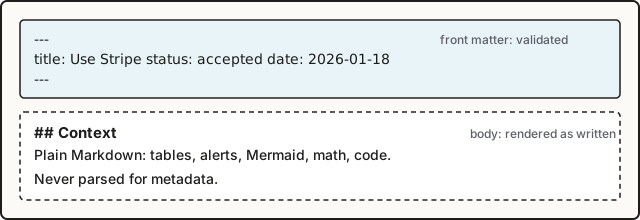
All metadata lives in YAML front matter between --- lines. The body is plain Markdown and is never parsed for metadata. The schema is validated at build time: a missing title, an unknown status or a malformed date fails inkan build with the file name and the field. Fields that take several values also accept a single value, so tags: db and tags: [db] mean the same.
Heading of the page, sidebar entry, search title. The build fails without it.
description
string
none
Lede on cards and in lists, <meta name="description">, RSS summary, llms.txt line. Keep it to one sentence.
status
one of the configured statuses
none
Sticker, status filter, backlog membership, foil. Any value outside the list fails the build. See Configurable status lifecycle.
date
date
first commit of the file
When the decision was made or the RFC opened. Sorts the record index and the timeline, newest first. When absent, the date of the commit that added the file is used; outside git the record sorts last. See Fill date and authors from git.
authors
list of handles
author of the first commit
Shown in the header with initials, counted on the authors page, filterable (?author=). When absent, the author of the commit that added the file is mapped to a handle; outside git the list is empty.
deciders
list of handles
[]
People who signed off. Shown in the header, counted on the authors page as “decided”.
tags
list of strings
[]
Shown as #tag chips, filterable (?tag=), listed on /tags/.
supersedes
list of record paths
[]
Lineage line “Supersedes” linking to the older records.
supersededBy
list of record paths
[]
Lineage line “Superseded by”.
related
list of record paths
[]
Lineage line “Related”. Shown on both records even when only one of them lists the other.
reviewBy
date
none
On open records: the decision deadline, shown as a D-n chip in the header and sorting the backlog. On decided records: the date of the next review.
reviewed
date
none
When a decided record was last reviewed. inkan reviewed writes it.
reviewEvery
interval or never
project’s, then reviews.every
How often a decided record comes up for review (1 year, 6 months, 90 days). never opts out. See Review decisions on a schedule.
order
number
0
Sidebar position for pages that are not records. Lower first. Ignored on records, which sort by number.
draft
boolean
false
Hides the file from production builds.
slug
string
none
Replaces the URL path derived from the file name. Use sparingly.
Handles are free text. They match entries in _authors.yml when that file exists, otherwise they are shown as written. Record paths are the path inside the content folder without extension, such as sre/adr/0001-define-slos; a .md suffix or a leading slash is tolerated.
Unknown fields are kept out of the way: the build neither fails nor uses them. To add keys of your own that the site validates, shows and filters, declare them as custom metadata fields.
Write dates as YYYY-MM-DD. Unquoted YAML dates and quoted strings are both accepted and coerced to a date; the site prints them back as YYYY-MM-DD in UTC. A value that does not parse (date: next week) fails the build. A missing date is not an error: inside a git repository it comes from the first commit, and git: { dates: false } turns that off.
reviewBy is compared with the reader’s current date in the browser, so an “overdue” badge never goes stale on a static page. On a record in an open status it is the decision deadline, tracked on the backlog. On a decided record it is the date of the next periodic review, shown as “Next review” in the header and listed on /reviews/ together with records scheduled by reviewEvery; reviewed records when the last review happened. See Review decisions on a schedule.
A draft is rendered by inkan dev so you can preview it, and skipped by inkan build: no page, no sidebar entry, no search hit, no line in llms.txt or decisions.json. Use it for work in progress that is already merged. For a record that is being discussed and should be visible, use an open status such as proposed instead.
Pages (Markdown files outside a type folder) use the same front matter but only title, description, order and draft have an effect. The project intro (<project>/index.md) needs title only.
inkan new fills title, date and authors from templates/<type>.md. Keep the template’s front matter in sync with the fields your team wants every record to carry. See Number records with inkan new.
Metadata is machine-checked. A typo in a status is caught before deploy, not discovered on the backlog page months later.
The body is free: HTML comments, tables and headings never interfere with metadata.
Front matter is hidden when the file is viewed on GitHub or GitLab, so the status is not visible there. Teams that read records in the repository often add a one-line alert at the top of the body.
The built-in schema is fixed by the package. Extra keys are not an error and are ignored, unless you declare them as custom fields.
Teams disagree on lifecycle vocabulary. One wants accepted, another approved; some track in-review, some do not. A fixed list either forces a vocabulary or leaves the status field unchecked. At the same time a few behaviours depend on the meaning of a status, not on its name: which records are still being decided, and which ones describe the system as it is today.
Statuses are a map in inkan.config.ts. Each status has a label and two optional flags: open (still being decided) and current (describes how things are now). The site reads only these flags; it never hard-codes a status name except to pick a sticker.
The package ships nine statuses. Setting statuses in the config replaces that list, so the vocabulary is entirely yours. A record whose status is not in the map fails the build.
The record number in the header and on its card gets a foil finish. implemented gets gold foil, every other current status gets holographic foil. This is the visual meaning of “this is how things are”.
The landing page’s stats count it as a decision in force, per site and per project.
The record gets periodic reviews: it is listed on /reviews/ and reported by inkan check when reviewBy, reviewEvery or reviews.every schedules it. reviews.statuses in the config picks other statuses instead of the current ones. See Review decisions on a schedule.
A status with neither flag is terminal and quiet: it is shown with its sticker and can be filtered, nothing more.
Every status, flagged or not, appears in the status filter on /decisions/ with its count and can be linked with /decisions/?status=accepted.
Backlog membership and review tracking, see above.
current
no
Foil on the record number.
sticker
no
Borrow the die-cut sticker of a built-in status: draft, proposed, in-review, accepted, implemented, rejected, withdrawn, deprecated or superseded.
color
no
Fill colour of the fallback sticker, any CSS colour. Used only when the status has no built-in sticker.
Sticker resolution, in order: the sticker field when it names a built-in; the status key itself when it is a built-in name (so a custom map that keeps accepted keeps its sticker); otherwise a generic sticker with the first letter of the label, filled with color.
Warning
statuses replaces the defaults. The example above removes draft, accepted and the others; any record still using them fails the build with a list of the allowed values. Either keep the built-in keys in your map or rename the statuses in the files.
A smaller change, such as adding one status, still needs the full map:
Edit the status line of the record. For superseded, also fill supersededBy on the old record and supersedes on the new one so the lineage shows on both; see Link records by path. The timeline and backlog update on the next build.
Records name their authors, and the site builds an authors page and author filters from those names. Writing “Anna Lis” in one file and “anna.lis” in another splits one person in two. A central list fixes that, but demanding one before the first record can be written is a barrier, and it must not break when a new colleague commits a record before being added.
authors, deciders and owners hold short handles. An optional _authors.yml at the root of the content folder maps a handle to a display name, a team and profile links. The site works without the file and with handles that are missing from it: an unknown handle is displayed as written and still gets its own filter and authors-page entry.
It is a YAML list; id is the handle used in front matter. Files whose name starts with _ are never pages, so the directory does not show up in the sidebar.
Field
Required
What it does
id
yes
The handle. Must match authors, deciders and owners values exactly (case-sensitive).
name
yes
Display name in record headers, cards, the team page and the authors page. Initials for avatars are derived from it.
email
no
Git author e-mail. Commits with this e-mail map to the handle when authors is filled from git history. Not shown on the site.
team
no
Project id or project name, matched case-insensitively. Links the person to that team page and colours their avatar ring with the team’s ink.
github
no
GitHub user name. Adds a “GitHub @name” link on the authors page.
gitlab
no
GitLab user name. Adds a “GitLab @name” link when github is absent.
avatar
no
Image URL shown on the authors page instead of initials.
A missing name or a wrong type fails the build with the handle and the field. Fields outside this list are ignored.
A handle that is not in the directory, or any handle when there is no _authors.yml at all, is shown as the raw string: piotr.nowak in the header, PN as initials. It appears in the author filter and on the authors page like everyone else. Nothing fails. Add the person to the directory later and every record updates on the next build.
Record header: author and decider names with initials, each linking to /decisions/?author=<handle>.
Record cards and the backlog: stacked initials, ringed in the author’s team ink.
Team page: owners with avatars and names.
/authors/: one card per person with name, team (linked to the team page when it matches a project), profile link, counts of authored and decided records, and the list of their records. People who are in the directory but have written nothing are listed too; the page is sorted by number of records, then name.
decisions.json and llms-full.txt keep the raw handles, so agents can join them with your own HR data.
inkan new fills authors with --author <handle> or, without the flag, with git config user.name. The git name is usually “First Last”, not a handle, so pass --author or edit the file:
A record whose front matter has no authors gets the author of the commit that added the file. The commit’s e-mail is compared with email, then its user name with the handle, name, github and gitlab, then a GitHub or GitLab no-reply address with the matching login. Without a match the git user name is used as the handle, which looks like Ania Kowal in the header and on the authors page. Adding email to the directory entry fixes this for every record on the next build. Details and the git option are in Fill date and authors from git.
Decisions refer to each other: a new ADR supersedes an old one, an RFC relates to the ADR it came from. Readers meet these records in two places, the rendered site and the repository on GitHub or GitLab, and a link must work in both. Numbers alone (ADR-0004) are ambiguous across projects, and absolute site URLs break when the site moves to a sub-path.
Lineage fields in front matter (supersedes, supersededBy, related) hold the path of the target record inside the content folder, without extension: platform/adr/0004-use-sqs-as-the-event-bus. The path is unique across projects and stable as long as the file does not move.
In the body, authors write plain relative Markdown links to the .md file, exactly as they would for GitHub. At build time a remark plugin (remark-md-links) rewrites those links to the page URL, including the base path, so the same text works in both places.
The record header shows a lineage block with the lines “Supersedes”, “Superseded by” and “Related”. Each entry links to the target and shows its number, title and status sticker.
Field
Shown as
Direction
supersedes
Supersedes
Written on the new record. Not mirrored: fill supersededBy on the old one yourself.
supersededBy
Superseded by
Written on the old record. Pair it with status: superseded.
related
Related
Mirrored: if A lists B, B also shows A under Related without listing it.
Path rules:
Path inside the content folder, with the project and type folders: sre/adr/0001-define-slos. Cross-project references work the same way.
No extension. A trailing .md or .mdx, a leading / and upper-case letters are tolerated and normalised.
Several targets: supersedes: [a/adr/0001-x, a/adr/0002-y]. A single string works too.
A path that matches no record is still rendered as a link to /<path>/ with the path as its text and no sticker. The build does not fail on it, so check the lineage block after renaming files.
On GitHub and GitLab these open the source files. On the site they become /sre/rfc/0001-error-budget-policy/#proposal and /payments/adr/0001-use-postgresql-for-the-ledger/. The rules, from app/src/lib/remark-md-links.mjs:
Link
Result
./0003-x.md, ../rfc/0001-y.mdx
Rewritten to the page URL, base path prepended, trailing slash added.
../rfc/0001-y.md#proposal
Fragment kept.
../index.md
An index.md maps to its folder (/sre/). A README.md is rewritten to /sre/readme/, which does not exist when the file is the project intro, so link ../index.md or the folder instead.
[x][ref] with [ref]: ./0003-x.md
Reference-style definitions are rewritten too.
/abs/x.md, https://host/x.md
Left alone.
#top, ./diagram.png
Left alone: only .md and .mdx targets are touched.
../../../README.md
Left alone when it points outside the content folder.
The rewrite applies to files inside the content folder only. Pages in pagesDir keep their links as written.
Tip
Mixed-case file names are lower-cased in URLs, so 0002-Second.md is served at /payments/rfc/0002-second/. Keep file names lower-case to avoid surprises when linking from other tools.
Renaming 0004-use-sqs.md to 0004-use-sqs-as-the-event-bus.md changes its path. Update the lineage fields in other records and the relative links that point at it, then add a redirect for the old URL in inkan.config.ts:
One spelling for a target everywhere: the file path. It survives a change of domain or base path.
Lineage references are not validated at build time; a stale path becomes a dead link in the header.
supersedes and supersededBy are two edits in two files. related needs only one.
Links in the body are rewritten, not checked. A typo in a relative link is a 404 on the site and a 404 on GitHub, which at least fails in the same way in both places.
Writing records · ADR · AUTHORING-ADR-0007
0007: GitHub-flavoured Markdown with diagrams and math
Records are read in two places: rendered on the site and as source files on GitHub or GitLab. A syntax that renders on the site but shows up as raw text in a pull request slows down review. At the same time decisions need tables, diagrams, formulas and annotated code, which plain CommonMark does not give.
Records are GitHub-flavoured Markdown (tables, task lists, strikethrough, autolinks, footnotes), plus the extensions GitHub and GitLab render themselves: > [!NOTE] alerts, ```mermaid diagrams and $ math. Zudoku and Docusaurus :::note admonitions work too and render as the same callout. Code blocks are highlighted by Expressive Code with GitHub-compatible meta strings. Everything on this page is produced by the Markdown source of this file; open “Raw Markdown” at the bottom to compare.
Column alignment with :---: and ---: works. Inline formatting inside cells works too. A table wider than the page scrolls sideways and, while it does, is a focusable region named “Table 1 in <record title>”, “Table 2 in <record title>” and so on, so it can be reached and moved with the keyboard; a table that fits is left alone. Display math gets the same treatment as “Equation 1 in <record title>”.
The boxes are read-only. A rehype plugin (rehype-task-labels) gives each one an aria-label of “Done” or “Not done” so screen readers announce the state.
Useful information the reader should know, even when skimming.
Tip
Helpful advice for doing things better.
Important
Key information the reader needs to achieve the goal.
Warning
Urgent information that needs attention to avoid problems.
Caution
Advises about risks or negative outcomes of an action.
The five GitHub alert types are supported. On GitHub and GitLab the same syntax renders the same boxes.
GitLab’s custom titles work as well: write the title after the marker.
1
> [!tip] Start small
2
> One availability SLO per service tier is enough.
If your team writes Zudoku, Docusaurus or Starlight docs, the ::: block form renders as the same callout.
The title goes in {title="..."} or in brackets.
1
:::danger{title="Do not"}
2
Never rewrite the decision of an accepted record. Supersede it.
3
:::
4
5
:::info[Bracket title]
6
Nested callouts use more colons on the outer block (`::::`).
7
:::
Do not
Never rewrite the decision of an accepted record. Supersede it.
Bracket title
Nested callouts use more colons on the outer block (::::).
Every callout gets .markdown-alert.markdown-alert-<type>, the same markup GitHub uses, so one CSS rule styles
both syntaxes. Only the ::: block form is parsed: word:name and :: in prose stay plain text. A ::: block
with any other name is left for remark plugins, which claim it by setting data.hName; unclaimed ones keep
their fences as text.
Note
On GitHub and GitLab, ::: blocks render as plain paragraphs. Prefer > [!NOTE] alerts when records are also
read in the repository.
Diagrams are rendered in the browser and follow the site’s light and dark theme. The Mermaid library is loaded only on pages that contain a diagram. Every diagram type Mermaid supports works: sequenceDiagram, stateDiagram-v2, erDiagram, gantt and so on.
Code blocks without a language are rendered as plain text. ```text is the explicit form. Inline code like inkan.config.ts is just backticks. A block that scrolls sideways is a focusable region named after its title or language (“Code block 2: ledger_entries.sql”), so keyboard users can reach it and screen readers can tell the blocks apart.

Relative image paths are resolved from the Markdown file, optimised at build time and copied to dist/. A folder whose name starts with _ is a good place for them: it is never treated as pages. Absolute URLs (https://...) are used as written.
Raw HTML in Markdown is passed through as on GitHub. A placeholder that only looks like a tag, such as <project> or <record title>, is shown as written instead of disappearing.
One source renders in three places (site, GitHub, GitLab) with the same meaning, so review happens where the pull request is.
Expressive Code meta strings (title=, {2}) are ignored by GitHub; the block still renders there, without the decoration.
Math and Mermaid syntax inside a record is rendered by GitHub, but GitLab and GitHub differ in details. Keep diagrams simple when the repository view matters.
Mermaid runs in the browser. Readers without JavaScript see the diagram source.
Decisions cite tickets: the incident that triggered them, the epic that implements them. Authors write the key (PAY-123) and move on; nobody pastes the full Jira URL every time. On the site the key should be a link, and the tracker URL should live in one place so a tracker migration is a one-line change.
issueLinks in inkan.config.ts is a list of rules. Each rule has a regular expression pattern and a url template. A remark plugin (remark-issue-links) scans the text of every Markdown file the site renders and wraps each match in a link, replacing $1 in the template with the first capture group. Text that is already a link or inside code is left alone.
A JavaScript regular expression as a string. Backslashes are doubled because it is a string literal. The plugin adds the g flag; do not include flags.
url
Link target. $1 to $9 are replaced by the matching capture group. A group that did not participate becomes an empty string.
The default is an empty list, which disables the plugin. Rules are validated at build time: a missing pattern or url, or an extra field, fails the build.
Anchor the key with \b so REPAY-123 does not link as PAY-123.
Use a non-capturing group (?:...) for alternatives and one capturing group for the part that goes into the URL.
For GitHub-style #42, exclude characters that commonly precede a # in prose, as in the example above, or the pattern also matches in words like C#5. Headings are not affected because the # of a heading is not text.
Pass the whole key when the tracker URL needs it (browse/$1 with (PAY-\d+)), or only the number (issues/$1 with #(\d+)).
Warning
A pattern that matches very broadly (\d+) links every number on the site. Test a new rule with inkan dev on a record that uses the key before merging the config.
Authors keep writing keys the way they do in commit messages; the site does the linking.
Moving trackers means changing one url. Old records update on the next build.
A regular expression in config is powerful and easy to get wrong. A bad pattern fails loudly (Invalid regular expression) at build time; an over-broad one fails quietly by linking too much.
The links are site-only. On GitHub the keys stay plain text, unless GitHub’s own autolink references are configured for the repository.
A record without date sorts last on the record index and the timeline, and a record without authors has no author on its page and is missing from the authors page. Both fields are easy to forget in a pull request, and both are already in git history. Teams that import hundreds of records from another tool have neither field in most files. The site already runs git for the “Last updated” date of every page, so the creation date and the first author are one more field of the same git log.
This ADR implements the proposal in Fill date and authors from git. The option names differ from the RFC: the config key is git, not inferDate / inferAuthors.
Front matter stays the source of truth. When a record has no date, the site uses the author date of the commit that added the file. When a record has no authors, the site uses the author of that commit, mapped to a handle through _authors.yml. Both are on by default and can be switched off separately with git: { dates: false, authors: false }.
The history comes from one git log per repository and build, not from one call per file. Shallow clones are skipped with a warning, because their oldest visible commit is not the commit that added the file.
On a build inside the repository, the page shows the date and author of the first commit that added the file. The inferred values are used everywhere the site reads them: the record header, the index and its filters, the timeline, the authors page, the RSS feed, decisions.json, llms.txt and the export document.
Author date (%at) of the commit that added the file.
Unset: sorts last, no date shown.
authors
Used as written.
The handle matched to that commit’s author, see below.
Empty.
Only the commit that added the file counts; later edits never change the date or add authors. deciders, tags and every other field are never inferred. A file that is renamed or moved counts as a new file (the log runs with --no-renames), so its date becomes the date of the move. Keep an explicit date in records you plan to move.
An empty list is the same as a missing field: authors: [] is inferred too. To state “no authors” for one record, turn inference off for the site.
A commit carries a name and an e-mail; records use handles. The lookup walks the entries of _authors.yml in this order and stops at the first match. Comparisons ignore case and surrounding spaces.
An entry whose email equals the commit e-mail. email is a new optional field of the directory, see Optional author directory.
An entry whose handle, name, github or gitlab equals the commit’s user name.
For a users.noreply.github.com address, an entry whose handle or github equals the login part (12345+login@ loses the number).
For a noreply.gitlab.com address, the same with gitlab.
No match: the commit’s user name is used as the handle, or the e-mail when the name is empty.
Step 5 produces a value like Ania Kowal instead of ania. The site shows it as any unknown handle, with its own filter and authors-page entry. The fix is to add the person to the directory with their email:
decisions/_authors.yml
1
- id: ania
2
name: "Ania Kowal"
3
email: ania.kowal@acme.dev
4
github: aniakowal
Tip
Commits made through the GitHub web editor use a users.noreply.github.com address, so a github login in the directory is enough to match them.
An inferred value is rendered like a stated one. The <dd> element in the record header carries data-inferred="date" or data-inferred="authors" and the tooltip “From git history”, which a custom stylesheet can use to mark it. decisions.json and llms-full.txt carry the inferred values without a flag.
The history is read with git rev-parse --is-shallow-repository first. In a shallow clone nothing is inferred and the build prints once per repository:
1
inkan: /path/to/repo is a shallow clone, so dates, authors and status history are not inferred from git (fetch the full history, e.g. fetch-depth: 0 or GIT_DEPTH: 0)
The CI files that inkan init creates already fetch the full history: fetch-depth: 0 on actions/checkout and GIT_DEPTH: 0 in .gitlab-ci.yml. Add the same to a pipeline you wrote yourself.
Records pulled in through sources behave in two ways. A dir source is read from its own repository, with the same rules. A repo source is a shallow clone made by inkan sync, so its records are never inferred; write date and authors in those files. The warning above is not printed for them.
One git log runs per repository over the content folder, the pages folder and every dir source. Repositories are found with git rev-parse --show-toplevel for each folder, so the content folder may live in a different repository than the config file. The same log feeds the “Last updated” date of every page, which comes from the committer date of the last commit touching the file. A second log over the same repositories feeds the “History” section of every record, see Show status history from git.
Imported and hand-written records get a date and an author without editing hundreds of files.
The build depends on history. A fresh clone with --depth 1 builds the same site minus inferred values, and a build outside git shows none of them.
The date of the first commit is not always the date of the decision. Write date when the two differ.
A squash-merged pull request has the pull request author as the commit author, so that is who is inferred. Migration commits by a bot make the bot the author of every record they add; map its e-mail to a handle or write authors in the imported files.
Renames reset the date. There is no --follow, because it would cost one git call per file.
Inference is per site, not per record: there is no front matter value that means “no authors, do not ask git”.
A decision is only useful while the code still follows it. Records link to each other, but nothing links a record to the module that implements it, so a reader of the ADR does not know where to look, and a reader of the code does not know why it is written that way. Comments like // see ADR 12 exist in most repositories already; they are just not machine-readable.
A comment that contains the marker @adr followed by a record reference is a code reference. Once per build, Inkan lists the files of the repository with git ls-files, scans the text files for the marker and groups the hits by record. Each record page ends with a “Referenced in code” section listing file and line, linked to the file on GitHub or GitLab when repo is configured. decisions.json carries the same list. A reference that matches no record is a build warning.
The scan is on by default, excludes Markdown and the content folder, and can be narrowed with globs or turned off.
# Consumers replay from the last committed offset, see @adr PAYMENTS-RFC-0001.
6
defreplay(self, topic, from_offset): ...
services/ledger/schema.sql
1
-- @adr payments/adr/0001
2
CREATETABLEledger_entries (
3
-- Retried requests never book twice. @adr payments/adr/0002
4
idempotency_key textNOT NULLUNIQUE
5
);
The syntax is <marker> + spaces or a colon + the reference. @adr: sre/adr/1 and @adr sre/adr/1 are valid. The marker must start a word: me@adr sre/adr/1 (an e-mail) and @adrx sre/adr/1 are ignored, and so is a bare `@adr` with nothing after it. A trailing ., , or / after the reference is dropped, so a reference can end a sentence.
Inside a git repository: the output of git ls-files --cached --others --exclude-standard, so tracked and untracked files, minus ignored ones (node_modules/, dist/ when they are in .gitignore). Outside git: a walk of the repository root that skips node_modules, dist and .git.
The content folder (contentDir) is never scanned, so a record can mention @adr in prose without referencing itself.
Files above 1 MB and files with a NUL byte in their first 8000 bytes (binaries) are skipped. Files that do not contain the marker at all are not parsed.
The repository root is the top level of the git repository that holds the config file, or the config folder outside git.
false turns the scan off; no section, no warnings, empty codeRefs in decisions.json.
codeRefs.include
['**/*']
Files to scan. A file must match one of the globs.
codeRefs.exclude
['**/*.{md,mdx}']
Files to skip even when included.
codeRefs.marker
'@adr'
The word that starts a reference.
Globs are matched against the path relative to the repository root with / separators. ** crosses folders, * and ? stay inside one segment, {a,b} picks one alternative. A pattern without a / matches a file name anywhere in the tree, like .gitignore: *.test.py skips every test file. Options you leave out keep their defaults, so setting include alone still excludes Markdown.
Note
The sample site in examples/company-decisions sets codeRefs: { include: ['examples/company-decisions/**'] } so only its own services are scanned. Decide what to include in every repository that keeps code next to its records; scanning a monorepo with the default **/* is correct but reads every text file, and markers in test fixtures or vendored code show up as warnings.
Below the body and above the “Edit” and “Raw Markdown” buttons, a record with references gets:
1
Referenced in code 3
2
services/api/handler.ts L1 ↗
3
services/jobs/run.py L1 ↗
4
services/jobs/run.test.py L1 ↗
Entries are sorted by file, then line. With repo.url set, each entry links to the file and line in the web UI: <url>/blob/<branch>/<file>#L<line> for GitHub, <url>/-/blob/<branch>/<file>#L<line> for GitLab, with repo.branch defaulting to main. Without repo.url the entries are plain text. The section is excluded from search indexing. Records without references show nothing.
The same list is in decisions.json as codeRefs: [{ "file": "services/api/handler.ts", "line": 1 }], with paths relative to the repository root. llms.txt and the MCP server do not include it.
Code and decisions reference each other with one comment and no tooling in the code repository.
The scan reads the hub’s repository only. Code that lives in another repository cannot be listed, even when its records are pulled in through sources.
Line numbers are those at build time. The link points at the current branch, so a file that moved since the last deploy may open at the wrong line until the site is rebuilt.
A reference to a record that is later renumbered or renamed becomes a warning, not an error. Run the build in CI and read the warnings, or reference records by ref (SRE-ADR-0001), which survives a rename of the file.
git ls-files includes untracked files, so a scratch file with a marker shows up in a local build but not in CI.
An ADR is written once, accepted, and then left alone. Two years later the vendor it chose has changed its pricing, the team that wrote it has moved on, and the record still says accepted because nobody was asked to look at it again. Decisions rot quietly: a wrong record looks exactly like a right one. The site tracks reviewBy for open records, so a proposal cannot sit past its deadline unnoticed, but once a record is decided its date stops meaning anything. Teams that do review their decisions keep the schedule somewhere else, in a calendar or a spreadsheet, where it drifts away from the records.
The lifecycle, the backlog and inkan check already know which records are in force. What was missing is a way to say “look at this again in a year” that lives in the record itself, and the places that read it: a page, a check rule, a command and a tool for agents.
This record is its own example: it carries reviewEvery: 1 year in its front matter, so it is due a year after its date and appears under “Scheduled” on this site.
Decided records get a review schedule from three front matter fields and one interval that can be set once for a project or a site:
reviewBy on a decided record is the date of the next review. On an open record it keeps its meaning of decision deadline, tracked on /backlog/.
reviewed is the date of the last review.
reviewEvery is an interval such as 1 year. It can be set on the record, in _project.yml or as reviews.every in the config, in that order of precedence. never (or false) opts out.
A record is due on reviewBy, or reviewEvery after reviewed (or after its date when it has never been reviewed). Which statuses get reviews follows the lifecycle: reviews.statuses in the config, by default the ones with current: true (accepted and implemented).
The schedule is read in four places: the /reviews/ page lists what is overdue, due soon and scheduled; inkan check warns about overdue reviews; inkan reviewed and inkan reviews mark a review done and list what is due; the MCP server offers due_reviews and a review field on every record, which decisions.json carries too. Nothing changes status by itself: a review is a human reading the record and deciding whether it still holds.
Most teams want one rule for everything rather than a field in every file. Set it once in _project.yml for a project, or in the config for the site:
decisions/dbre/_project.yml
1
name: "DBRE"
2
owners: [marek]
3
reviewEvery: 6 months
inkan.config.ts
1
exportdefaultdefineConfig({
2
reviews: { every:'1 year', soon:30 },
3
});
With reviews.every set, every record in a review status is scheduled from its date (which may come from git when the front matter has none; see Fill date and authors from git). A record or project that should not be reviewed opts out:
1
reviewEvery: never
Option
Where
Default
What it does
reviews.every
config
null
Interval for every record in a review status. null or false schedules only records that carry reviewBy or reviewEvery themselves.
reviews.statuses
config
statuses with current: true
Which statuses get reviews. Records in other statuses are never scheduled, whatever their fields say.
reviews.soon
config
30
Days before the due date from which a review counts as “due soon”, on the page and in the CLI.
reviewEvery
_project.yml
none
Interval for the project’s records. Overrides reviews.every.
reviewEvery
record
none
Interval for this record. Overrides the project and the site.
reviewBy
record
none
Fixed date of the next review (on a decided record).
reviewed
record
none
Date of the last review. Written by inkan reviewed, or by hand.
An interval is a count and a unit, in the long or the short form:
Unit
Long form
Short form
days
90 days, 1 day
90d
weeks
2 weeks
2w
months
6 months, 1 month
6m, 6mo
years
1 year, 2 years
1y, 2yr
The count must be a whole number above zero; the space is optional and the plural s is too. Month and year steps clamp to the end of shorter months: a record reviewed on 31 January with reviewEvery: 1 month is due on 28 February, not on 3 March. Anything else, such as quarterly or 1.5 years, fails the build and is reported by check as review-interval; write 3 months or 18 months instead.
The next review is computed from the fields in this order:
The record is in a review status; otherwise there is no schedule, and reviewBy on an open record is a decision deadline for the backlog.
reviewBy is the due date, unless reviewed is on or after it. A fixed date wins over the interval until it has been honoured.
Otherwise the interval, taken from the record’s reviewEvery, then the project’s, then reviews.every, counted from reviewed, or from date when the record was never reviewed. never at any level stops the lookup: a project with reviewEvery: never is not scheduled even when the site sets reviews.every.
No interval, or no date to count from: no schedule.
reviewBy
reviewed
interval
date
Next review
2026-11-15
none
any
any
2026-11-15
2026-11-15
2026-11-20
1 year
any
2027-11-20
2026-11-15
2026-11-20
none
any
none (the fixed date was honoured)
none
2026-04-01
6 months
any
2026-10-01
none
none
1 year
2026-03-02
2027-03-02
none
none
1 year
none
none
A review is overdue when its due date is before today, due soon when it is within reviews.soon days, and scheduled otherwise.
Read the record, decide whether it still holds, then record the review:
Terminal window
1
npxinkanrevieweddbre/adr/0001
This sets reviewed to today. When the record has an interval, the next review follows from it; a reviewBy that was just honoured is removed. Without an interval the command asks for one, --every 1 year, or for the next date, --next 2027-10-01. A record that no longer holds is a status change, not a review: run inkan status or inkan supersede instead. The command is described in Mark records reviewed from the CLI.
/reviews/ lists every scheduled record in three groups: “Overdue”, “Due soon” and “Scheduled”. The groups are computed in the browser from the reader’s date, so a static build does not go stale. Each row shows the due date, the sticker, the team and number, the title and the interval. A “Periodic reviews” link appears in the sidebar hub as soon as any record has a schedule, and the header of a scheduled record shows “Next review” with the date and “Reviewed” with the last review date.
With nothing scheduled, the page says so and the sidebar link is not shown. A site that never sets reviews.every, reviewEvery or reviewBy on a decided record looks exactly as before.
inkan check reports an overdue review as a review-due warning and a malformed interval as a review-interval error:
1
decisions/dbre/adr/0001-standardize-on-postgresql-16.md warning review every 1 year (due 2027-03-02) has passed; review it and run `inkan reviewed dbre/adr/0001-standardize-on-postgresql-16`
The starter workflow already runs check on every pull request, so an overdue review shows up as an annotation there and, with --strict, fails the job. See Check records in CI.
A review that only fails pull requests is easy to postpone. Add a scheduled job that lists what is due, so the team sees it even in a quiet week:
.github/workflows/reviews.yml
1
name: Decision reviews
2
on:
3
schedule:
4
- cron: '0 8 * * 1'# Monday 08:00 UTC
5
workflow_dispatch:
6
7
jobs:
8
reviews:
9
runs-on: ubuntu-latest
10
steps:
11
- uses: actions/checkout@v4
12
with:
13
fetch-depth: 0# dates may come from git history
14
- uses: actions/setup-node@v4
15
with:
16
node-version: 22
17
- run: npm install
18
- run: npx inkan reviews --within 30 | tee reviews.txt
19
- run: npx inkan check --strict# fails the job when a review is overdue
Replace the last step with whatever reaches your team: gh issue create --body-file reviews.txt, a message to a chat channel, or nothing but the job log. inkan reviews --json prints the same list for scripts, and inkan mcp serves it to agents as due_reviews.
decisions.json carries a review field per record: { "due": "2027-03-02", "reviewed": null, "every": "1 year" }, or null when the record has no schedule. The MCP server returns the same object from get_record and lists what is due with the due_reviews tool (project, within, all). An agent that works in the repository can therefore answer “which decisions should we look at this month” without reading every file. See decisions.json and MCP server for agents.
Every decision in force has a date by which someone looks at it again, and that date lives in the record, in the same pull request flow as everything else.
One line in the config schedules an entire archive. Teams that do not want this see no change: without reviews.every, a project interval or fields on the records, nothing is scheduled.
reviewBy means two things, decided by the status. It keeps old records and the backlog working, at the cost of a field whose meaning depends on another field. Records that are accepted with a stale reviewBy from their proposal days become due at once; run inkan reviewed once to move on to the interval.
A review is a date, not a verdict. The site cannot tell a careful review from a quick inkan reviewed; that stays with the people and the pull request review.
Dates inferred from git make records from imports and old files schedulable without edits, and also make them due early: a file added in a migration commit counts from that commit. Write date or reviewed where that is wrong.
Intervals are calendar steps in UTC, so a review due on the 31st moves to the 30th or 28th in shorter months and stays there once reviewed is written on that day.
“Today” is the local calendar day everywhere: of the machine for check, inkan reviews and MCP, of the reader for /reviews/. A CI runner in UTC and a reader in another time zone can still disagree for a few hours around midnight.
The built-in front matter covers what every team shares: status, dates, people, tags, links. Teams also track things only they care about: the risk of a change, the yearly cost, whether the payment card scope is touched, the compliance regime. Today those end up as tags (risk-high), which cannot be validated, sorted or compared, or in the body, where nothing can read them. Unknown front matter keys are ignored by the site, so inventing a key does not help either.
A fields map declares extra front matter keys. Each field has a type, and the build checks every record against it. Declared fields appear in the record header, as filters on /decisions/, in decisions.json, in llms-full.txt and in the MCP server. fields in inkan.config.ts applies to every project. A project adds its own fields, or redefines or removes a site field, under fields in its _project.yml.
Values are top-level keys in the record’s front matter (risk: high), not a nested object. Keys that are not declared are still ignored. A value that does not fit its type, or a missing value on a required field, stops the build.
values: [low, medium, high, critical] # replaces the site's definition
11
cost: false# Payments does not track cost
A project’s field with the name of a site field replaces it completely (the definition is not merged). false removes the site field for that project: its records may still carry the key, but it is ignored. A project without fields gets the site’s.
Name in the record header, the filters and the table. Default: the key in sentence case (dataClass becomes Data class).
description
all
What the field means. Returned by the MCP list_fields tool.
values
enum, list
Allowed values. Required for enum, optional for list. Also the order of the filter chips.
required
all
A record without a value fails the build and inkan check. Default false.
filter
all except url
Show a filter on /decisions/. Default true.
column
all
Add a column to the table view. Default false.
unit
number
Printed after the value (40 k€/year).
default
all
Written into new records by inkan new. Must be valid for the type.
Field names start with a letter and use letters, digits, - and _. They are front matter keys and URL parameters, so they cannot be a built-in key: title, description, status, date, authors, deciders, tags, supersedes, supersededBy, related, reviewBy, reviewed, reviewEvery, order, draft, slug, the index’s own project, type, author, tag, q, view (and fields), or a key records already carry in decisions.json and the MCP server: id, ref, number, url, markdown, source, file, body, current, currentRecord, codeRefs, review.
the spelling in values (high); matching ignores case
chips, in the order of values
list
regions: [eu, us] or regions: eu
list of strings without duplicates, checked against values when set
chips, one per item
url
runbook: https://...
the URL; http://, https:// or a path starting with /
none
An empty value (risk:, risk: "", risk: " ", regions: []) counts as missing. Dates must be real calendar days (2026-02-30 is rejected), and text values are kept on one line.
Record header: each field with a value is listed with its label. Values of chip types (text, enum, list, boolean) link to the index filtered by that value; numbers print with their unit, URLs are links.
Filters: /decisions/ gets a facet group per field with filter on that at least one record sets. Chips work like the built-in facets: OR inside a group, AND between groups, and each chip shows how many records have that value in total. Values in the URL match chips regardless of case. A number or date field shows a min and a max input; a bound that is not a number or a YYYY-MM-DD date is ignored.
Table: a field with column: true adds a column to the table view.
The filters are part of the URL, named after the field:
Query parameter
Example
Meaning
chip field
?risk=high,medium
risk is high or medium.
boolean field
?pci=true
pci is Yes. false selects No.
number range
?cost=10..50
cost between 10 and 50, both included.
open range
?cost=..50 or ?cost=10..
At most 50, or at least 10.
date range
?decided=2025-01-01..
decided on or after 2025-01-01.
Records without a value never match a filter on that field. Because the key is the parameter name, a field cannot be called project, type, author, tag, q or view.
Invalid fields in decisions/payments/adr/0004-store-card-tokens.md: risk: "severe" is not one of low, medium, high, critical; pci is required
The build stops with a line like this for every record with problems. inkan check reports the same problems with the rule field, and a bad fields block in a _project.yml with the rule project-fields. An unknown option, a missing values on an enum, a default that does not fit the type or a reserved name is an error in the config or in _project.yml.
One name may not have different types in different projects: cost as a number in Payments and as text in SRE would give the index one filter with two meanings, so the build stops. The same goes for different units. Give the second field another name. Enum and list values of the same field are merged across projects for the filter, the label of the first definition is used for it, and the filter is left out when any project sets filter: false.
decisions.json has a fields object on every record, with normalised values: "fields": { "risk": "high", "cost": 40, "pci": true }.
llms-full.txt has a name: value line per field in each record’s header block (risk: high, lists comma-separated).
The MCP server includes fields in its records. search_records takes field: "risk=high" to keep records whose field has that value, and list_fields returns the declared fields with their types, allowed values and descriptions, so an agent can ask for the right values. list_fields needs the config, so it works with inkan mcp --root but not --url.
inkan new writes every field that has a default into the front matter of the new record. Fields without a default are not written; add them by hand, or mark the field required so check reminds you.
Teams get typed, filterable metadata without a plugin or a custom component, and the values reach decisions.json and agents the same way as the built-in fields.
Values are validated, so a typo in risk fails the build instead of producing a filter chip nobody notices. The price is that adding required: true to a field fails every older record until it has a value. Add the field as optional first, fill it in, then require it.
Fields are flat. There is no nesting, no computed field and no cross-field rule.
Declared keys live next to the built-in ones in the front matter, so the set of reserved names cannot grow without risk: a new built-in key would collide with a field of the same name in someone’s config. The build reports the collision.
Removing a field from the config does not touch the records; the key stays in the files and is ignored.
Filters on a field with many distinct values (free text) produce many chips. Use enum or list with values when the set is known.
An RFC is open until people have read it, and the front matter only said when comments were due (reviewBy). Who was asked, who has answered and who still holds the RFC up lived in a pull request thread or in someone’s head. Once the RFC was merged as proposed, nobody could tell from the site whether it was waiting on a reviewer, on its authors or on the person who decides.
A record may list reviewers in its front matter. Each reviewer has one state: pending, approved or changes-requested, with an optional date and note. From the states, Inkan derives a review status and the people the record waits on. The states are written by hand or with inkan rfc-review; nothing is stored outside the file, so the review is part of the pull request and of git history.
reviewBy keeps its meaning: on an open RFC it is the comment deadline. The review status says whose move it is; reviewBy says by when.
By default every reviewer must approve. To accept a quorum, set the number in the config:
inkan.config.ts
1
exportdefaultdefineConfig({
2
reviewers: { approvals:2 },
3
});
With approvals: 2 and three reviewers, the second approval makes the review approved. A number larger than the reviewer list is capped at the list. null is the default: all reviewers. A changes-requested answer wins over approvals until that reviewer answers again.
inkan check reports a reviewers error for entries it cannot read or states it does not know, warns about reviewers missing from _authors.yml, and warns with review-blocked when a record already has a current status such as accepted while a reviewer still requests changes. See Check records in CI.
The review is plain front matter: it shows in diffs, survives a change of hosting and needs no service.
Nothing stops a record from being accepted with open reviews. The site and check make it visible; the decision stays with people.
A review state is a claim typed into a file. A reviewer who edits their own line is trusted, as with deciders.
The review status never moves the record’s status. Authors or deciders change it themselves, so the lifecycle in Configurable status lifecycle stays the only source of status.
An approval stays after the RFC changes. Reset it with inkan rfc-review <record> <reviewer> reset when a change should be read again.
When a record has no date or no authors in its front matter, take them from git: the date of the first commit that added the file, and the author of that commit mapped to a handle. The front matter stays the source of truth; git only fills gaps. The idea is borrowed from log4brains.
Today a record without date sorts last on the record index and the timeline, and a record without authors shows no author and is missing from the authors page. Both fields are easy to forget in a pull request, and both already exist in git history with better accuracy than a hand-typed value. Teams migrating from a tool that inferred them from git have hundreds of files without either field.
The site already runs git for related data: the “Last updated” footer of a page comes from git log -1 on the file, and inkan new reads git config user.name to fill the template. Extending that to creation date and author is a small step.
In the content loader, when the collection is built. A build inside a shallow clone (fetch-depth: 1, the default of actions/checkout) sees only one commit for every file, so the inferred date would be the date of the latest commit. The CI templates created by inkan init would set fetch-depth: 0, and the build would print one warning when the repository is shallow.
Inferred values are shown like any other value, with a small “from git” marker in the record header, so a reader knows the date was not stated. The raw Markdown and decisions.json would carry the inferred values too, with a boolean inferred field in the JSON.
Both default to true once the feature ships. A record can also opt out per field with an explicit empty value: authors: [] means “no authors”, not “ask git”.
Should a record that is moved with git mv keep its original date? git log --follow does this but is slow on large repositories; one call per file at build time may be acceptable, one per file on every dev reload may not.
Is the author of the first commit the right person? A squash-merged pull request has the merger as committer and the author as author; using the author date and author name seems right, but a bot that opens migration PRs would become the author of hundreds of records.
Should inferred values be written back into the file by a CLI command (inkan metadata --write), so the repository stays the single source and the build stays pure? This would make the build-time inference a transition tool rather than a permanent feature.
Does the date of the first commit match what teams mean by date? For an ADR it is usually the day of the decision, which may be weeks before the file was committed.
A decision archive needs a front door that works on day one: a title, a sentence that says what the site is, a few buttons and the numbers that tell a visitor whether the archive is alive. Most teams do not want to write a custom page for that, but every team wants to rename a button, drop a section or add a paragraph of their own. The landing page therefore has to come out of the box and still be shaped from the one config file.
Not every Inkan site is an internal archive. A platform team documenting its own tool, or an open source project like Inkan itself, needs the home page to say what the thing is: a picture, a pitch, the command to try it and what it can do. Record counts mean little to a first-time visitor there.
Inkan renders the home page from the landing option in inkan.config.ts. The hero shows the title, the tagline, up to three kinds of buttons and, when configured, a picture and a command to copy. Below it, landing.sections lists which blocks appear and in which order. Free Markdown for the page lives in <contentDir>/_landing.md and is rendered by the content section.
Everything on the page is derived from the records in the repository. There are no hand-maintained numbers.
The same options turn the page into a product page: drop stats, set an eyebrow, a picture and a command, and list feature cards. The home page of this site is built that way.
The hero reads landing.title and landing.tagline; when they are not set it falls back to title and tagline of the site. The eyebrow line shows the date of the last commit in the repository (built from git, 16 Oct 2026); outside git it shows the build time. The lede starts with the record and team counts (42 records from 5 teams.) followed by the tagline; without stats in sections it is the tagline alone.
inkan.config.ts
1
import { defineConfig } from'@tilaven/inkan';
2
3
exportdefaultdefineConfig({
4
title:'Acme Decisions',
5
tagline:'Architecture decisions from every team.',
6
landing: {
7
title:'Why did we do it like that?',
8
tagline:'Every architecture decision at Acme, with its reasons.',
9
actions: [
10
{ text:'Browse all records', link:'/decisions/', variant:'primary' },
Blocks below the hero, in this order. Remove a name to hide the block.
landing.eyebrow
null (“Decision archive” and the date)
Small line above the title.
landing.image
null
{ src, dark?, alt }: a picture beside the text, below it on narrow screens.
landing.command
null
A shell command under the buttons with a copy button.
landing.features
[]
Cards for the features section: { title, text, link? }.
Each action has text, link and an optional variant: primary, secondary or ghost. A link that starts with / gets the site’s base path prefixed, so the same config works under a sub-path. A link with a scheme (https://...) is left alone. An action without a variant renders as secondary.
image.src and image.dark are paths relative to the config file and go through the build like the logo, so the files get hashed names and long cache headers. The Day theme shows src, the Stage theme dark; without dark, both themes show src, so pick a picture with a transparent background. alt is required: describe what the picture shows, or pass an empty string when it is only decoration. The same picture and the landing tagline go into the site’s Open Graph card and the home page’s og:description, so a link to the site unfurls with them in Slack, Teams, Messenger or Facebook; see Open Graph cards.
The command is shown as a shell line with a copy button. It wraps on narrow screens instead of scrolling.
Feature cards take the project inks in turn (cyan, magenta, yellow, green, violet, orange). A card with a link is a link as a whole; the link follows the same rules as action links. Text is plain, without Markdown.
The landing.features cards under a “Features” heading. Hidden when the list is empty.
stats
Four numbers inside the hero: Decisions, Teams, In force (records whose status has current: true) and Review overdue. The overdue count is the number of decided records whose next periodic review is past, the same records /reviews/ lists as overdue, and links to that page. It is recomputed in the browser from the due dates, so a static build does not go stale.
projects
One card per project folder, with its cover, description, record count, how many are in force, and the owners’ avatars. A ghost card at the end says how to add a team.
latest
The four newest records as photocards. Hidden when there are no records.
content
The Markdown of _landing.md, see below. Hidden when the file does not exist.
agents
The machine-readable endpoints the build writes: /llms.txt, /llms-full.txt, /decisions.json, /graph.json, /AGENTS.md (only when an AGENTS.md exists in the content folder or next to the config) and /rss.xml.
Unknown names are ignored. The order of the list is the order on the page.
Put a file named _landing.md (or _landing.mdx) at the top of your content folder. Files starting with _ are never records, so it does not show up in the sidebar or the index. Its body is rendered under a “Content” heading wherever content sits in sections. Front matter title and description replace the heading and the hint next to it.
1
decisions/
2
_landing.md ← rendered by the "content" section
3
_authors.yml
4
sre/
5
_project.yml
6
adr/0001-define-slos.md
The file needs no front matter, but a heading of your own reads better:
decisions/_landing.md
1
---
2
title: Try it, right now
3
description: two commands, one minute
4
---
It supports the same Markdown as records: callouts, code blocks, Mermaid, tables and MDX components when you use the .mdx extension.
Tip
Want a text-first home page? Set sections: ['content', 'latest'] and write the page in _landing.md. The hero stays; only the blocks below it change.
The hero is the LandingHero component. If the config options are not enough, point components.LandingHero at your own .astro file; it receives title, eyebrow, lede, actions, command, image (with built URLs) and stats as props. The rest of the page is not overridable; use a custom page in pagesDir for a completely different home page.
One config file shapes the page; there is nothing to copy into the repository to get started.
The hero copy, picture, command and buttons are configurable. The section headings (“Features”, “Teams”, “Latest”, “For agents”) are fixed in this release; only the content heading comes from _landing.md.
Feature cards are plain text with a link, not Markdown, so they stay short. Longer prose belongs in _landing.md.
Section names are plain strings and not validated, so a typo silently hides a block.
The _landing.md section sits in a fixed slot. For a page that is mostly prose, a custom page is the better tool.
Counts and dates come from the content and from git, so a build outside a git checkout shows the build time instead of the last commit date.
An archive with a few hundred records is browsed by slicing: “everything the Payments team accepted”, “all RFCs tagged kafka”, “what did Anna write”. The slices have to be shareable, because they end up in chat messages, review tickets and agent prompts. A page that holds its state in JavaScript only loses the slice on reload. At the same time, the page must stay fast when a company has thousands of records.
Inkan ships one index page, /decisions/, that lists every record and filters it by project, type, status, author, tag and free text. The filter state lives in the query string and is written back to the address bar on every change, so a filtered view is a plain link. The index is static HTML; the filtering happens in the browser without a server.
Every project also gets a team page at /<project>/ with its records grouped by type.
The filter field and a Filters button sit at the top of the page. The button opens the facets: one chip group per facet, with a count on every chip. Click a chip to add its value; click it again to remove it. While the facets are closed, every active value shows as a pill under the filter field (remove it with one click), and the button shows how many are active. Values inside one facet are OR-ed, facets are AND-ed. The free-text field matches every word against the title, the tags and the description.
Query parameter
Example
Meaning
project
?project=sre,payments
Project folder ids.
type
?type=rfc
Record type ids (the folder name: adr, rfc or your own).
status
?status=accepted,implemented
Status ids as spelled in the front matter.
author
?author=anna.kowalska
Handles from authors or deciders: records the person wrote or signed off.
tag
?tag=kafka
Tags from tags.
q
?q=rate+limit
Words that must all occur in the title, tags or description.
view
?view=table
table for the table view; absent means cards.
custom field
?risk=high,medium, ?cost=10..50
One parameter per custom field, named after it. Chips take values, number and date fields a range (10..50, ..50, 2025-01-01..). See Custom metadata fields.
Lists can be comma-separated or repeated (tag=a&tag=b). A comma inside a value is written as %2C. The order of parameters does not matter.
The links on the rest of the site use the same scheme: a tag on a record header goes to /decisions/?tag=kafka, an author name to /decisions/?author=anna.kowalska, a status to /decisions/?status=accepted.
Tip
Hand a filtered view to a coding agent: https://decisions.acme.dev/decisions/?project=payments&status=accepted is a stable, bookmarkable description of “the Payments decisions in force”.
Two layouts of the same list. Cards show each record as a photocard. The table has a status sticker, number, title, team and type, date and tags; clicking anywhere on a row opens the record. The choice is kept in the URL (view=table) and nowhere else.
To keep the page light at scale, the first 120 cards are in the HTML and the rest wait in chunks of 60 that mount as you scroll. The table always holds every record, which is also what the filter reads, so a filter applied to the cards view mounts the chunks that hold matches immediately.
Only the ten most used tags are visible at first; a +N more chip reveals the rest, and it opens on its own when the URL already selects a hidden tag.
Team: every project, from _project.yml files and bare folders alike, with its ink dot.
Type: the keys of docTypes, labelled with their label.
Status: the keys of statuses, each with its sticker.
People: handles that appear in at least one authors or deciders list, counted once per record; the display name comes from _authors.yml when there is one.
Tag: every tag used, most frequent first.
Custom fields: one group per filterable field in fields: chips for text, enum, list and boolean fields, a min and max range for number and date fields. A field with column: true also gets a column in the table.
No configuration is needed. A new folder, status or tag appears on the next build.
The page shows the project’s name, description and owners from _project.yml, one stat per record type that links to the pre-filtered index, the project’s links as pills, and the records grouped by type as cards. An index.md or README.md directly inside the project folder is rendered as the team intro and is not a page of its own.
When repo.url is set, the page also shows a + New ADR · 0008 button per type that opens the repository’s web editor with the next number and the record template already filled in. See Header, banner, footer and redirects.
The older address /projects/<project>/ redirects permanently to /<project>/.
Note
Because team pages live at the root, a project folder may not be called decisions, timeline, backlog, authors, tags or another built-in route. The build stops with a clear message if it is.
Filtered views are plain URLs: they survive reloads, can be shared and can be generated by hand.
Filtering is client-side, so it needs JavaScript. Without it the page still lists every record as cards.
The free-text field searches titles, tags and descriptions only; full-text search over the bodies is a separate feature, see Full-text search with pluggable providers.
Every record is in the HTML twice (table rows and cards). The chunked cards keep the first paint small, but very large archives still ship a large page.
Facet values are not validated against the content, so an unknown value in the URL simply matches nothing.
Two questions come up constantly and the filterable index answers neither well: “what happened when” and “what is still waiting for a decision”. The first wants records in date order with the quiet years compressed. The second wants only the open proposals, sorted by their review deadline, with overdue ones impossible to miss. Both views must come from the front matter that is already there.
Inkan builds two pages from the records’ date, status and reviewBy fields:
/timeline/: every dated record, newest first, grouped by year and month.
/backlog/: every record whose status is open, ordered by reviewBy, with D-day tags computed in the browser so a static page never shows yesterday’s countdown.
Which statuses count as open is part of the status configuration, not of these pages.
Nothing to configure. A record appears on the timeline when it has a date in its front matter; records without a date are left out. Records are grouped by the month of that date, newest month first, with a year heading whenever the year changes and a record count per month.
1
---
2
title: Define SLOs per user journey
3
status: accepted
4
date: 2026-03-14
5
---
Each month shows its records as photocards. Past 150 dated records, years older than the two most recent collapse to compact rows (status sticker, team, number and title) so the page stays light while the recent history keeps its cards.
A record is on the backlog when its status has open: true. With the default statuses that is draft, proposed and in-review. Records with a reviewBy date come first, soonest deadline first; the rest are listed under “No deadline”.
1
---
2
title: Error budgets for the checkout flow
3
status: in-review
4
date: 2026-10-01
5
reviewBy: 2026-11-15
6
---
Each row shows the day and month of the deadline, the sticker and status label, the team and number, the title, the description and the authors. In the browser the row gets a tag and a sentence from the reader’s current date:
Days until reviewBy
Tag
Text
Row state
more than 7
D-12
in 12 days
normal
1 to 7
D-3
in 3 days
is-soon
0
D-DAY
today
is-soon
negative
D+4
4 days late
is-overdue
The eyebrow of the page gains “today is 16 Oct 2026” and the lede says how many rows are past due, or “Nothing is overdue.” The same D-n chip appears next to “Review by” on the record’s own page, with the text (“4 days late”) for screen readers and the word “overdue” on a late chip, so lateness is not shown by colour alone.
With this config the backlog lists idea and proposed records. The “Open decisions” link in the sidebar carries the number of open records, and the landing page counts overdue review dates among them.
Both pages are in the header (Records, Timeline, Open decisions), in the sidebar hub (with the open count next to Open decisions) and among the default landing actions. All three places take the base path into account when the site is served from a sub-path.
Both views need no maintenance: dates and statuses in the front matter are the only input.
Undated records are invisible on the timeline. Add a date to every record you want in the history.
Countdowns are computed in the reader’s time zone from calendar days, as inkan check computes them on its machine, so a deadline flips to overdue at the reader’s midnight. Without JavaScript the ISO date is shown and no row is marked overdue.
The timeline compacts old years only beyond 150 records; below that, every month shows full cards.
The backlog has no per-team view. Use the index with ?status=proposed&project=sre for that.
People and topics are the two ways readers remember a decision when they do not remember its number: “the thing Marek wrote about Kafka”. The archive has that data in every record’s authors, deciders and tags. It should not require a second place to keep a list of people or an approved vocabulary of tags; such lists go stale the week after they are written.
Inkan derives two directory pages from the front matter: /authors/ lists everyone named as an author or decider, /tags/ lists every tag in use. Both pages are indexes into the filterable record list: a name links to /decisions/?author=<handle>, a tag to /decisions/?tag=<tag>. An optional _authors.yml adds display names, teams, avatars and profile links, but is never required.
Name people by handle in the front matter. The handle is the key used everywhere: filters, the authors page, avatars.
1
---
2
title: Use Stripe as the primary payment provider
3
authors: [piotr.nowak]
4
deciders: [tomasz.wojcik, anna.kowalska]
5
---
/authors/ then lists every handle that occurs in an authors or deciders list, plus everyone in _authors.yml, busiest first (by number of records, then by name). Each entry shows:
the avatar: the avatar image from the directory, or initials built from the name;
the name, linking to the pre-filtered index;
the team, linking to the team page when it matches a project;
N authored · M decided;
a GitHub or GitLab profile link when the directory has one;
the five newest records the person authored or signed off, with their status stickers;
when there are more, a See N more records link to /decisions/?author=<handle>, which lists all of them.
To put names and teams behind the handles, add _authors.yml at the top of the content folder. See Optional author directory for the full format.
decisions/_authors.yml
1
- id: anna.kowalska
2
name: "Anna Kowalska"
3
team: SRE
4
github: akowalska
5
avatar: https://example.com/avatars/anna.png
6
- id: marek
7
name: "Marek Zieliński"
8
team: Payments
9
gitlab: mzielinski
Field
Effect on the authors page
name
Display name; initials are derived from it.
team
Shown under the name. When it equals a project’s id or name (case-insensitive), it links to that team page and the avatar takes the project’s ink.
github / gitlab
Adds GitHub @handle or GitLab @handle. GitHub wins when both are set.
avatar
Image URL or path used instead of initials.
A handle that is not in the directory still works everywhere: its name is the handle itself and its initials come from the handle (anna.kowalska becomes AK).
A single value is accepted too (tags: payments). /tags/ shows every tag with its record count, most used first, as a tag cloud; each tag links to /decisions/?tag=<tag>. The same links appear on record headers, on the cards’ tag line and in the table view of the index.
There is no allow-list. If two spellings exist (postgres and postgresql) both appear, which makes the page a cheap way to spot drift.
Tip
Keep tags lowercase and singular. The filter compares the exact string, so Kafka and kafka are two tags.
The sidebar hub shows “Authors” with the number of distinct handles across authors and deciders, and “Tags” with the number of distinct tags. Both numbers come from the records at build time.
Nothing to maintain: a new author or tag appears on the next build, a removed one disappears.
Without _authors.yml the pages show handles instead of names, which is fine for small teams and poor for a company-wide site.
Tag spelling is not enforced. Reviewing /tags/ from time to time is the intended control.
The authors page lists everyone in the directory even with zero records, which is useful as a staff list and noisy if the directory is large.
A busy author does not stretch the page: each entry stays at five records however many the person has.
?author= matches deciders as well as authors, so the filtered index and the authors page agree on a person’s records. There is no filter for authors only.
A decision archive is useful in proportion to how fast it answers “did we ever decide anything about X”. The filter page covers titles, tags and descriptions, but the reason behind a decision is in the body. Search over the bodies must work on a static host with no server and no account, because that is how most archives start. Larger organisations already run a search service and want the archive in it, with the same ranking, synonyms and analytics as the rest of their docs. Both cases need the same palette; only the index behind it differs.
Inkan has one search entry point: a button in the header and the ⌘K / Ctrl K shortcut open a palette. The palette asks a provider for results. The default provider is Pagefind: inkan build indexes the finished HTML and writes the index to dist/pagefind/, so search runs from static files. Alternatively the search option names Algolia, Meilisearch, Typesense or a custom module; the build then writes dist/search.json, a flat list of records you push into that service, and the palette queries the service from the browser. search: false removes search altogether.
The “Search records…” button, shown as an icon only on screens up to 720px wide.
Keyboard
Ctrl K, or ⌘K on Apple devices, anywhere on the page. The button shows the shortcut for your platform.
Inside the palette ↑ and ↓ move through the results, Enter opens the selected one and Esc or a click outside closes it. With an empty query the palette lists the seven newest records under “Recent decisions”. A query is sent 120 ms after the last keystroke; a newer query aborts the one in flight. Each result shows the status sticker, the title, the project and type, an excerpt with the matches marked and the record reference (SRE-ADR-0007). The footer says how many results there are in all, for example 8 of 23 results.
The palette shows at most maxResults hits (default 8, between 1 and 50). Hits whose url is not an http(s) page are dropped.
false removes the button, the shortcut and the index step. search: false is the short form.
maxResults
8
Most hits the palette shows, 1 to 50.
Without type the provider is pagefind. The schema is strict: a key that does not belong to the chosen provider fails the build, for example search.apiKey: unknown option with type: 'pagefind', and search.type: type must be one of pagefind, algolia, meilisearch, typesense, custom for anything else. A plugin may set search in its config hook; the result is validated again after the hooks ran, so a plugin that forgets host fails with search.host in the message.
Pagefind’s ranking weights. All four keys are optional numbers; unknown keys are rejected.
The index is produced by the build, not by the dev server. In inkan dev the palette opens, but a query shows “Search works after inkan build; run inkan preview to try it.” The build log ends with Search index: N pages. Deploy the whole dist/ folder; the page loads pagefind.js from <base>/pagefind/, so a sub-path deployment needs no extra step.
Every record body and every Markdown page is indexed. Navigation, the record header, the right rail, the footer and the pager are excluded. Each record also carries Pagefind metadata and filters: title, ref, project (the project name), type and status (their labels) and one tag entry per tag. A custom page can call the Pagefind JS API at <base>/pagefind/pagefind.js with filters such as { project: 'SRE' }.
apiKey is written into the page and sent from the browser. Use a search-only key, never an admin key.
The palette asks the service for maxResults hits with <mark> highlighting on content and description; params is merged into that request last, so it can override anything. A hit is read as a record (see below): url (or href), title, description, content and the project, type, status and ref fields, so an index with another shape works as long as those names match. When the service cannot be reached or answers with an error, the palette says so and names the options to check.
External providers work in inkan dev too, because the browser talks to the service directly.
With any provider other than pagefind, the build writes dist/search.json instead of the Pagefind index (in dev it is served at /search.json). The file is a JSON array with one record per built record and per Markdown page:
Field
Value
id, objectID
The record id with / replaced by __, e.g. sre__adr__0001-define-slos; pages are page__<id>. Both fields hold the same value, so Algolia, Meilisearch and Typesense find a primary key.
url
Link to the page, including base.
title, description
From the front matter; description is null when missing.
content
The body as plain text: front matter, Mermaid diagrams, HTML tags, comments, link targets and Markdown markup (headings, emphasis, list markers, table rules) are removed. Code inside fences stays as text.
project
The project id (the folder name), or null for pages.
type, status, ref
Type id, status id and reference, or null.
tags, authors
Arrays, empty for pages.
date
YYYY-MM-DD or null.
Push it to the service after every build, for example in the CI job that deploys dist/:
A browser module, relative to the config file (a file: URL is accepted too). Its default export is a SearchProviderFactory.
options
{}
Passed to the factory as is.
The module runs in the browser. It gets options and returns an object with a search method and an optional preload, which the palette calls when it opens so the first query is fast. The types come from @tilaven/inkan/search, together with SearchUnavailableError: throw it to show your own message in the palette (text in backticks renders as code) instead of the generic “Search failed. Try again.”
search.ts
1
import { SearchUnavailableError, type SearchProviderFactory } from'@tilaven/inkan/search';
{ limit: number; signal: AbortSignal; base: string }. limit is maxResults, signal aborts when a newer query replaces this one, base is the site’s base path ending in /.
SearchResults
{ hits: SearchHit[]; total: number }. total may be larger than hits.length; the footer shows both.
SearchHit
{ url: string; title: string; excerpt?: string; marked?: boolean; project?: string; type?: string; status?: string; ref?: string }. url includes base. Set marked: true when excerpt is HTML whose only markup is <mark>; otherwise it is plain text and the palette marks the query terms itself. project is the project id, used to show the project’s name and colour.
The same types are also exported from the root module @tilaven/inkan (SearchConfig, SearchRecord, SearchHit, SearchProvider, SearchProviderFactory, SearchContext, SearchResults). To ship a provider as a package, let a plugin set search in its config hook; give module an absolute path or a file: URL (new URL('./search.ts', import.meta.url).href), because a relative path is resolved against the site’s config file, not the plugin.
The default needs no service, no key and no tracking; the Pagefind index is only available after a build, so reviewing it locally means build then preview.
Pagefind indexes the rendered HTML, so anything hidden from the DOM is not found; search.json is built from the Markdown source, so an external index sees the text before rendering, without MDX components or diagrams.
An external provider puts a search key in the page and makes every query a request to a third party; the archive’s text lives in that service as well.
Keeping an external index current is your CI’s job; the build only writes search.json.
Custom providers are a browser contract, not a build-time one: the module cannot read the content folder, it can only call something that already holds the records.
The free-text field on the record index page stays metadata-only, see Filterable record index.
The pages around the content are the same on every site, but every team needs small adjustments: a link to the handbook, a notice during a migration, a copyright line, a redirect after a record was renamed, and a way to get from a page to the file behind it. These must be reachable from the one config file so nobody has to touch the site code for them.
Inkan keeps a fixed chrome (sidebar, header, footer) and exposes the parts teams change through navigation, banner, footer, redirects and repo. The repository option turns on links to edit a page and to start a new record in the web editor of GitHub or GitLab. Records of the same project and type get a previous/next pager. The chrome components themselves can be replaced through components, which is described in Override components and fill slots.
The header always has Records, Timeline and Open decisions. navigation appends links after them; plugins can append more. The same links are repeated in the sidebar under the hub links.
A href starting with / gets the base path prefixed; URLs with a scheme, //host links and #fragments pass through untouched. The current page is marked with aria-current="page".
The sidebar is built from the content: Home, All decisions, Timeline, Open decisions, Authors and Tags with their counts, then any Markdown page at the root of the content folder (ordered by order, then title), then one collapsible section per project (a heading with the project’s name, then lists of its pages and of its records grouped by type) inside a “Teams and their records” navigation landmark. Collapsed sections are remembered in the browser (localStorage key inkan-side-closed); the section holding the current page always opens. On phones the sidebar is a drawer with its own close button, and a second skip link at the top of the page jumps to the search button.
copyright may contain inline HTML. links follow the same href rules as navigation. After your links the footer always shows a “Print / export” link to the /export/ document (see Print and export) and ends with “Built with Inkan”.
Keys are old paths, values are new paths or absolute URLs. Site-relative targets get the base path prefixed. Redirects are emitted by the static build as redirect pages, so they work on any host. A redirect source may not collide with a real page; the build fails with a message if it does. The old team page address /projects/<project>/ redirects to /<project>/ on its own.
Edit on github / gitlab under every record and page. The path is the file’s location relative to the repository root, detected with git rev-parse --show-toplevel, so a config in a sub-folder of a monorepo still produces correct links.
+ New ADR · 0008 buttons on each team page, one per record type. GitHub opens the new-file editor with the file name (0008-new-adr.md) and the record template pre-filled; GitLab opens it with the file name only. The number is one above the highest existing number for that type in that project.
A pill with the provider name in the header that links to the repository.
Pages and records also show a “Last updated” date taken from the last commit touching the file; records have “Copy link” and “Raw Markdown” buttons next to the edit link, and a “Copy page” menu in the header (see Markdown copy of every page).
A record ends with a pager to the previous and next record of the same project and type, in number order. Pages that are not records (guides, team intros) have no pager. The breadcrumb in the header shows site, team, type and number.
Unknown paths render the built-in 404 page with a link to /decisions/. Static hosts need to be told to serve 404.html; GitHub Pages and the nginx config from init already do.
People who should know about a decision rarely visit the archive; they live in feed readers, chat rooms and crawlers. An archive that can only be browsed is read by its authors. The site needs a standard way to push “a new record exists” and a standard way for crawlers and tools to discover every page, without a server to compute either.
Every build writes an RSS 2.0 feed at /rss.xml with the newest records and a sitemap at /sitemap-index.xml. Both are linked from the <head> of every page so readers and crawlers discover them. Both need absolute URLs, which come from the url option.
/rss.xml holds the 50 newest records, in the same order as the index (by date, newest first). Each item:
Field
Value
title
[SRE-ADR-0007] Define SLOs per user journey: the reference in brackets, then the title. Records without a number use the type label.
link
The record’s page.
pubDate
The record’s date.
description
The status label and the description, joined with a dash.
category
The project id, the type id and every tag.
author
The authors handles, comma-separated.
The feed’s title is <title> – new records and its description is the site description. Only records (files inside a type folder such as adr/ or rfc/) are in the feed; guides and team intros are not.
Subscribe with any reader, or wire it to a chat room: most chat tools have an RSS integration that posts each new item to a channel. Because the items are sorted by date, a record whose date is changed to today appears as new.
The sitemap is produced by Astro’s sitemap integration for every built page: records, pages, team pages, the index, timeline, backlog, authors and tags. It is written as sitemap-index.xml plus sitemap-0.xml (more parts for very large sites). Pages with draft: true are not built, so they are not listed. Point search engines at https://decisions.acme.dev/sitemap-index.xml, or let them find it through the <link rel="sitemap"> in the page head.
The feed is listed in the “For agents” section of the landing page together with llms.txt, llms-full.txt and decisions.json. Use the feed for “what changed”, decisions.json for “what is the full state”; see decisions.json.
An audit, a vendor review or a new hire’s reading list asks for “the decisions” as one document, not as a web site. Printing pages one by one loses the order and the table of contents, and a PDF made from the browser carries the sidebar and header. The document must be reproducible from the repository so it can be attached to a release or an audit ticket.
Every site has a page at /export/ with a cover, a table of contents and the full text of every record whose status is “current”, grouped by project. It prints to A4 from the browser with the site chrome removed, in the Day theme. The export option chooses the statuses and the cover title.
inkan export builds the site and turns that page into one self-contained decisions.html, or with --pdf into an A4 PDF with page numbers. Diagrams and the PDF need a Chromium that playwright-core can launch.
Open /export/ or follow “Print / export” in the footer of every page. The page has no sidebar and is left out of the search index and the sitemap. It contains, in order:
A cover with the title, the generation date, the number of records and projects, and the count per status.
A table of contents, one section per project, listing number, title and status of each record.
Every record in full: project and type, status sticker, title, date, authors, deciders, tags, the “Supersedes” and “Superseded by” lines, the body, and the record’s URL. related is not repeated.
Records are sorted by project (same order as the sidebar), then by record type in the order of docTypes, then by number. Links to records inside the document jump within the page; links to other records go to the site.
“Print or save as PDF” opens the browser’s print dialog. The print stylesheet sets A4 with 16 mm, 14 mm and 18 mm margins, puts the cover and the table of contents on their own pages and starts every record on a new page. A reader in the Stage theme is switched to Day for the print and back afterwards. Code blocks print as black on white.
Records with one of these statuses are exported. An empty list means the default.
export.title
'<title>: decisions'
Heading on the cover, <title> of the page and the left side of the PDF footer.
With the default statuses (see Configurable status lifecycle) the document holds accepted and implemented records. Open proposals are not exported unless you list their status. When no record matches, the page says so instead of a table of contents.
The export page is cut out of the built site between two markers and wrapped in a minimal document: every stylesheet is inlined, fonts and images become data: URIs, scripts are dropped, the theme is fixed to Day, and site links such as /sre/adr/0001-define-slos/ are made absolute with the url option. The file opens offline and can be attached to a ticket or an e-mail.
The HTML export of a site without Mermaid diagrams needs nothing but Node. Two cases launch a headless Chromium through playwright-core, an optional peer dependency that is not installed with Inkan:
Mermaid diagrams are rendered in the browser, so the HTML file gets them as SVG. Without a browser the command warns and leaves the diagram source in the file.
--pdf always needs the browser. Without one the command fails with a message that tells you how to install it.
Install the package next to Inkan; it ships no browser, so install one too, or point the command at a Chrome or Chromium you have:
The PDF is printed from the built site served on a local port, so fonts and scripts load as on the deployed site. Pages are A4 with the same margins as the browser print, with backgrounds, and a footer that shows the export title on the left and page / total on the right. Rendering waits for every diagram (30 s limit) and for the fonts.
Tip
In CI, run npm install playwright-core && npx playwright-core install --with-deps chromium before the export, and upload the PDF as a job artifact or attach it to the release.
One URL and one command give the same document, so “send me the decisions” has a reproducible answer.
The page renders every current record in full, so it is the heaviest page of the site. Sites with hundreds of records should export in CI rather than ask readers to open it on a phone.
The PDF needs a browser binary that is not installed with the package. The HTML export does not, unless the records contain diagrams.
Only supersedes and supersededBy are shown per record; related and code references are left to the site.
The generation date is the build time, so the page changes on every build even when no record did.
The README of a service repository is where developers start, and the decision site is one link away that nobody clicks. A badge next to the build status makes the archive visible where people already look, and a number that changes (“accepted 42”) is a nudge that the archive is alive. Services such as shields.io render badges from a JSON endpoint, but a static site can also serve the image itself, so the README works with and without a third party.
Every build writes a set of badges under /badges/: one for all records, one for current decisions and one per project. Each badge exists twice, as a flat SVG in the shields.io style (.svg) and as shields.io endpoint JSON (.json). The badges are static files, so their numbers are those of the last build. badges is a reserved name and cannot be used as a project folder.
records, or the plural of the only record type when docTypes has one entry (Decisions)
Number of records of every type and status
blue
/badges/accepted.svg
accepted
Number of records whose status has current: true (accepted and implemented by default)
brightgreen
/badges/<project>.svg
The project’s name from _project.yml
Number of records in that project, any status
blue
<project> is the project id, that is the folder name under the content folder or the project of a sources entry. Drafts are not counted in production builds, because they are not part of the site. A project whose id is records or accepted gets no badge of its own.
With base set, the files sit under the sub-path: /docs/badges/records.svg.
The url parameter must be URL-encoded. shields.io accepts its usual parameters (style, logo, labelColor) next to url, and its own label and color override the ones in the JSON.
The image is a 20 px high flat badge: grey label on the left, coloured message on the right, rounded corners, the same gradient and shadow as shields.io. It uses the Verdana font stack and embeds nothing, so it is a few hundred bytes. Text widths are estimated per character and fixed with textLength, so the layout is the same in every renderer. The <title> and aria-label read “label: message” for screen readers and tooltips.
Badges are generated from the same record list as the index page, so the numbers match the stats in the hero of the landing page and the counts in decisions.json. They change when the site is rebuilt and deployed. There is no option to add a badge, change a colour or count a different status; a plugin page can produce its own badge from decisions.json or the data API when you need one.
Note
GitHub caches README images through its camo proxy. After a deploy, a badge in a README can show the old number for a few minutes.
An RFC is a question put to other people. The text on the page is the proposal; the answers are the useful part, and they usually end up in a chat thread or a pull request that the record never links to. Months later the record says “accepted” and nobody can find who objected to what. For an ADR this matters less, because it records a decision that is already made. For an RFC, the conversation is part of the evidence.
The site is static. It has no database, no login and no server that could store a comment. Whatever holds the discussion has to be a service the team already uses, and the page can only show it or link to it. Teams differ in which service that is: GitHub Discussions on one side, GitLab issues on the other, an internal forum on a third.
A record page can show a “Discussion” section below the record footer. It is off by default. The comments option turns it on and names a provider that renders the conversation:
giscus embeds GitHub Discussions with the giscus widget.
gitlab shows the notes of a GitLab issue or merge request, read from the public GitLab API in the browser, and always keeps a link to the issue.
custom renders an .astro component you write.
By default only records of type rfc get the section. The options types and statuses change that, and two front matter fields, comments and discussion, override it for a single record. The static site stores nothing itself: the comments live in the provider, and the page is only a window onto them.
Independent of the provider, an RFC that is proposed in a pull request or merge request also shows the review comments left on its file, pinned next to the paragraph they refer to. The only setting is the record’s discussion field.
giscus stores a comment thread as a GitHub Discussion in your repository. Readers sign in with GitHub in the widget; the site itself needs no token.
Setup, once per repository:
Make the repository public and turn on Discussions (Settings, General, Features).
Create a Discussions category for the threads. An “Announcements” type category is the safest choice, since only maintainers and giscus can start threads in it.
Open giscus.app, enter owner/name, choose the category, and copy data-repo-id and data-category-id from the generated snippet. They are repoId and categoryId in the config.
Option
Default
What it does
repoId
required
The repository id from giscus.app.
category
required
Name of the Discussions category.
categoryId
required
The category id from giscus.app.
repo
from repo.url
owner/name. Required when repo.provider is not 'github' or repo.url is empty.
mapping
'specific'
How a page finds its discussion: 'specific' uses the record id as the search term, so a page keeps its thread when the site moves to another domain. Also 'pathname', 'url', 'title' and 'og:title'.
strict
true
Find the discussion by an exact hash of the term instead of GitHub’s fuzzy search, so a record never picks up a similar record’s thread.
reactions
true
Show the reaction buttons on the discussion.
inputPosition
'top'
Put the comment box above ('top') or below ('bottom') the comments.
lang
'en'
Language of the widget, e.g. 'pl' or 'zh-CN'.
theme
{ light: 'light', dark: 'dark' }
giscus theme names, or URLs of a CSS file, for Day and Stage.
The page loads https://giscus.app/client.js, and the comments iframe loads lazily, when the section comes near the viewport. The first comment on a record creates the discussion; giscus does it, not the site.
The theme follows the reader’s choice in the header. When the Day/Stage toggle changes, the site tells the giscus iframe to switch between theme.light and theme.dark, without reloading it. See Day and Stage themes.
If the discussion already exists, for example one started by hand, put its URL in the record:
GitLab offers no widget to embed. The gitlab provider therefore works in two steps. The server renders a plain link. In the browser, a small script then asks the GitLab API for the comments of the issue and lists them under the page. Comments come from the GraphQL API (/api/graphql), which answers anonymous reads of public projects; the REST notes endpoint needs a token on gitlab.com. The issue search uses the REST API (/api/v4). Nothing needs a token, and nothing is stored by the site.
Project path, e.g. group/sub/repo. Required when repo.provider is not 'gitlab'.
host
origin of repo.url when repo.provider is 'gitlab', else 'https://gitlab.com'
GitLab instance, for self-hosted installs.
labels
[]
Labels added to the issue when a reader starts the discussion.
Which issue belongs to a record is decided in this order:
The record’s discussion field, when it is a link to an issue or merge request on the same host (https://gitlab.acme.dev/platform/decisions/-/issues/7, .../-/work_items/7 or .../-/merge_requests/12).
Otherwise a search of the project’s issues, open and closed, by the record reference. The first issue whose title starts with the reference (SRE-RFC-0001: Define SLOs) wins, case does not matter, and SRE-RFC-0001 does not match SRE-RFC-00012. A record without a reference is matched by its exact title.
When an issue is found, the page shows “N comments on GitLab” (or “No comments yet”) with a link to the issue, then each note with the author’s avatar and name, the date and the text, oldest first, and a “Reply on GitLab” button. The page fetches the newest 100 notes; on a longer thread the heading says “Latest N comments on GitLab”. System notes such as label changes are left out. Note text is shown as plain text with its line breaks, not rendered Markdown.
When no issue is found, or the API cannot be reached, the link stays:
Situation
Link
discussion is an issue or merge request on host
“Open the discussion on GitLab”, to that URL.
discussion points elsewhere (another host, a GitHub discussion)
“Open the discussion”, to that URL. The issue search still runs.
No discussion
“Start the discussion on GitLab”, to the project’s new-issue form with the title (SRE-RFC-0001 Define SLOs) and a description holding the record’s URL already filled in, plus a /label ~"x" line for each entry of labels.
Title the issue with the reference at the start and the next visit finds it. Private projects get the link only: the API answers anonymous requests with an error, and the page does not ask for credentials. The same happens when the instance does not allow cross-origin requests from your site.
Note
The API is called by the reader’s browser, so a self-hosted GitLab behind a VPN shows the notes only to readers on that VPN. Everyone else sees the link.
<aclass="pill"href={href}>{discussion ?'Open the discussion':'Start the discussion'}</a>
A plugin can set comments in its config hook; use an absolute path or a file: URL for component, because a relative path is resolved against the site’s config file.
An RFC is usually proposed in a pull request (GitHub) or merge request (GitLab), and reviewers comment on specific lines of the RFC file in the diff. Set discussion to that pull or merge request and the record page shows those comments where they belong:
No config is needed. The reader’s browser fetches the review comments on the record’s own file and pins each one next to the paragraph (top-level block) of the record text it refers to. A paragraph with comments gets a marker with their count; it opens the list under the paragraph. Comments on other files of the same pull request are ignored. The record’s path is its path in its repository (for sources, in the source repository), so the pull request must be in that repository; a record from a dir source outside any repository gets nothing.
Part
Behavior
Placement
A comment goes to the block that contains its line. A line between blocks goes to the block above; a line before the first or after the last block goes to the first or last.
Outdated
GitHub keeps comments whose line has since changed. They are placed by their original line and marked “outdated”.
Removed lines
Only comments on lines of the new version of the file are shown; comments on removed lines are left out.
“Comment” link
Paragraphs, headings, quotes and code blocks get a small ”+” link in the right margin, visible on hover and keyboard focus on screens wider than 1100px. Lists and tables get none. It opens the pull or merge request diff: on GitHub at that line, on GitLab at the file. On a plain http:// site (no Web Crypto) it opens the diff at the top.
Failure
When the request fails, nothing is pinned. The “Comment” links stay.
Limits:
Public repositories only. The page calls the GitHub or GitLab API anonymously, and a private repository answers with an error.
GitHub allows 60 anonymous API requests per hour for each reader’s IP address. Past that, the comments are not shown until the limit resets.
Up to 500 review comments are fetched on GitHub (one request per 100) and the newest 100 on GitLab. Comment text is shown as plain text, not rendered Markdown.
The comments are read-only; a reader replies on GitHub or GitLab.
This is independent of the comments option. It works with giscus, gitlab, a custom component or with comments off, and it does not depend on the record type or status. It does not use repo or the provider settings either: the pull or merge request is found from the discussion URL alone. A discussion that is neither a pull request nor a merge request, such as a GitHub discussion or a GitLab issue, pins nothing.
The section is excluded from the search index, so a comment is never a search hit and the record’s excerpt does not change when people reply. The index covers the record text; the conversation stays in its provider.
The default is no comments, no extra request and no third-party script. A site that never sets comments is unchanged.
giscus loads a script and an iframe from giscus.app, so giscus and GitHub see the reader’s requests. Readers who comment need a GitHub account. If that is a privacy problem, the gitlab provider loads no script or iframe: the reader’s browser only calls the API of the configured host (gitlab.com unless you set your own) when the page opens, and a custom provider loads whatever you put in it.
The static site keeps no comments. They survive in GitHub Discussions or GitLab, not in dist/, and a rebuild neither adds nor loses any. The page shows what the provider has at the moment the reader opens it.
GitLab comments are read-only on the page. To reply, a reader goes to GitLab. That is a deliberate limit of having no embeddable widget and no tokens in the site.
A record is matched to its thread by its id (giscus) or its reference (GitLab). Renaming a record file changes the id, so give the record a discussion link before moving it.
Review comments on lines add one anonymous API request per page view, to GitHub or GitLab, only on records whose discussion is a pull or merge request. GitHub’s limit of 60 requests per hour per reader IP applies, and a private repository shows only the “Comment” links.
Comments are not searchable from the palette. Teams that want to find a past objection search in GitHub or GitLab.
Decisions are shared as links, in Slack, Teams, Discord, LinkedIn and pull request comments. A bare link unfurls into a grey line of text, so the record that was worth sending looks like every other URL. Every record already has a generated cover, but a cover is an inline SVG that unfurlers do not render: they read og:image and want a raster image at an absolute URL. A hosted image service or a headless browser would add an account or a heavy dependency to what is otherwise a static build.
Every build writes Open Graph cards as 1200×630 PNG files under /og/ and points the page <head> at them.
A record gets /og/<record id>.png, for example /og/sre/adr/0001-define-slos.png.
A team page gets /og/<project>.png.
Every other page uses the site card, /og/index.png.
satori lays the card out and @resvg/resvg-js rasterises it, so no browser is needed. Text becomes paths, which means the cards do not depend on fonts installed on the build machine. The cards are controlled by the og option; og: false turns them off.
Project and type eyebrow, the big record number, the title, the status sticker, the status label and date, the site title, and the record’s generated cover on the right
Team
/og/<project>.png
Project name, description, record counts per type, the project’s cover
Site
/og/index.png
Site title, tagline, counts, and the covers of the three busiest projects fanned out. With landing.image set, that picture takes the place of the covers (the dark one when og.theme is dark), and without stats in landing.sections the counts give way to the site’s host.
The cover is the one the record shows on the site, with the project’s motif and ink. The status sticker uses the same colours as the record page.
Every page gets these tags in <head>, with og:image resolved against url and base:
Tag
Value
og:image
Absolute URL of the card
og:image:type, og:image:width, og:image:height
image/png, 1200, 630
og:image:alt
The full page title
twitter:card
summary_large_image
twitter:image, twitter:title, twitter:description
Same image, the page title and its description
og:title, og:description and the rest of the existing tags are unchanged. On the home page the description is landing.tagline when it is set, so a shared link to the site carries the same pitch as the landing.
The card is rasterised without a browser, which reads PNG, JPEG and GIF only, so landing.image is converted to PNG with sharp, the image library Astro installs for its own image service. If sharp is missing, the build prints a warning and the card shows the covers.
Rendering a card takes about 0.3 to 0.4 seconds of CPU. Cards render in parallel on all cores before the endpoints are built, and each finished PNG is cached by a hash of its content in node_modules/.inkan/og. A build only redraws cards whose record, cover or settings changed; old files are never read again and go away with node_modules. In CI, restore that folder after npm ci (which empties node_modules) and key it on the lockfile, so a new renderer starts fresh:
Cards are printed with the default Day (or Stage) ink values. --inkan-ink-* overrides from customCss do not reach them, because the cards are drawn at build time, not by a browser reading your CSS.
The card fonts are static instances of the site fonts and cover Latin and Latin Extended. Text in other scripts, such as CJK, has no glyphs and is not drawn correctly. Use og: false for such a site.
Unfurlers cache images. After a record is renamed, Slack and LinkedIn can show the old card until their cache expires or you re-scrape the link.
Lineage fields answer a local question: from one record, which records does it supersede or relate to. The lineage block in the header shows that one hop. Nobody can see the chain behind it: an SQS decision replaced by Kafka, which a payments RFC leans on, which later becomes an ADR of its own. The timeline orders records but does not connect them; the index filters but does not follow links. The picture of how decisions grew out of each other, across teams and over time, had to be reconstructed by clicking.
Inkan builds /graph/: one page that draws every linked record as a node and every resolved supersedes and related link as an edge, laid out as a project-by-time grid. The same data is written to /graph.json for tools and agents.
The layout is a grid:
One horizontal lane per project, in the projects’ display order, in the project’s ink.
One column per calendar month that contains at least one linked record, oldest on the left. Months without linked records are skipped, so a quiet year costs no space. A last column, undated, holds the linked records without a date.
Inside a lane and month, records stack vertically.
Edges come in two kinds:
Front matter
Drawn as
Direction
supersedes, supersededBy
solid arrow
points at the newer record, the one doing the superseding
Nothing to configure. The page is linked from the header and the sidebar hub next to Timeline and Open decisions (the sidebar link carries the number of linked records), and every record header whose lineage resolves to another record has a “See on the graph” link that opens the page with that record highlighted.
Only records with at least one resolved link are drawn. The lede says how many records are not on the figure for lack of links, so a sparse graph is not mistaken for a sparse archive. Each node shows the record’s reference and title next to a strip of the project’s ink, and links to the record. Records whose status is superseded, deprecated, rejected or withdrawn have a dashed, faded outline. The title of each node, shown on hover, carries the full title and the status.
Hovering or focusing a node highlights it together with its neighbours and the edges between them, and fades the rest. The URL ?focus=<record id> opens the page with that node highlighted, for example /graph/?focus=platform/adr/0009-move-the-event-bus-to-kafka; that is what “See on the graph” links to. When the record is not on the figure, the page says so under it. Two checkboxes above the figure hide one kind of edge, to see only the chain of replacements or only the loose connections.
The figure is a static SVG rendered at build time. Highlighting and the checkboxes are a small inline script; without JavaScript the full graph is still there to read, and a list under the figure repeats every edge as text (“0009 Move the event bus to Kafka supersedes 0004 Use SQS as the event bus”), which also serves screen readers and search.
References are resolved the same way as the lineage block, see Link records by path: the target is a path inside the content folder without extension, a leading / and a trailing .md or .mdx are tolerated, and the comparison ignores case. Then:
A link written on both sides (supersedes on the new record and supersededBy on the old, or related on both) is one edge, not two.
When a pair of records both supersedes and relates, only the supersedes arrow is drawn.
A reference that matches no record is ignored on the figure. inkan check reports it, so a renamed file does not silently remove an edge.
nodes holds the drawn records with their edge count (degree). In edges, a supersedes edge goes from the newer record to the one it replaces; a related edge is undirected and its ends are sorted. dangling lists the links with an end that resolved to nothing, in the same directions; the missing end is the normalised path as written. These are the references inkan check reports. An agent that wants the chain behind a record reads this file instead of walking supersededBy through decisions.json one record at a time.
Nothing to configure and nothing new to write: the graph is built from the lineage fields that records already carry.
Records without links are not on the figure. A record only appears once another record points at it, or it points at one.
Columns are months, so two decisions a day apart share a cell and are only ordered vertically. The timeline keeps the exact order.
An archive with links spread over many years and projects makes a wide figure. The page scrolls it horizontally rather than shrinking it to the viewport, so the labels stay readable.
Unresolved references no longer pass unnoticed: they are missing from the figure and listed by inkan check.
graph.json is one more file to keep stable. New fields may be added; existing ones keep their meaning.
A record shows its current status and nothing else about how it got there. When a proposal became accepted, who marked it implemented and when it was deprecated are questions the page cannot answer, although every one of those changes is a commit that edited the status: line. Readers open the repository’s history view and look for the right diff by hand.
The site already reads git for the “Last updated” date of every page and for inferred dates and authors, see Fill date and authors from git. The status history is one more query against the same repositories, with the same rules for authors and shallow clones.
Every record page gets a “History” section under the body, above the footer actions. It lists each change of the front-matter status, newest first, with the new status, the author date of the commit, the author mapped to a handle through _authors.yml, and the short commit SHA linking to the commit on GitHub or GitLab. The first entry is the first commit in which the file has a status, usually the one that added it. Entries are ordered by author date, and commits on both sides of a merge count. The section is on by default and git: { history: false } turns it off.
The data comes from one git log -G'^status:' and one git cat-file --batch per repository and build, not from one call per file. Shallow clones are skipped with the same warning as date and author inference.
Build inside the repository. A record whose file was added as proposed, later accepted and then implemented shows:
Status
Date
By
Commit
implemented
2026-03-02
ania
9f3c1e2
accepted
2026-02-11
ania
4b7d0a8
proposed
2026-01-28
ania
c21e9d4
The status is rendered with its sticker and label from the lifecycle, see Configurable status lifecycle. An unknown status value in an old commit is shown as written; a commit that removed the line shows “No status”. An author found in _authors.yml is shown by name and links to the index filtered by that author.
Yes, as the first entry. A file added without one starts at the commit that sets it.
Changes the value of status:
Yes.
Touches the status: line without changing the value (reformatting, moving the line)
No.
Leaves front matter that does not parse
No; the next valid commit is compared with the last listed status.
Edits the file without touching status:
No.
Renames or moves the file
History restarts: the move is the first entry of the new path.
The log runs without --follow, as the one in 0009 does, so a renamed record loses the entries from before the move. Dates and statuses from before a move stay in git; the page shows the part under the current path.
When repo.url is set (see Header, banner, footer and redirects) and the file is in the hub’s own repository, the short SHA links to the commit on GitHub or GitLab, anchored to the diff of that file. Without repo.url, or for a file in another repository (a dir source outside the hub’s repository), the SHA is plain text.
The commit author becomes a handle with the lookup from Fill date and authors from git: email in _authors.yml first, then handle, name or github / gitlab login, then the noreply address forms. A commit that matches nothing shows the git user name. Add the person to _authors.yml with their email to fix it for every entry at once.
The same shallow-clone rule applies: in a shallow clone no history is read, the section is left out and the build prints the one-time warning from 0009 for that repository (it names dates, authors and status history together). The CI files that inkan init creates fetch the full history (fetch-depth: 0, GIT_DEPTH: 0), so a pipeline made from them shows the history.
Records from sources behave as for inference. A dir source is read from the repository it lives in and gets a history; it gets commit links only when that is the hub’s repository, because repo.url names the hub’s repository. A repo source is a shallow clone made by inkan sync and has no history, see Records from other repositories.
date is the full author timestamp, commit the full hash (the page shows the first seven characters), url is null when there is no link and status is null for a commit that removed the status: line. A record without history (shallow clone, outside git, repo source) has an empty array. The rest of the file is described in decisions.json.
inkan status <record> <status> edits the front matter in place, see Change status and supersede from the CLI. The edit shows up in the history once it is committed; an uncommitted change has no entry, and dev keeps showing the committed history until then.
The section is the component RecordHistory, with the record as d: Decision, and can be replaced through components, see Override components and fill slots. Its content is excluded from the Pagefind index, so author names and commit SHAs do not turn up as search hits.
Note
The section is rendered only when a record has at least one entry. Turning git.history off, a shallow clone and a build outside git all leave the page without a “History” heading rather than with an empty one.
The lifecycle of a record is visible on its page and in decisions.json without editing the record or keeping a changelog in the body.
The build depends on history, as inference does. A --depth 1 clone builds the same site without the section.
Two git processes per repository and build, regardless of the number of records. The cost grows with the size of the history, not with the number of files.
A squash-merged pull request attributes the change to the pull request author, not to the person who approved or merged it.
A rename restarts the history. Move records rarely, or accept that the entries before the move are reachable only through git.
A commit that changes the status of many records at once, such as a migration, appears in every one of them with the same author and date.
Reformatting the status: line is invisible; changing its value is not. There is no way to change a status “quietly” short of rewriting history.
The backlog sorts open records by reviewBy. It does not say who has to act. With reviewers in front matter that is known for every record, but the site is static HTML on any host: it has no accounts and does not know who is reading it. People still want one answer: what is waiting on me?
A page at /rfc-reviews/ lists the open records that have reviewers, in three groups: In review, Changes requested and Approved. Each row shows the reviewers’ states, the “2 of 3 approvals” count, the people it waits on and the reviewBy deadline. Cards and backlog rows carry a small review chip, and the sidebar and header have an “RFC reviews” link once any open record has reviewers.
“Waiting on you” works without a server. The viewer picks who they are on /rfc-reviews/; the choice is stored in the browser, and every record whose review waits on that handle gets a “Waiting on you” badge. ?me=<handle> in any URL shows that page as that person, so a link in a chat message can open a record as its reviewer; it applies to that page only and never replaces what the reader picked.
Records in each group are sorted by reviewBy, with records without one last and ties broken by id. A deadline in the past is marked overdue; the day count is computed in the browser, as on the backlog. Closed records (accepted, rejected, …) are not listed, and neither are open records without reviewers.
On /rfc-reviews/ choose your handle from the list of handles used in reviewers, authors and deciders. Records waiting on you then carry the badge everywhere on the site. To share a view, add the handle to any URL:
No server and no login: the identity lives in the visitor’s browser and goes nowhere.
It is a convenience, not authentication. Anyone can type any handle, and the page shows nothing that is not already public on the site. Do not use it to hide records.
The badge needs JavaScript. Without it the page still lists every record and its states.
A person who uses two browsers picks their handle twice, or shares a ?me= link.
Handles not in _authors.yml can still be picked if they appear in a record.
Site · ADR · SITE-ADR-0016
0016: Open decisions, periodic reviews and RFC reviews
Three pages list records against a date: /backlog/, /reviews/ and /rfc-reviews/. They were added one at a time, and in English two of them were called “Reviews” and “RFC reviews” while the first one was titled “Review backlog”. Readers took them for three views of the same list. They are not: each answers a different question for a different person, and the word “review” means something else on each.
a due date: reviewBy, or the last reviewed date (else the record’s date) plus an interval from reviewEvery on the record or its project, or reviews.every
reviewers in front matter
Date it sorts by
reviewBy, the deadline for the decision
the next review date
reviewBy
Groups
with a deadline, then “No deadline”
Overdue, Due soon, Scheduled
Waiting on you, In review, Changes requested, Approved
Every record on RFC reviews is also on Open decisions, because both list open records only. Open decisions shows such a record with a small review chip (“Review: 2 of 3 approvals”); RFC reviews adds the reviewers’ states and the “Waiting on you” view for the person reading.
Periodic reviews shares nothing with the other two under the default statuses: once a record is accepted it leaves Open decisions and RFC reviews, and if it has a schedule it appears on Periodic reviews. Putting an open status into reviews.statuses is the only way a record shows on all three.
reviewBy is read differently depending on the status. On an open record it is the deadline for the decision; on a decided record it is the date of the next periodic review.
An RFC is written with status: proposed and reviewBy: 2026-11-15. It is on Open decisions.
reviewers: [ann, marek] is added. It stays on Open decisions and appears on RFC reviews, where it shows under “Waiting on you” for whichever of them picks themselves on that page.
It is accepted with reviewEvery: 1 year, and the proposal’s reviewBy is removed. It leaves both pages and appears on Periodic reviews, due a year after its date. A reviewBy left in place would be read as the review date instead, so the record would show as overdue from 15 November.
The sidebar lists every project with its records, grouped by type. Listed by record number, the records a team wrote last week sit at the bottom of a long list, while the ones people open most are usually the latest. A team with a hundred decisions has to scroll past all of them to reach what was just accepted.
Some archives read better in number order, for example when records are a numbered series that people cite by number, so the old order has to stay available.
The sidebar lists records newest first. “Newest” means the record date (from front matter, or from git when git.dates is on). Records with the same date are ordered by number, highest first, and records without a date come last.
The sidebar.sort option picks the order:
Value
Order
newest (default)
By date, latest first, then by number from the highest.
oldest
By date, earliest first, then by number from the lowest.
number
By record number, as earlier versions of Inkan did.
Plain pages inside a project keep their order from front matter. The previous and next links at the bottom of a record follow the record number whatever the sidebar shows, so “previous” always means the record before it in the series.
Architecture decisions are the most documented and least cared-for artefact in a company. A generic docs theme (purple gradient, glass cards, one accent colour) tells the reader the content is interchangeable. The site needed a look that treats each record as an object worth keeping, that uses colour as information rather than decoration, and that reads the same in a browser, on a phone and on paper. It also had to be cheap to ship: no images, no runtime dependencies, no font CDN.
Inkan ships one design system, OVERPRINT. Its rules:
Two physics. Day is ink on paper: flat process inks that overprint with multiply. Stage is light on black: the same hues, brighter, blended with screen. See Day and Stage themes.
Colour is information. Each project has one process ink (cyan, magenta, yellow, green, violet, orange). Foil appears only on records whose status describes the current state.
Status is never colour alone. Every status has a die-cut sticker with its own silhouette and glyph.
A record is a photocard (55 × 85 mm proportions): cover art and title plate on the front, the record as JSON on the back.
Everything is code-native: SVG covers and stickers, CSS foil, variable fonts shipped in the package. No generated images.
You do not configure OVERPRINT; it is what every site looks like. This record explains the parts you will see so that the other theming records make sense.
Six inks are defined as tokens and picked per project, either pinned in _project.yml or assigned so that no two projects share an ink and motif pair (see Generated record covers):
Ink
Token
Day
Stage
c cyan
--inkan-ink-c
#00AEEF
#2BD4FF
m magenta
--inkan-ink-m
#FF2D8F
#FF4FA6
y yellow
--inkan-ink-y
#FFE000
#FFEA4A
g green
--inkan-ink-g
#00B35A
#2BEA8A
v violet
--inkan-ink-v
#7B4DFF
#9A78FF
o orange
--inkan-ink-o
#FF6B1A
#FF8A3D
The ink colours a project’s dot in the filters, its sidebar section, the ring around its owners’ avatars, the underline of its name on cards and the covers of its records. Where two projects’ inks overlap (lineage links, overprinted sticker plates) the blend mode mixes them like real ink.
Each of the nine default statuses has a sticker: a silhouette cut from a 72 × 72 box and a glyph.
Status
Silhouette
Glyph
draft
rounded square
three dots
proposed
arrow tag
diagonal arrow
in-review
circle
magnifier
accepted
12-point rosette
check
implemented
10-point star
double check
rejected
octagon
cross
withdrawn
notched ticket
return arrow
deprecated
hexagon
exclamation mark
superseded
two overprinted plates
arrow to the right
Stickers appear in the sidebar, on cards, in filters, on timeline rows and in search results. A custom status in statuses borrows a built-in sticker with sticker: 'accepted', or gets the fallback: a rounded square with the first letter of its label, filled with its color. Covers of records that no longer describe the current state get a treatment baked in: rejected goes grey, withdrawn fades, deprecated goes sun-faded, superseded is dimmed, draft is pale.
The RecordCard renders a record as a card with the cover, the team chip, the number, the sticker, the title, tags, authors and date. On a record’s own page the card in the right rail flips to its JSON back, which shows the same fields the site writes to decisions.json. Cards tilt slightly with the pointer; both effects respect prefers-reduced-motion.
Only a status with current: true (by default accepted and implemented) gets a foil number and a foil ring: a holographic spectrum for accepted, gold for implemented. Everything else is matte. On a record page the big outlined number carries the same foil and its sheen follows the pointer. The rule teaches itself: foil means “this is how things are now”.
Four families, all shipped as woff2 inside the package with their SIL Open Font License texts, so a site renders the same offline and no request leaves the page for a font CDN:
Role
Font
Token
Display (titles, numbers)
Anybody, variable weight and width
--inkan-font-display
Body
Instrument Sans
--inkan-font-text
Captions, paths, counters, code
Martian Mono
--inkan-font-mono
Math
STIX Two Text (via KaTeX)
Hangul labels
Noto Sans KR, subset to the 29 syllables the stickers use
A @media print stylesheet is part of the site CSS. Printing a record hides the sidebar, header, rail, pager, banner, footer and action buttons, turns the page black on white, draws foil numbers as plain outlines, prints external link URLs after the link text and keeps code blocks, callouts, figures, tables and formulas from breaking across pages.
The whole look ships as CSS, SVG and five fonts. A built site has no image assets for its chrome.
Status is readable without colour (shape, glyph and label), which also covers colour-blind readers and monochrome print.
Teams cannot pick arbitrary accent colours per project; they pick one of six inks. Everything else is retinted through tokens, see Theme with —inkan-* CSS tokens.
Foil and blend modes rely on modern CSS (mix-blend-mode, color-mix, registered custom properties). Old browsers get flat colour.
The Hangul subset only holds the syllables in use; Korean text in your own records will fall back to a system font.
Readers expect a dark mode, and they expect it to follow the operating system until they say otherwise. A static site has no server to remember the choice, and a theme applied after the first paint flashes the wrong colours. The site also needs a way for a link or a screenshot script to force one theme regardless of what the reader saved.
Inkan has two themes, Day (light, ink on paper) and Stage (dark, light on black). The theme is resolved by an inline script before the first paint, in this order: the reader’s saved choice, a ?theme= query parameter, the theme.default option, the operating system preference. A toggle in the header switches between the two and saves the choice in the browser.
flowchart LR
  A[localStorage inkan-theme] -->|set| T[apply]
  A -->|empty| B[?theme=light or dark]
  B -->|set| T
  B -->|absent| C[theme.default]
  C -->|light or dark| T
  C -->|system| D[prefers-color-scheme]
  D --> T
The saved choice in localStorage under inkan-theme, written by the toggle.
A query parameter ?theme=light or ?theme=dark on the current URL. It wins over the saved choice for that page view but is not saved.
theme.default when it is light or dark.
The operating system preference when the default is system.
The result is written to <html data-theme="light|dark"> before any content renders, so there is no flash. The HTML element also gets the class js, which the CSS uses to show controls that need scripting.
The header has a sun/moon button labelled “Dark theme”, a toggle that is pressed (aria-pressed="true") while Stage is on. It flips data-theme on the spot and stores the new value in localStorage. The choice is per browser; there is no account or cookie.
1
?theme=dark force Stage for this view, e.g. for a screenshot or a link in a dark dashboard
Both themes are expressed entirely through tokens. The dark values are defined twice in tokens.css: once under @media (prefers-color-scheme: dark) for :root:not([data-theme="light"]), so a page still looks right before the script runs or without JavaScript, and once for :root[data-theme="dark"]. When you override tokens in your own CSS, do the same:
brand/theme.css
1
:root {
2
--inkan-bg: #F7F4EE;
3
}
4
:root[data-theme="dark"] {
5
--inkan-bg: #0B0A08;
6
}
7
@media (prefers-color-scheme: dark) {
8
:root:not([data-theme="light"]) {
9
--inkan-bg: #0B0A08;
10
}
11
}
Code blocks, Mermaid diagrams and the covers read the same tokens, so they switch with the page; nothing needs a second palette. The color-scheme property is set per theme so form controls and scrollbars follow.
Tip
To ship a dark-only site, set theme.default: 'dark'. Readers can still switch to Day with the toggle; to remove the toggle, override the Header component.
No flash of the wrong theme: the decision is made in a small inline script in <head>.
The choice is stored per browser. Readers on two devices pick twice.
?theme= is for one page view; following a link inside the site drops it and the saved or default theme returns.
Without JavaScript the data-theme attribute is never set, so the site follows prefers-color-scheme through the media query and the toggle does nothing.
There are exactly two themes. A third palette means overriding tokens, not adding a theme id.
Every company wants the site in its own colours and most want to stop there. Forking the stylesheet or writing selectors against generated class names breaks on the next release. The theme needs a stable surface: a set of named values that the site promises to read everywhere, and a way to load a file that changes them.
All colours, fonts, radii and motion values of the site are CSS custom properties prefixed --inkan-, declared on :root in tokens.css. They are the public theming API. The customCss option lists CSS files from your repository that are loaded after the built-in styles, so a plain :root { --inkan-...: ... } block retints the whole site, including cards, covers, code blocks and diagrams.
CSS files, relative to the config file, imported after the site’s own CSS and in the given order.
The files go through the build like any other asset: hashed, minified and bundled into the page CSS. Changing one in dev hot-reloads the page. Anything valid in CSS is allowed, but overriding tokens is the supported path; selectors against the site’s class names may break between releases.
Project colours and how they mix (multiply in Day, screen in Stage). The -text variants are the magenta and green that pass AA as small text and glyphs in Day; --inkan-on-ink is the text printed on an ink, and violet gets its own because key text on it falls short of AA in Day.
One beat is 500 ms; the easings are shared by every transition.
The dark theme redefines the surfaces, inks, blend mode, foil outline, some status hues, focus, link and code colours. Geometry, type and motion are the same in both themes.
/* Stage: same brand on black. Both selectors are needed, see the Day and Stage record. */
15
:root[data-theme="dark"],
16
:root:not([data-theme="light"]) {
17
--inkan-ink-c: #4D9BFF;
18
--inkan-link: #8AB8FF;
19
}
Warning
Wrap the second block in @media (prefers-color-scheme: dark) when you use the :root:not([data-theme="light"]) form, as tokens.css does. Outside that media query it would also apply to Day for readers without JavaScript.
If you replace a font, load it in the same file with @font-face or from a host you control; the built-in fonts stay available as fallbacks.
Everything. The tokens are consumed by the page chrome, the Markdown styles, the photocards, the generated covers (--inkan-ink-*, --inkan-paper, --inkan-blend), the status stickers, the Expressive Code blocks (--inkan-code-*) and the Mermaid diagrams (--inkan-fg, --inkan-surface, --inkan-bg-2, --inkan-rule-strong). Changing an ink changes the covers of every project that uses it.
Project sections and cards also set a local --ink from their project’s ink class (.ink-c … .ink-o). Your own components can use var(--ink) to pick up the current project colour.
The first thing a company changes on an internal site is the logo, and the first thing a reader looks for among twenty tabs is the favicon. Both are files that live in the content repository, not in the package, and both have to survive a sub-path deployment and the asset hashing of the build.
Inkan takes a logo and a favicon path in the config, relative to the config file. The logo replaces the built-in mark next to the site title in the header and in the sidebar; the favicon replaces the built-in one in the tab. Both are processed by the build like any other asset. When they are not set, the package’s own mark (two overprinted cards and a ribbon, in the process inks) is used for both.
Image shown at 26 px in the header and 32 px in the sidebar, next to title. Path relative to the config file.
favicon
null (built-in mark)
Icon for the browser tab. Path relative to the config file.
The paths are resolved to absolute paths when the config loads and imported by the site as URLs, so the files end up hashed in dist/_astro/ and the page references them with the base path included. A missing file fails the build with the path in the message.
Any image the browser can display works for the logo; SVG keeps it crisp at both sizes. For the favicon the type attribute of the <link rel="icon"> is derived from the extension:
Extension
type
.svg
image/svg+xml
.png
image/png
.ico
image/x-icon
.jpg, .jpeg
image/jpeg
A square image, at least 32 × 32 for PNG, is enough; SVG favicons are supported by current browsers and scale on their own.
The logo is rendered at a fixed height (26 px in the header, 32 px in the sidebar) with alt="", because the site title is printed next to it; the image is decorative for screen readers. Make the artwork fill its box, or it will look small next to the title.
Since both Day and Stage themes exist, pick a logo that reads on light and dark backgrounds, or embed a prefers-color-scheme media query in the SVG the way the default mark does:
A media query inside an <img> SVG follows the operating system, not the site’s toggle. A logo that works on both themes without switching is the safer choice.
The text next to the logo is the title option. To show only the logo, or a wordmark with no text, override the Header and Sidebar components; see Override components and fill slots. The header also shows a pill with the repository provider when repo.url is set.
There is no option for a social preview image in this release; pages set og:title, og:description and og:url but no og:image. Use the head option to add one site-wide tag if you need it:
A photocard needs art on its front, and an archive of hundreds of records cannot have an illustration made for each. Stock images and generated pictures would weigh down the site, break the flat ink look and need an API or a licence. The art had to be free, instant, unique per record, stable across builds and recoloured by the same tokens as the rest of the page. Teams also need to tell their cards apart at a glance, and a few of them want a motif of their own.
Inkan draws a cover for every record as an inline SVG at build time. The drawing is a pure function of the record’s id, so the same file always gets the same print, and of the project’s ink and motif, so a team’s cards look like a set. Every project is assigned an (ink, motif) pair that no other project has, for as long as pairs remain. The SVG carries ink roles rather than colours and is painted by CSS, which means a cover changes with the theme and with any --inkan-ink-* override.
Motifs are functions. Seventy-six are built in: seventeen abstract prints, ten for infrastructure, platform and security teams, ten for product teams, twelve for operations, data and hardware teams, twelve for business teams, seven for finance teams and eight for engineering, product and company functions. Each team motif carries keywords, so a project called security, frontend, dbre or legal gets a shield, a browser window, database discs or a pair of scales without any configuration. A plugin can add or replace a motif with defineMotif and the motifs key, and give it keywords of its own.
description: "Ledger, settlement and everything that moves money."
3
ink: m
4
motif: ticker
5
owners: [jules, noor]
6
order: 20
Field
Values
When absent
ink
c cyan, m magenta, y yellow, g green, v violet, o orange
Assigned so the (ink, motif) pair is unique
motif
A built-in name (below) or a motif a plugin registered
A motif whose keywords appear in the project id or name when one is free, otherwise assigned so the (ink, motif) pair is unique
Both are optional. The ink is the project’s colour everywhere (dots, sidebar, avatar rings, card underline); the motif only affects the covers.
An ink outside the six letters fails the build in the _project.yml schema. A motif that nobody registered fails the build too, naming the file and the available motifs:
1
inkan: project "sre": unknown motif "ring", did you mean "rings"? (available: a11y, arcs, bank, bars, ...)
The allocation runs once per build over every project, including bare folders without a _project.yml. Six inks and seventy-six built-in motifs give 456 pairs; plugin motifs add six more each.
Projects that pin both ink and motif are settled first. Two projects pinning the same pair share it.
Projects that pin one field get the other chosen from the free pairs. A half pin avoids the motifs and inks another half pin still needs.
Projects that pin nothing are allocated in id order. Each project ranks all pairs: pairs whose motif matches a keyword in the project’s id or name come first, then the rest, and within each group a stable hash of the id decides. The project takes the first pair that is still free.
Only when every pair is taken do pairs repeat. The ranking is stable across machines, so a build gives the same covers everywhere. Adding an unpinned project does not change the style of any project that comes before it in id order; a project that sorts earlier can move the ones after it. Because pinned projects are reserved before unpinned ones, adding a pin to any _project.yml can change the pair of an unpinned project. Pin both fields on the teams whose look must never move.
Every team motif owns a list of keywords (tables below). When a project does not pin a motif, the allocation splits its id and its name from _project.yml into words and looks for a motif that owns one of them:
Text is split at every character that is not a letter or a digit, and at the lowercase-to-uppercase step inside a word, then lowercased. payments-core gives payments core; SecurityTools gives security tools; ML Platform / v2 gives ml platform v2.
A word matches a keyword exactly or with a trailing s on either side, so payment finds payments and orders finds order. There is no stemming beyond that: authentication does not find auth.
Each built-in keyword belongs to exactly one motif, so a word never points at two built-in motifs. A project whose words hit several motifs (platform-security hits lattice and shield) ranks both equally and the hash of the id decides.
A match wins only while that motif still has a free ink. Six teams whose names contain security get a shield in six inks; the seventh gets the next free pair.
A pinned motif always wins over a keyword match. A project that pins only ink still prefers a matching motif for the field it leaves open.
A project that matches nothing is allocated by the hash alone, as before.
Keywords are matched against the project id (the folder name) and the name, nothing else; a description that says “security” does not count.
The keywords are chosen so that the team names most companies use get a themed motif, and a test keeps it that way: about 130 names from Engineering, Platform and SRE through Payments, KYC and Treasury to Sales, Marketing, Legal and Workplace (app/src/lib/team-catalog.test.ts) must each get a matching motif, on their own and all together on one site. Camel case does not split after a single leading lowercase letter, so iOS and eCommerce stay one word while SecurityTools and dataAPI split.
The nine remaining abstract prints (waves, sunburst, bricks, orbit, contour, checker, crescent, dots, triangles) own no keywords.
Every motif takes two decisions per project (the side it leans to, the number of teeth or rays, the thickness of a line) and the rest per record, so a team’s set is recognisable while every card differs.
A motif receives two seeded random generators. record is seeded by the record id (payments/adr/0003-stripe-as-primary-provider) and decides positions, sizes, rotations and the paper grain. project is seeded by the project id, so the choices drawn from it are the same on every cover of a team. The record id also picks the card stock:
Stock
Chance
Look
paper
3 in 5
Ink printed on the paper token (--inkan-paper).
flood
1 in 5
The ink floods the card; motif in paper and key black.
black
1 in 5
Light on black; the motif screens over the dark stock.
Each ink has a fixed second ink for overprints (cyan with magenta, magenta with yellow, yellow with cyan, green with cyan, violet with magenta, orange with magenta), so the same two-plate misregistration appears across a team’s set.
A shared motif alone would make a team’s cards hard to tell apart in a grid, so the record id also frames the print. Every cover zooms into its own part of the motif (1.15 to 1.85 times) at its own angle (up to 18 degrees either way), and the paper and black stocks get one flat shape in the second ink laid over the print, a disc or a band in its own place. A team’s set keeps its ink and motif while neighbouring cards differ in composition and colour balance. Plugin motifs are framed the same way and need no changes.
Renaming a file changes its id and therefore its cover. Changing a record’s title or body does not.
On every photocard: the record index, the latest records on the landing page, team pages, the timeline and the flippable card in a record’s rail.
As the banner of each team card on the landing page, using the project’s newest record (or the project id when the project has no records yet).
Covers are written into the HTML, so they cost no requests. A page with many cards carries the SVG markup of each; the record index therefore renders the first 120 cards and mounts the rest as you scroll.
The SVG uses classes that cover.css maps to tokens: --inkan-ink-<ink>, --inkan-ink-k, --inkan-paper, --inkan-bg-2 in Stage and the blend mode --inkan-blend. Override those tokens in customCss and every cover follows; see Theme with —inkan-* CSS tokens. There is no per-record cover setting and no way to supply an image instead.
A motif is a module whose default export is a MotifFn, wrapped in defineMotif. A plugin registers it under a name with the motifs key, and any _project.yml can then pin that name. The second argument of defineMotif takes keywords, so projects whose id or name contains one of them get the motif without pinning it. This is examples/company-decisions/plugins/stamp.ts:
plugins/stamp.ts
1
import { defineMotif } from'@tilaven/inkan';
2
import { circle, n, TAU } from'@tilaven/inkan/covers';
3
4
/** A rubber stamp: a ticked ring over a halftone cloud, with a black seal off to one side. */
A name matches /^[a-z][a-z0-9-]*$/. Anything else fails config validation: plugins.0.motifs.Stamp: motif names use lowercase letters, digits and dashes and start with a letter.
The value is an absolute path, a file: URL string or a URL. A URL with another scheme fails with plugin "acme" motif "stamp": expected a file path or file: URL, got ...; a file that does not exist fails with plugin "acme" motif "stamp": module not found: ....
A later plugin wins over an earlier one, and a plugin motif named like a built-in replaces it for the whole site.
The module’s default export must be a function, or the build fails with plugin motif "stamp" must default-export a function. An exception thrown while drawing fails with motif "stamp" failed for <record id>: ....
Rules for defineMotif(fn, options?):
Without options it returns fn unchanged. With { keywords } it attaches the list to the function, which is what the registry reads.
keywords must be an array of strings; anything else (a single string, numbers) throws inkan: defineMotif keywords must be an array of strings when the module loads.
Each keyword goes through the same word splitting as project names: ['Legal', 'data-science'] becomes legal, data, science. Keep keywords to single lowercase words.
A plugin keyword is not checked against the built-in lists. If stamp claimed legal, which scales owns, both would match and the hash would decide; audit, controls and sox are free today.
A plugin motif that replaces a built-in name and sets keywords replaces that motif’s keyword list too. One that sets none keeps the built-in keywords of the name it replaces.
The motif is called with (canvas, record, project). record and project are the two generators described above; each call returns a number in [0, 1). Draw with ink classes instead of colours, so one print works in Day and Stage and on every stock:
Class
Paints
a
Fill in the main ink
b
Fill in the alternate ink
k
Fill in key black
p
Fill in paper
sa
Stroke in the main ink
sk
Stroke in key black
n
No fill (for outlines, together with sa or sk)
x
Blend with what is below (multiply in Day, screen in Stage)
The canvas is a MotifCanvas (types in lib/index.d.ts):
Member
What it does
w, h
Size of the print. The default cover is 220 by 340 units.
add(markup)
Appends SVG markup to the print.
id()
A fresh id for <defs> entries such as patterns, unique across every cover on a page.
halftone(options)
A riso halftone raster: dots grow where the field is strong.
clip(d)
Registers a clip path from an SVG path and returns its id.
halftone takes HalftoneOptions: spacing between dots, the screen angle in radians, maxR (dot radius where the field is 1), cls (a, b, k or p), an optional clip id, and field, either one radial fall-off { cx, cy, r, pow, amp } or a list of linear ramps { x1, y1, x2, y2, amp? } that multiply.
@tilaven/inkan/covers exports four helpers for writing the markup: TAU (a full turn in radians), DEG (radians to degrees), n(v) (a number as an attribute value, one decimal, no -0) and circle(cx, cy, r, attrs?) (a <circle> element; attrs is raw attribute markup such as ' class="k"'). The built-in motifs in app/src/lib/motifs.ts, motifs-infra.ts and motifs-product.ts are written with the same API and are the best reference for more complex prints.
Zero assets to make or store; a thousand records have a thousand distinct covers on the first build.
Deterministic: the same repository builds the same covers anywhere, so screenshots and printouts stay consistent.
Teams stay distinct until 222 pairs are in use (more with plugin motifs); after that, pairs repeat.
Keyword matching depends on the folder name and name: renaming security to trust-and-safety keeps the shield (trust is a keyword), renaming it to blue-team loses it. Pin motif where the picture must survive a rename.
Adding a pin or a project that sorts early can move the covers of unpinned projects. Pin both fields where the look matters.
A plugin motif is code that runs at build time; a motif that throws stops the build. There is still no way to upload artwork per record.
Renaming a record file gives it a new cover, which is a reason (next to broken links) to keep file names stable.
Inline SVG on list pages adds to the HTML size; that is why the index streams cards in chunks.
inkan.config.ts covers the common cases, but some teams need more: a remark plugin for an in-house
Markdown syntax, a Vite plugin, an Astro integration, a page that only one company wants, a cover motif, or a set of head tags
and links that every decision site in the organisation should share. Copying these into every config file does
not scale, and a config schema that rejects unknown keys cannot grow a field for every such need.
A plugin is a plain object with a name and a few optional hooks, wrapped in definePlugin() for type hints.
Plugins are listed in plugins in the config. Each hook is appended to what Inkan already does: the
built-in remark and rehype plugins, Vite plugins and integrations run first, then the plugins’ in list order.
A config hook can rewrite the resolved config before the site is built. It runs on every config load, which
includes every dev-server restart, so it has to be idempotent.
Rewrites the resolved config. Runs after validation and path resolution, before head and navigation are merged.
remarkPlugins
unknown[]
Appended after the built-in remark plugins (callouts, math, .md links, issue links). Applies to every Markdown and MDX file.
rehypePlugins
unknown[]
Appended after the built-in rehype plugins (KaTeX, task labels, heading slugs and anchors).
vitePlugins
VitePlugin[]
Appended to Astro’s vite.plugins, after Inkan’s own virtual-module plugin.
integrations
AstroIntegration[]
Appended after the built-in integrations (Mermaid, Expressive Code, MDX, sitemap).
pages
{ pattern, entrypoint }[]
Extra routes. entrypoint is an absolute path, a file: URL or a URL of an .astro page or a .ts endpoint.
motifs
Record<string, string | URL>
Cover motifs: a name (/^[a-z][a-z0-9-]*$/) to a module whose default export is a MotifFn. Projects pick it with motif: in _project.yml, or get it through the motif’s keywords when their id or name contains one. A later plugin wins over an earlier one and over a built-in of the same name.
head
HeadTag[]
Tags added to every page’s <head>, after the ones from head in the config.
navigation
NavLink[]
Links appended to the top navigation and the sidebar’s links block, after the ones from the config.
The hook sees the resolved config: every path is absolute (contentDir, pagesDir, customCss, logo,
components, mdxComponents), defaults are filled in, BASE_PATH has already replaced base, and
root, configFile, repoRoot, contentPath and templates are set. Return a new object or mutate the
argument and return nothing.
Warning
The hook runs on every load, including each restart of the dev server. Appending to a list or a string
inside the hook must not grow it twice. The example above is safe because Inkan starts from a fresh
copy of the defaults on each load; a hook that reads state from outside the config is not.
After all hooks ran, head and navigation are validated once more. A hook that puts a malformed entry
there fails the build with Invalid inkan config after plugin hooks: and one line per problem.
Plugin pages go through the same collision check as the pages in pagesDir: a pattern that matches a built-in
page, a record, a redirect or another page fails the build. A pattern with a parameter (/rota/[team]) only
warns, because Astro gives the more specific route priority. A missing entrypoint fails with
plugin "acme" page /on-call-rota: entrypoint not found: .... See Custom pages for the
layouts and data helpers a page can use.
A motif module default-exports a drawing function wrapped in defineMotif. It receives the
canvas and two seeded generators, one per record and one per project. The optional second argument lists the
keywords that make the motif the natural pick for a team:
The plugin registers it with motifs: { stamp: new URL('./stamp.ts', import.meta.url) }. A team pins it
with motif: stamp, and a project whose folder name or name contains audit, controls or sox
(as a whole word, plural s ignored) gets it without pinning, as long as the motif still has a free ink.
keywords must be an array of strings or defineMotif throws
inkan: defineMotif keywords must be an array of strings. A bad name fails config validation, a missing
module fails with plugin "acme" motif "stamp": module not found: ..., and a module that does not
default-export a function fails with plugin motif "stamp" must default-export a function. The canvas API,
the ink classes, the @tilaven/inkan/covers helpers and the matching rules are described in
Generated record covers.
The config schema rejects unknown top-level options, but plugin objects keep unknown keys, because a newer
plugin may carry fields an older Inkan does not know. Every such key is reported once per load:
1
inkan: plugin "acme": unknown key "navigaton"
Treat the warning as a typo until proven otherwise.
Plugins are TypeScript or JavaScript modules imported by the config file, so they work in
inkan.config.ts, .mjs and .js. A inkan.config.json cannot hold a plugin, because hooks are
functions. Plugins can also be published to npm and imported like any other package.
One plugin object replaces a growing config schema; every hook is additive and keeps its position after the built-ins. Only motifs can replace something built in, by reusing a name.
The config hook has full power over the resolved config, including paths, which also means it can break the site. Keep hooks small and idempotent.
Plugins are stripped from the config that reaches the browser build (virtual:inkan/config), so a plugin cannot hand data to components that way. Use head, a page or a Vite virtual module instead.
Remark and rehype plugins run after the built-in ones; a plugin cannot run before callouts, math or link rewriting.
Unknown plugin keys only warn. A misspelled hook does nothing until you read the warning.
CSS tokens change how the site looks, but not what it shows. Teams want a notice under the sidebar, an extra
button in the top bar, an analytics snippet in <head>, or a different record header, without forking the
app that ships inside the package. Astro has no runtime component registry, so the override has to be
resolved at build time.
The app imports every replaceable component from a virtual module, virtual:inkan/components/<Name>.
The components option in the config maps a name to a path of your own .astro file; that file is what the
virtual module resolves to. Without an override, the built-in app/src/components/<Name>.astro is used, and
for the six slot names, which have no built-in file, an empty component renders nothing.
Paths are relative to the config file. Edits to the file hot-reload in the dev server; adding or removing an
entry in components restarts it. A name outside the list below is rejected as an unknown option.
Actions under a record: edit link, copy link, raw Markdown
d: Decision
PageActions
The “Copy page” menu in the record header: copy the Markdown or the link, open the Markdown, hand the page to Claude or ChatGPT. Point it at an empty component to hide it
d: { id: string }
RecordCard
The cover card on the landing page, the index, the timeline, team pages and the record rail
Two habits worth keeping: build links with import.meta.env.BASE_URL or the url() helper so they survive a
sub-path deployment, and style with --inkan-* tokens so the component follows the Day and Stage themes.
A single tag is also possible without a component: head: [{ tag: 'script', attrs: { defer: true, src: '...' } }]
in the config. Use the slot when you need markup or logic.
Start from a copy of the original in node_modules/@tilaven/inkan/app/src/components/<Name>.astro. Internal
imports such as ../lib/config will not resolve from your repository; use @tilaven/inkan/data for the same
values (site, url, editUrl, markdownUrl, and so on).
Any of the fifteen names can be swapped with one line of config. Nothing else in the app changes.
A replaced component is yours to maintain. When an Inkan release changes the props of RecordCard or RecordHeader, your file has to follow.
Slots have fixed positions. A new position means a new slot name in Inkan, not a config change.
Components resolve at build time, so one site cannot pick a different header per page through this mechanism. A custom page can import any component directly instead.
Overrides see only what @tilaven/inkan/data exports plus the props they receive; app internals stay private.
A decision site needs a few pages that are not decisions: a handbook on how to write records, an on-call page,
a statistics dashboard. Markdown files inside the content folder already become pages, but they are grouped
under a project and listed in the sidebar as part of the archive. Some pages belong to the site, not to a team,
and some need code, not prose.
A folder outside the content directory, pagesDir (default pages), holds your own pages. The file path is
the URL. .md and .mdx files render through the same route and layout as the records, with the site’s
Markdown features and your MDX components. .astro files are injected as routes and can import the package’s
layouts and data helpers. Files and folders starting with _ are ignored.
Front matter needs a title; description and draft are optional. Nothing else is read, so a page cannot
have a status or authors; that is what records are for.
pages/handbook.md
1
---
2
title: Decision handbook
3
description: How Acme writes, reviews and retires architecture decisions.
4
---
5
6
## When to write a record
7
8
Write an **ADR** when a choice is hard to reverse. Write an **RFC** when you want feedback before deciding.
Field
Required
What it does
title
yes
Page title, breadcrumb and <title>
description
no
Lede under the title, meta description, entry in llms.txt
draft
no
true hides the page from production builds; it still renders in dev
slug
no
Replaces the path-derived URL, for example slug: help serves pages/faq/long-name.md at /help/
The page renders in the reading layout with the eyebrow “Page”, a table of contents in the right rail, an
“Edit on github” link when repo is configured, and a “Last updated” date from git. It is indexed by search,
listed in a ## Pages section of /llms.txt, and served as raw Markdown at /handbook.md.
Markdown pages are not added to the sidebar. Link them from the header with navigation or from
_landing.md:
accent is the word of the title to underline. ink is a project ink class such as ink-c. Both layouts
take a default slot and a lede slot for markup under the title; Page adds a head slot inside the page
head, Docs adds rail and rail-end slots. See Data API and layouts.
A page whose route matches a built-in page (/decisions/, /timeline/, /authors/, /rss.xml, a project
folder, …), a record, a redirect source or another page fails the build with inkan: page routes must be unique.
A route with a parameter only warns.
Adding or removing a file in pagesDir restarts the dev server so the routes are recomputed. Edits hot-reload.
pages/index.astro would claim /, which the landing page owns; it fails the collision check.
Pages in pagesDir are not records: no status, no number, no place in decisions.json or the timeline.
Prose pages cost one Markdown file; code pages cost one .astro file. Both live outside the archive and do not disturb numbering or statistics.
Markdown pages are reachable only through links you add, by design. A page that should sit in a team’s sidebar belongs in decisions/<project>/ instead.
.astro pages use Astro directly, so Astro’s API surface and its upgrades become part of your site.
Collisions fail the build rather than silently shadowing a built-in page.
MDX lets a record embed a component, for example a callout, a decision matrix or an embedded diagram viewer.
In plain MDX every file has to import the component, with a relative path that depends on how deep the file
sits in decisions/. Authors copy the import wrong, and a renamed component breaks dozens of records.
The mdxComponents option names one module whose default export maps component names to components. The
app passes that map to every rendered MDX file: records, project intros, pages in pagesDir and
_landing.mdx. Inside those files the names are available as JSX tags with no import.
Every project folder has owners in its `_project.yml`.
7
8
<Callouttitle="Escalation">
9
No owner within a day? Post in #architecture and tag the Platform Engineering lead.
10
</Callout>
The same works in decisions/<project>/adr/0007-something.mdx. Records may be .md or .mdx; the type and
number come from the folder and file name either way.
Edits to the module or to a component hot-reload in the dev server. Changing the mdxComponents path itself
restarts it.
Note
Nothing stops an MDX file from importing a component the usual way. The map is for the components every
author should have at hand; one-off imports still work.
Custom pages and component overrides need the same data the built-in pages use: the list of records with
their status and type, the projects, the author directory, the site config and the URL helpers that respect
base. Reaching into node_modules/@tilaven/inkan/app/src/lib/... works until the next release moves a file.
The package exports one stable module, @tilaven/inkan/data, that re-exports the helpers the app itself uses,
and two layouts, @tilaven/inkan/layouts/Page and @tilaven/inkan/layouts/Docs. The root export @tilaven/inkan
holds defineConfig, definePlugin and defineMotif, @tilaven/inkan/covers the drawing helpers for
plugin motifs (see Generated record covers) and
@tilaven/inkan/search the SearchProviderFactory, SearchProvider, SearchContext, SearchResults and
SearchHit types plus SearchUnavailableError for custom search providers (see
Full-text search with pluggable providers).
Everything else inside the app is private and may change between releases.
Page is the wide layout (sidebar plus one content column). Docs is the reading layout (sidebar, content
column, right rail with the table of contents built from headings). Their props and slots are listed in
Custom pages. Both wrap the shared shell, so your page gets the header, banner,
footer, theme and search for free.
Teams want to know which decisions are read, what people search for and do not find, and whether the “Copy page” menu is used. A script tag in HeadEnd gives page views, but nothing from inside the site: the search palette and the page actions are client-side and a provider’s script cannot see them. Pasting the same snippet into every config also means every team gets the loading details wrong in its own way, and the local dev server ends up in the statistics.
Analytics is a plugin, analytics() from @tilaven/inkan/analytics, not a top-level analytics config key. The config schema stays closed, and the feature follows the same path as any other optional extra, see Plugins with definePlugin.
It is an Astro integration, not only head tags, because an integration can inject an inline script with injectScript('head-inline') and can see whether the command is build or dev. Plain tags would load in both. The script is injected only for inkan build, unless dev: true.
The app reports what happens on the page through one DOM event, inkan:track. The plugin listens for it and forwards it to every provider it loaded. Without the plugin nothing listens and the event is harmless.
Use any combination of providers, but at least one. All options are validated when the config loads; a bad one throws inkan analytics: followed by one line per problem.
Option
Type
Default
What it does
plausible.domain
string
required
The site’s domain as registered in Plausible.
plausible.src
string
https://plausible.io/js/script.js
Script URL, for a self-hosted instance.
plausible.api
string
Plausible’s own
Event endpoint when proxied through your domain, for example /stats/api/event.
umami.websiteId
string
required
The website ID from Umami.
umami.src
string
https://cloud.umami.is/script.js
Script URL, for a self-hosted instance.
umami.hostUrl
URL
script origin
Where events are sent when that differs from the script’s origin.
Each provider counts its own page view on every full page load. The site has no client-side router, so every navigation is a full load and nothing more is needed.
Props are flat values: strings, numbers or booleans. Plausible stores every prop as text, so results is filtered as a string there. The event reaches every provider that was loaded, and Plausible needs a goal for the new name just like for the built-in ones.
Matomo, PostHog, Google Tag Manager and the like are not part of the plugin. Add their snippet with head in the config or the HeadEnd slot, see Override components and fill slots.
Tip
inkan preview serves the built site, so the scripts load there without dev: true. Open the network tab to check that the provider’s script and events go out.
Search queries are sent to the analytics provider, as typed. Set events: false if queries can contain anything sensitive, such as customer names or incident details.
Plausible and Umami are cookieless. Google Analytics uses cookies, so in the EU it needs a consent banner before the plugin’s script runs; the plugin does not ship one.
The scripts load from the provider’s servers on every page, so a strict Content-Security-Policy has to allow them. Self-hosting through src and api avoids third-party origins and most ad blockers.
Local work never reaches the statistics, because dev is off by default. Turn it on only to test the setup, and expect the test traffic in the numbers.
The events are fixed: two names and their props. Anything else is yours to send through inkan:track.
Ad blockers hide a visitor from the numbers. Page counts are a floor, not an exact figure.
A decision archive is the best context a coding assistant can have about a codebase: it says what was chosen
and why. HTML pages are a poor way to feed it. An agent has to crawl, strip navigation and guess which page is
a record. The llms.txt convention gives a site one plain-text entry point that lists its content with short
descriptions, and a companion file with the full text.
/llms.txt: the site title and description, the record types and statuses, and one line per record grouped
by project, each linking to the raw Markdown of the record.
/llms-full.txt: the full body of every record, newest first, each preceded by a YAML block of metadata.
Both are built from the same collection as the HTML pages, so they can never list a record the site does not have.
Nothing to configure. After inkan build the files are in dist/llms.txt and dist/llms-full.txt;
in dev they are served at the same paths. The landing page lists them in its “For agents” section, and the
right rail of every record links to llms.txt.
Set url in the config: every link inside the files is absolute and built from it.
inkan.config.ts
1
exportdefaultdefineConfig({
2
title:'Acme Decisions',
3
description:'Central, searchable record of architecture decisions (ADR) and proposals (RFC).',
> Central, searchable record of architecture decisions (ADR) and proposals (RFC).
4
5
Types: adr (Architecture Decision Record), rfc (Request for Comments).
6
Statuses: draft, proposed, in-review, accepted, implemented, rejected, withdrawn, deprecated, superseded. Only "accepted"/"implemented" records describe the current state; "superseded" ones point to their replacement.
7
Full text of every record: https://decisions.acme.dev/llms-full.txt. Machine-readable index: https://decisions.acme.dev/decisions.json.
8
Every link below points to the raw Markdown of the record; drop the ".md" suffix and add "/" for the HTML page.
9
10
## Payments (payments)
11
12
Checkout, billing and payment providers.
13
14
- [PAYMENTS-ADR-0001: Use Stripe as the primary payment provider](https://decisions.acme.dev/payments/adr/0001-use-stripe.md) [accepted]: One provider for cards and wallets.
15
16
## Pages
17
18
- [Decision handbook](https://decisions.acme.dev/handbook.md): How Acme writes, reviews and retires architecture decisions.
Line by line:
Part
Source
# title and > description
title and description from the config
Types:
docTypes, key and description
Statuses:
the keys of statuses
One ## per project
_project.yml name and id, in order; the description when there is one
One - per record
ref (or title) and title, link to the .md copy, [status], then the front-matter description
## Pages
Markdown pages from pagesDir, only when there are any
Records inside a project are in the same order as getDecisions(): newest date first, then by path.
Records without a status show [n/a].
The YAML block holds ref, type, project, status, date, authors, deciders, reviewers, rfc_review (RFC review status), tags, supersedes,
superseded_by, url, markdown and source; empty fields are left out. The body is the record’s Markdown
as written, without its front matter. Only records are included, not pages or project intros. For a record pulled
from another repository with sources, source is the file’s web URL in that repository instead of a local path
(see Records from other repositories).
Give the assistant the llms.txt URL and let it follow links, or paste llms-full.txt into a context window
for a question about the whole archive. The starter AGENTS.md already tells agents where these files are.
An agent with tool support does better with the MCP server, which filters
and returns single records over the same published files.
Note
Drafts (draft: true) are excluded from production builds and therefore from both files. Records with
status: superseded are included; the superseded_by line tells the reader where to look instead.
llms-full.txt adds a name: value line for each custom field a record has. See Custom metadata fields.
An assistant gets the whole archive in one or two requests, with the same freshness as the site.
llms-full.txt grows with the archive. Thousands of records make a file too large for one context window; decisions.json, the per-record .md copies and inkan mcp are the way to fetch less.
Absolute links depend on url being correct. The default http://localhost:4321 is fine for dev and wrong for production.
The format is plain Markdown by convention, not a schema. Tools that need types read decisions.json.
llms.txt is for reading. Scripts, dashboards, badges and agents with tools want to filter: all open RFCs of
one team, every record tagged database, the chain of records that superseded each other. Parsing front
matter out of a Git checkout works but ties every consumer to the folder layout and to a YAML parser.
Every build writes /decisions.json: an array with one object per record, holding the normalised front matter
plus the computed fields the site itself uses (id, ref, type, project), the code references found for
the record (codeRefs) and three links (url, markdown, source). Dates are YYYY-MM-DD strings, missing
values are null, lists are always arrays.
Nothing to configure. After inkan build the file is at dist/decisions.json; in dev it is served
at /decisions.json. The landing page lists it under “For agents” and every record links to it from its rail.
RFC review status (in-review, changes-requested, approved, closed), approval counts and waitingOn handles; null without reviewers
supersedes, supersededBy, related
string[]
Record ids as written in front matter
codeRefs
{ file, line }[]
Places in the repository that mention the record in an @adr <record> comment; file is relative to the repository root. Empty when codeRefs: false. See Reference records from code
review
{ due, reviewed, every } | null
The record’s periodic review: due is the next review date, reviewed the last one (or null), every the interval that applies ("1 year", or null when only reviewBy schedules it). null for records without a schedule. See Review decisions on a schedule
url
string
Absolute URL of the HTML page, built from url and base in the config
markdown
string
Absolute URL of the raw Markdown copy
source
string
Path of the file relative to the repository root. For a record pulled with sources from another repository, its web URL there (https://github.com/acme/checkout/blob/main/docs/decisions/adr/0001-x.md), or <repo> <path> when no web URL can be derived
Records are sorted newest first by date, then by id. Only records are listed: Markdown pages, project
intros and _landing.md are not in the file. Drafts are excluded from production builds.
The site already serves ready badges for the common counts at /badges/records.svg, /badges/accepted.svg
and /badges/<project>.svg (and .json for shields.io); see
Static HTML output.
Follow a lineage: start from a record, read supersededBy, look up that id in the same array. For the whole chain at once, /graph.json holds every resolved supersedes and related link as {nodes, edges, dangling}, see Decision graph.
Tip
The same data is available at build time from @tilaven/inkan/data (getDecisions()), which is the better
choice for a custom page inside the site. decisions.json is for everything outside the build. An agent
with tools gets the same index with filters from the MCP server, which reads
this file when started with --url.
The field list above is the contract. New fields may be added in later releases; existing fields keep their
name and type. Consumers should ignore fields they do not know.
Custom fields declared with fields are in each record’s fields object, with normalised values (numbers as numbers, booleans as booleans, lists as arrays). See Custom metadata fields.
Any language with a JSON parser can query the archive without cloning the repository or parsing YAML.
The file is regenerated on every build and is only as current as the last deployment.
Record bodies are not included, to keep the file small. Fetch markdown for the text of one record, or llms-full.txt for all of them.
supersedes, supersededBy and related are copied as written. A typo in front matter is a dangling id here too; run inkan check in CI to catch it before the build.
The HTML page of a record is for reading in a browser. Someone who wants to quote a record in a pull request,
feed one record to an assistant or diff it against a copy wants the Markdown, with its front matter, exactly as
committed. Linking to the file on GitHub works only for people with access to the repository and gives
agents a rendered page or an API detour.
For every record, every project intro and every Markdown page in pagesDir, the build also writes the raw
source file next to the HTML page: the page URL without the trailing slash, plus .md. The content is the file
as it is in the repository, front matter included, served as text/markdown.
Every record page has a Copy page split button next to its title. The main button copies the record’s
Markdown to the clipboard, ready to paste into a chat or an issue. The menu next to it offers:
Item
What it does
Copy link to page
Copies the page URL.
Open Markdown page
Opens the .md copy in a new tab.
Use in Claude
Opens claude.ai with a prompt asking it to read the .md URL.
Use in ChatGPT
The same for chatgpt.com.
The menu is keyboard accessible (arrow keys, Home, End, Escape) and appears only when JavaScript runs.
The assistants fetch the Markdown from your public URL, so these two items only help on sites they can reach.
To change the items or drop the menu, override the PageActions component (see
Override components and fill slots):
inkan.config.ts
1
exportdefaultdefineConfig({
2
components: { PageActions:'./components/Empty.astro' }, // an empty file hides the menu
The file is byte for byte what is in the repository. Relative links such as ../rfc/0001-x.md stay relative;
the HTML page rewrites them, the copy does not. A reader who has the record’s URL can resolve them the same way
the repository does.
<ahref={markdownUrl(latest)}>Source of {latest.title}</a>
The route behind it is the package’s [...slug].md.ts endpoint, which enumerates the same entries as the HTML
route: all docs plus all pages, drafts excluded in production.
The llms.txt header says it in one line: every link points to the raw Markdown; drop the .md and add a /
for the HTML page. An agent can therefore list the archive once and fetch exactly the records it needs, with
their front matter, instead of reading llms-full.txt in full.
Note
The copy is static output like everything else. A static host serves 0001-use-stripe.md as a file next to
the 0001-use-stripe/ folder; no rewrite rule is needed. The starter nginx.conf leaves paths with an
extension alone for exactly this reason.
Coding agents work in the repository, not on the site. They need to know where records live, which statuses
mean “this is how we do it”, how to create a record and what not to do (mark it accepted). AGENTS.md is the
file convention agents read at the root of a repository. The same instructions are useful to an agent that only
sees the published site.
inkan init copies a starter AGENTS.md into the repository. The site serves that file at
/AGENTS.md when it exists, either in the content folder or next to the config file, and lists it in the
“For agents” section of the landing page. Inkan does not generate or rewrite the file in the repository;
it is yours. The served copy only gets a short ## MCP section appended that names the server for this site.
init (and npm create @tilaven/inkan) writes this file unless one already exists:
AGENTS.md
1
# Instructions for AI agents
2
3
This repository is the source of truth for architecture decisions (ADR) and proposals (RFC).
4
5
## Reading
6
- Records live in `decisions/<project>/<adr|rfc>/NNNN-slug.md`. Project metadata is in `decisions/<project>/_project.yml`.
7
- Front matter `status` tells you whether a record is current: only `accepted` and `implemented` describe how
8
things are done today. `superseded` records name their replacement in `supersededBy`.
9
- `decisions.json` / `llms-full.txt` on the published site contain the same data in one file.
10
- Prefer the MCP server when you can run it: `npx inkan mcp --root .` (or `--url <published site>`) offers
11
`search_records`, `get_record`, `list_projects`, `list_tags`, `list_fields` and `list_authors` with filters, so you need not read every file.
12
13
## Writing
14
- Create records with `npx inkan new <adr|rfc> <project> "<title>"`, then fill in the template.
15
- Use `status: proposed` (ADR) or `draft` (RFC). Never mark a record `accepted` yourself.
16
- When a record replaces another, set `supersedes` on the new one and `supersededBy` + `status: superseded` on the old one.
17
- Link other records with relative Markdown links to the `.md` file.
18
- Run `npm run build` to validate front matter before committing.
Edit it to match your process: the status an agent may set, who reviews, which projects exist, whether a
pull request is required. If your contentDir is not decisions, change the paths. The MCP line points
agents at inkan mcp; drop it if you do not want agents to run npx.
The content folder is checked first. In a monorepo where the decision site lives in a sub-folder, the file
next to the config is the one that is served; the repository’s own root AGENTS.md is not.
/AGENTS.md returns the file as text/markdown, with one section appended:
1
## MCP
2
Query these records with filters through the MCP server: `npx @tilaven/inkan mcp --url https://decisions.acme.dev` (tools: search_records, get_record, list_projects, list_tags, list_fields, list_authors; resources: decision://<id>).
The address is url from the config, so set it or the line names http://localhost:4321.
The landing page section agents (part of the default landing.sections) lists /llms.txt,
/llms-full.txt, /decisions.json, then /AGENTS.md when the file exists, then /rss.xml.
The links between records are at /graph.json, see Decision graph.
Nothing else reads it. It is not indexed by search and not a page in the sidebar.
Without the file the endpoint is absent and the landing list skips it.
llms.txt and llms-full.txt give an agent the whole archive in one or two requests. That stops working when
the archive outgrows a context window, and neither file answers “which accepted decisions mention Kafka” without
the agent reading everything. decisions.json has the typed metadata but no protocol. The Model Context Protocol
(MCP) is what coding assistants speak today; the proposal in
MCP server over decisions asked for a server over the data the site
already publishes.
inkan mcp is an MCP server over stdio, shipped inside the @tilaven/inkan package with no extra
dependency. It has two sources: the content folder of a repository (the default, read live on every call) or a
published site (--url, read through decisions.json, the .md copies and llms.txt). It offers eight
read-only tools (list_projects, search_records, get_record, list_tags, list_fields, list_authors, due_reviews, rfc_reviews) and one resource
per record (decision://<id>). Writing records stays with inkan new and a pull request.
Folder with inkan.config.*; the server reads contentDir and every sources entry from it
--url <site>
none
Read a published site instead of local files. Must start with http:// or https://, otherwise the command exits with --url must be the address of a published site
Local mode re-reads the content folder on every tool call, so an edit is visible without a restart. Drafts
(draft: true) are skipped. On start-up the server fetches repo sources that are not cached yet (the same as
inkan dev) and loads the config once to fail early when it is broken. Records from
other repositories are served like local ones.
Remote mode fetches <url>/decisions.json for the index, <url>/<id>.md for a body and <url>/llms.txt for
project names and descriptions. Pass the site including its base path when it is served from a sub-path. Each
response is cached for 30 seconds; each request times out after 10 seconds with
<url>/decisions.json did not answer within 10s. Without llms.txt the project list still works, with the folder
name as the project name. Remote mode decides “current” with the default statuses (accepted, implemented),
because the site’s statuses config is not published.
Only protocol messages go to stdout. Logs, warnings from the config and anything a plugin prints go to stderr,
prefixed inkan mcp:.
Every tool returns JSON as text content and, for clients on protocol 2025-06-18, the same object as
structuredContent. Filters compare case-insensitively.
Tool
Input
Output
list_projects
none
projects[]: id, name, description, owners, records (count), in _project.ymlorder
search_records
project, type, status, tag, author, field (name=value), query, current_only, limit (default 20, max 200), offset (default 0); all optional
total, offset, limit, records[] of summaries: id, ref, title, status, date, project, type, tags, description, fields; newest first
get_record
id (required)
Every metadata field including custom fields, current (boolean), review ({ due, reviewed, every } or null, as in decisions.json), reviewers and rfcReview ({ status, approved, required, waitingOn }), supersedes and supersededBy resolved to { id, ref, title, status } (or { id, missing: true }), currentRecord (the end of the supersededBy chain, null when the record is current itself), body (Markdown without front matter). Text content is a YAML block followed by the body
list_tags
project (optional)
tags[] of { name, count }, most used first
list_fields
none
fields[] of { name, label, type, values, unit, description } and projects with each project’s own fields (local sites only)
list_authors
project (optional)
authors[] of { name, count }, from authors only
due_reviews
project, within (days, default 30), all (every scheduled record, not only the due ones); all optional
Decided records whose periodic review is overdue or due within the window, soonest first, each with its summary and review. See Review decisions on a schedule
rfc_reviews
reviewer (optional)
Open records with reviewers: id, title, each reviewer’s state, the review status and who it waits on. With reviewer, only records waiting on that handle. See Review RFCs with reviewers
query looks in title, description and tags first and reads bodies only for records that did not match there,
eight at a time. current_only keeps records whose status has current: true in your statuses.
get_record accepts what the CLI accepts: a full id (sre/adr/0001-define-slos), a short id (sre/adr/0001
or sre/adr/1), a reference (SRE-ADR-0001, case-insensitive) or a bare slug that ends an id
(0001-define-slos). A bare number such as 0001 does not match. Two possible answers (duplicate numbers in one
folder, the same slug in two projects) produce a tool error
"sre/adr/1" is ambiguous: sre/adr/0001-a, sre/adr/0001-b.; no match produces
No record matches "...". Use search_records to find ids. Input problems (wrong type, limit below 1, a missing
id) are tool errors too, with isError: true, so the agent can correct itself. An unknown tool name is a
protocol error (-32602).
resources/list returns one entry per record: URI decision://<id>, name ref (or id), the title, and
<status>: <description> as the description, text/markdown. resources/read on such a URI returns the same
YAML block and body as get_record. resources/templates/list advertises decision://{id}. An unknown URI
is error -32002, Resource not found.
Use --root for an agent that works in the repository (it then sees uncommitted records) and --url for one
that only knows the site. The served /AGENTS.md ends with an ## MCP section that names the --url command
for the site, and the starter AGENTS.md tells agents to prefer the server over reading every file; see
AGENTS.md for coding agents.
JSON-RPC 2.0, one message per line on stdin and stdout; batches (arrays) are accepted and answered as one array.
Protocol versions 2025-06-18 and 2025-03-26; an unknown version is answered with 2025-06-18.
initialize returns capabilities: { tools: {}, resources: {} } and an instructions text that tells the
agent to start with list_projects or search_records and to trust only current records.
Notifications (notifications/initialized, notifications/cancelled) are accepted and not answered; ping
returns {}; unknown methods return -32601.
The server exits when stdin closes.
Records include their custom fields. search_records takes field: "risk=high" and the list_fields tool returns the declared fields with their types and allowed values. See Custom metadata fields.
An agent fetches the records a question needs, with filters and lineage, instead of the whole archive. Large archives stay usable.
Read-only by design. The write path is unchanged: inkan new, a commit, a review.
Remote mode depends on what the site publishes: without url in the config the .md links in decisions.json point at localhost, and current_only ignores custom statuses.
Text search is substring matching over bodies read on demand. It is fine for hundreds of records; it is not ranked search.
The transport is stdio only. A shared, always-on HTTP server would need a process manager and authentication that this command does not provide.
Ship an optional Model Context Protocol (MCP) server, inkan mcp, that reads decisions.json and the
Markdown copies of a published site (or a local dist/) and exposes them as tools: list records with filters,
read one record, follow its lineage, search by text. Agents connected to the server fetch exactly the records
they need instead of a growing llms-full.txt.
The current files work in two ways. llms.txt is an index an agent follows link by link; llms-full.txt is
everything at once. Both are fine for a few dozen records. With several hundred records the full file no longer
fits a context window, and following links one by one costs a round trip per record with no way to ask
“which accepted decisions mention Kafka and are tagged messaging”.
decisions.json already holds the typed metadata and a markdown link per record. What is missing is a
protocol agents speak. MCP is the one coding assistants support today; a server over the existing JSON gives
agents filters and lineage without a new data format and without a database.
The server runs over stdio, the transport every MCP client supports for local servers. --site fetches
decisions.json and .md copies over HTTP; --dist reads them from a built folder, for use in CI or offline.
The index is loaded once at start and refreshed on demand with a refresh tool.
Matching entries of decisions.json, without bodies
get_decision
id
The entry plus the raw Markdown body of the record
search_decisions
query, same filters as list_decisions
Entries whose title, description or body contains the query
lineage
id
The chain of supersedes and supersededBy around a record, plus related
list_projects
none
Projects with name, description and record counts
refresh
none
Reloads the index from the site or folder
Each tool returns the same objects as decisions.json, so a client that already understands the file
understands the tool output. get_decision fetches the markdown URL of the record, which is why the server
needs nothing beyond what the site already publishes.
The server also exposes llms.txt, AGENTS.md and each record as MCP resources, so a client that prefers
resources to tools can attach a record to the conversation by URL.
Read-only. Writing a record stays with inkan new and a pull request; AGENTS.md explains that path.
No full-text ranking beyond substring matching on the loaded bodies. The search.json the build writes for external search providers (plain-text content per record) could be reused later.
Shipped inside the @tilaven/inkan package behind the mcp command so no second package is needed; the MCP SDK
becomes a dependency only when the command runs, if that can be arranged with a lazy import.
Should the server be a separate package (@inkan/mcp) to keep the SDK out of the main dependency tree, or a lazily imported command as proposed?
search_decisions needs record bodies. Fetch all .md copies at start (simple, one request per record) or lazily per query (slower first search)?
Private sites behind SSO: pass a bearer token or cookie through an option, or support only --dist for those?
Does decisions.json need a version or generatedAt field so the server can tell a client how fresh the index is? That would be a small change to the JSON shape.
Is lineage worth a tool, or is it enough that get_decision returns supersedes and supersededBy and the client follows them?
Should validation of broken supersedes/related references land first, so lineage never returns dangling ids?
A decision archive changes a few times a week and is read by many. It should be as cheap to host as a folder
of files and as hard to break as one: no runtime, no database, no secrets on the server. Full-text search is
usually the feature that forces a server; here it must not.
inkan build runs Astro as a static compiler and writes the whole site to dist/ next to
inkan.config.ts: one index.html per page, hashed assets, the machine-readable files and a Pagefind
search index generated from the finished HTML. Everything the browser needs is in that folder. The build fails
instead of publishing a site with invalid front matter or a page collision.
pagefind/ search index and the Pagefind script (default search)
20
search.json instead of pagefind/, when search uses an external provider
URLs always end with a slash (/sre/adr/0001-define-slos/), so every page is a folder with an index.html.
Files with an extension (.md, .json, .txt, .xml, .svg) sit next to those folders. Redirects from
redirects in the config are HTML pages with a meta refresh.
/export/, linked as “Print / export” in the footer, is one document with a cover, a table of contents and
every record whose status is current (or the statuses in export.statuses), grouped by project, one record per
A4 page when printed. It is not indexed by search and not in the sitemap. inkan export builds the site
and turns that page into a single self-contained decisions.html; --pdf writes an A4 PDF instead, --out
names the file and --no-build reuses an existing dist/. The PDF and Mermaid diagrams need the optional
playwright-core package and a Chromium (npm install playwright-core && npx playwright-core install chromium, or
PLAYWRIGHT_CHROMIUM_EXECUTABLE_PATH).
Each .svg has a .json twin in the shields.io endpoint format. A project named records or accepted gets no
badge of its own, and badges cannot be used as a project folder name. The two features in full:
Print and export and README badges.
After Astro has written the HTML, the build indexes dist/ with Pagefind and writes the index to
dist/pagefind/. The browser loads pagefind.js from there and fetches only the index fragments a query
needs. The build log shows Search index: N pages. Set search: false to skip the index and hide the search
UI. With search.type set to algolia, meilisearch, typesense or custom the build writes
dist/search.json, one record per page for you to push into that service, and no pagefind/ folder. See
Full-text search with pluggable providers.
The build stops with an error, and exit code 1, when:
the config has an unknown option, a wrong type or an invalid plugin hook result;
a record has front matter that fails the schema: missing title, a status outside your statuses, a date
that does not parse;
a page in pagesDir or a plugin page collides with a built-in page, a record or a redirect;
a project folder name collides with a built-in page such as decisions or authors, or with a folder of
built-in pages such as badges.
A pull request pipeline that runs npm run build is therefore a front matter linter. inkan check goes
further (broken references, duplicate numbers, missing project metadata) without building; the CI files from
init run it first.
Two folders under node_modules/ speed up rebuilds: node_modules/.inkan (Astro’s cache, including
optimised images) and node_modules/.vite-inkan. Records pulled from other repositories with sources
are cloned into node_modules/.inkan/sources/<project> and refreshed by every build unless --offline
is set; see Records from other repositories. Deleting these folders is
always safe. The _gitignore that init writes already excludes dist/ and node_modules/.
Any static host works: GitHub Pages and GitLab Pages (workflows come with init), an S3 or GCS bucket behind
a CDN, nginx in a container, Netlify, Cloudflare Workers. Two things to configure on hosts that do not do it
by default:
serve <folder>/index.html for a request to <folder>/;
Hosting costs nothing beyond file storage; there is no server to patch and no database to back up.
The site is only as current as the last build. Every merge needs a build, which is what the generated CI files do.
Filters, search and the theme switch run in the browser. Without JavaScript the pages still render and link, but the record index does not filter and search is unavailable.
“Last updated” dates come from git log at build time. A shallow clone in CI shows wrong dates; the generated workflows fetch the full history for that reason.
The build is Node 22 or newer and takes a few seconds for dozens of records; the Pagefind step grows with the number of pages.
Most decision repositories already live on GitHub or GitLab, and both offer free static hosting from a CI job.
Writing the pipeline is the same twenty lines every time, and getting the sub-path right (/<repo>/ for a
project site) is where people lose an afternoon.
inkan init copies two ready pipelines into the repository: .github/workflows/decisions.yml for
GitHub Actions and .gitlab-ci.yml for GitLab CI. Both run inkan check and build every pull or merge
request, so broken references and invalid front matter fail the check, and publish the default branch to Pages.
Both set BASE_PATH to the repository name,
which is right for a project site and is one line to remove for a custom domain. Existing files are never
overwritten.
fetch-depth: 0 is not cosmetic: the “Last updated” dates on pages come from git log, and a shallow clone
would date every page to the day of the build.
On GitHub Actions inkan check prints every problem as a workflow annotation on the file and line, so a
broken supersedes reference shows up in the pull request’s “Files changed” view. The step exits 1 on errors and
stops the job before the build; the build itself still validates front matter. If the hub lists sources, the
check and the build fetch them, so the job needs credentials that can read those repositories. Every rule the
command applies is listed in Check records in CI.
# Project pages live under /<project>/. Remove BASE_PATH for a custom domain.
20
- BASE_PATH="/$CI_PROJECT_NAME" npm run build
21
- mv dist public
22
artifacts:
23
paths: [public]
24
rules:
25
- if: $CI_COMMIT_BRANCH == $CI_DEFAULT_BRANCH
GitLab publishes the public folder of a job named pages, hence the mv. The site appears at
https://<group>.gitlab.io/<project>/. For a group site or a custom domain, remove BASE_PATH=... from the
build line. With repo.provider: 'gitlab' in the config, the edit and “New ADR” links point at GitLab’s
web editor.
GitLab has no annotation format, so check prints its report to the job log; --format json gives a
machine-readable report if you want to post it elsewhere.
Note
Both pipelines check and build on every pull or merge request but publish only from the default branch. A
failing check on a pull request is the point: fix the reference or the front matter, push again.
A new repository is published with init, one commit and one click in the Pages settings.
The default assumes a project site under /<repo>/. Custom domains need one line removed, and forgetting it produces a site whose links all start with the repository name.
init never overwrites files, so an existing .gitlab-ci.yml or workflow keeps its content; copy the relevant jobs by hand.
The two files encode today’s recommended actions (upload-pages-artifact@v3, deploy-pages@v4). They are yours after init and do not update with the package.
Not every archive can live on GitHub or GitLab Pages. Internal platforms run containers, and a static site in
a container is a solved problem as long as the web server gets three things right: trailing slashes, the 404
page and cache headers for hashed assets. Writing that nginx configuration from memory is where mistakes
happen.
inkan init copies a Dockerfile, an nginx.conf and a .dockerignore into the repository. The
image builds the site in a Node stage and copies dist/ into an nginx:alpine stage. The nginx configuration
redirects slash-less URLs to the canonical form, serves 404.html for unknown paths, compresses text and caches
content-hashed assets (/_astro/ and Pagefind’s index chunks) forever.
npm ci needs a committed package-lock.json; run npm install once and commit the lock file, or change the
line to npm install. Both base images are multi-arch, so the same Dockerfile builds on arm64 and amd64.
The build context is the repository without its dependencies and previous output. Note that .git is
excluded: inside the image there is no git history, so “Last updated” dates are not shown on pages built this
way. Remove .git from the list if you want them, at the cost of a larger context.
The configuration assumes the site is at /. For BASE_PATH=/decisions, build with that variable and move
the files into a matching folder in the image, for example COPY --from=build /app/dist /usr/share/nginx/html/decisions,
and prefix the two prefix locations (/decisions/_astro/, /decisions/pagefind/); the Pagefind regex location matches under any prefix. See
Serve from a sub-path.
The same three rules translate to any server: redirect to the trailing slash, serve index.html for folders,
serve 404.html for misses. On Caddy that is file_server with try_files {path} {path}/index.html and
handle_errors; on S3 and CloudFront, an index document of index.html and a custom error response for 404.
GitHub and GitLab project sites live under /<repo>/. Company portals mount tools under paths such as
/docs/decisions/. A static site with absolute links (/decisions/, /_astro/x.css) breaks there, and
relative links break the moment a page sits one folder deeper. The prefix has to be known at build time and
applied everywhere: HTML links, rewritten Markdown links, redirects, the search index and the asset URLs.
The base option sets the path prefix. The BASE_PATH environment variable overrides it, so one config file
serves local development at / and CI builds at /<repo>/. Every URL the app produces goes through one
helper that prefixes base; links in Markdown and in the config are site-relative and get the prefix at
build time.
Links the app renders (sidebar, header, cards, breadcrumbs, pager)
Built with the url() helper, which prefixes base
navigation, footer.links, landing.actions in the config
Site-relative hrefs (/handbook/) get the prefix; https://, // and # hrefs pass through
Relative Markdown links to .md files inside the content folder
Rewritten to <base>/<project>/<type>/<slug>/
redirects
Sources are matched under base by Astro; site-relative targets get the prefix
Search
Pagefind’s script and index are loaded from <base>/pagefind/; the url of every record in search.json carries the prefix, and a custom provider gets it as base
Hashed assets
Astro writes them under <base>/_astro/
Absolute URLs in llms.txt, decisions.json, RSS, sitemap, canonical tags
new URL(href, url), where href already carries the prefix
The one thing that does not change is the output folder: dist/ stays flat. dist/index.html is the page
served at /<base>/; the host decides where the folder is mounted.
In Markdown, link records by relative path to the .md file, as on GitHub:
1
See [SLOs](../adr/0001-define-slos.md) and the [handbook](/handbook/).
The first link is rewritten with the prefix. The second is not, because it does not end in .md and starts
with /; use the navigation option or a relative link for pages instead, or accept that absolute links in
prose are tied to one deployment.
In your own components and pages, never write /decisions/ by hand:
1
---
2
import { url } from'@tilaven/inkan/data';
3
---
4
<ahref={url('decisions/')}>All records</a>
or read import.meta.env.BASE_URL, which Astro sets to base.
GitHub Pages and GitLab Pages: nothing to do, the generated pipelines set BASE_PATH and the platforms mount the artifact at /<repo>/.
nginx, S3, a CDN: upload or copy dist/ to a folder named after the base (html/decisions/), or configure the
server to map /decisions/ to the folder. The asset cache rules in the starter nginx.conf need the same prefix.
Custom domain at the root: remove BASE_PATH from the pipeline and leave base at its default.
Warning
Build and host must agree. A site built with base: '/decisions' and served at / shows unstyled pages,
because every stylesheet and script URL starts with /decisions/. The reverse, built for / and served
under a prefix, breaks the same way. If the page renders without styles, this is the first thing to check.
One config and one environment variable cover root, project-site and portal deployments; CI needs no second config file.
Absolute paths in Markdown prose are not rewritten. Authors who hard-code /decisions/ tie the archive to one deployment.
The prefix is baked in at build time. Moving the site to another path means another build, not a server rewrite.
The dev server honours base too, so local URLs carry the prefix when it is set in the config. Keep base out of the file and use BASE_PATH in CI if you prefer http://localhost:4321/ locally.
One repository with one folder per project is the simplest layout and the default. Many teams keep their
decisions next to their code instead: docs/decisions/ in the service repository, reviewed in the same pull
requests as the change. Without aggregation the organisation has one site per repository, or none, and agents
have several llms.txt files to find instead of one. The proposal in
Aggregate records from many repositories asked for a
sources option that pulls those folders into one site at build time.
sources in inkan.config.ts lists projects that live elsewhere. Each entry is either a git remote
(repo), which inkan sync clones shallowly into node_modules/.inkan/sources/<project>, or a
folder on disk (dir). A source appears as a project exactly like a folder under contentDir: same pages, same
_project.yml, same ids (<project>/<type>/<slug>), same llms.txt and decisions.json. Nothing is copied
into the content folder. “Edit” and “New ADR” links, and the source field of a record, point at the repository
the record came from, and records fetched from a repo are read-only for the CLI.
Project id and URL segment, a folder-style name (letters, digits, -, _). Must not also exist under contentDir; the build fails with project "x" also exists locally
repo
none
What git clone takes: an https:// or ssh:// URL, git@host:org/x.git, or a local path relative to the config folder (turned into a file:// URL). Exactly one of repo or dir
dir
none
Folder relative to the config folder, read as it is. Exactly one of repo or dir
path
docs/decisions
Records folder inside the repository or folder. Relative, no .. segments
branch
remote default
Branch to follow. repo only
provider
guessed
'github' or 'gitlab', for edit links; guessed from repo (gitlab when the URL contains “gitlab”). repo only
repo, branch and path must not start with -. Listing the same project twice is an error.
The folder at path holds <type>/NNNN-title.md files and an optional _project.yml, which gives the project
its name, description and owners. A repository laid out like the hub itself (<path>/<project>/<type>/...) works
too: when <path> has no records of its own, the folder named after the project inside it is used.
# sync: search ← ../search-service/adrs (local): 4 records
sync makes a shallow (--depth 1), single-branch clone of every repo source with only path checked out
(sparse checkout), under node_modules/.inkan/sources/<project>. Later runs fetch the new tip and reset to
it, so the cache never grows history. dir sources need no fetching and are listed as (local). If path is
not in the repository, sync fails with folder "docs/decisions" not found in <repo>.
You rarely run it yourself:
Command
What it does with sources
inkan build
Refreshes every repo source, then builds. --offline builds from the cache and fails when a source was never fetched
inkan dev
Fetches only the sources that are not cached yet, then starts. Run sync to pull newer records
inkan check, inkan mcp
Fetch missing sources, then include sourced records
inkan preview
Nothing; it serves dist/
The cache lives under node_modules/, which the .gitignore from init already excludes. Deleting it is safe.
sync runs git with GIT_TERMINAL_PROMPT=0, so it never waits for a password; a repository git cannot read
fails the command with git’s own message. Give git the credentials the way you already do:
SSH remotes (git@github.com:acme/checkout.git) use the SSH agent or deploy key of the machine.
HTTPS remotes use git’s credential helper, or a token in the URL read from the environment:
The pipelines from init run npx inkan check and npm run build, and build syncs the sources first,
so a hub with sources needs two additions: credentials for the source repositories and a reason to rebuild when a
source changes. On GitHub Actions a SOURCES_TOKEN secret (a fine-grained token with read access to the source
repositories) and a schedule: trigger cover both:
.github/workflows/decisions.yml (additions)
1
on:
2
push:
3
branches: [main]
4
pull_request:
5
schedule:
6
- cron: '0 6 * * 1-5'# rebuild on weekday mornings to pick up source changes
7
8
jobs:
9
build:
10
steps:
11
- run: npx inkan check
12
env:
13
SOURCES_TOKEN: ${{ secrets.SOURCES_TOKEN }}
14
- run: npm run build
15
env:
16
SOURCES_TOKEN: ${{ secrets.SOURCES_TOKEN }}
17
BASE_PATH: /${{ github.event.repository.name }}
A repository_dispatch event sent from the source repositories’ pipelines rebuilds immediately instead of on a
schedule. See GitHub and GitLab Pages for the full files.
Record ids are <project>/<type>/<slug>, so supersedes, related and cross-project links work across
repositories. Relative .md links and images inside a source resolve to the project’s pages.
“Edit on GitHub/GitLab” opens the file in the source repository, on its branch (or the branch the clone is
on). The project page’s “New ADR” button opens the source repository’s editor in <path>/<type>/ with the
next number and the hub’s template. Both need a web URL that can be derived from repo; a file:// or
unrecognised remote gets no links.
source in decisions.json and llms-full.txt is the file’s web URL in the source repository
(https://github.com/acme/checkout/blob/main/docs/decisions/adr/0001-use-stripe.md), or <repo> <path> when
no web URL is known. Local records keep a path relative to the hub repository.
Dates and authors are not filled from git for repo sources, because the clone is shallow. dir sources are
read from their own repository’s history.
check reports broken references and duplicate numbers in sourced records too, but does not warn about
authors missing from the hub’s _authors.yml for repo sources.
The clone is a cache. inkan status, inkan supersede, inkan new and
inkan import refuse to touch a repo source and name the repository to change instead:
1
checkout/adr/0001-use-stripe comes from the "checkout" source (git@github.com:acme/checkout.git) and cannot be edited here; change it in that repository.
The source repository can run Inkan itself, with the folder as its contentDir, or just edit the files
and let the hub’s next build pick them up. dir sources are ordinary folders and are edited in place.
Note
A source’s _project.yml lives in the source. There is no local override, because a local
<contentDir>/<project>/ folder with the same name is an error.
Teams keep records with their code and review them in the same pull requests; the organisation gets one site, one search, one llms.txt and one MCP server.
The site is only as current as its last build. Without a schedule or a dispatch from the source repositories, a merged record appears when the hub next builds.
Every build clones the sources. A source that is unreachable fails the build; --offline keeps a cached copy usable.
No “Last updated” or inferred authors for repo sources, a consequence of shallow clones.
Sourced records use the hub’s docTypes, statuses and templates. A source repository with its own Inkan config must keep them compatible or the hub’s build rejects its front matter.
Decision records are often internal: architecture trade-offs, security reviews, vendor choices. The site
Inkan builds is plain static files, so it has no notion of a user and no login of its own. Teams still
need “only people from our company can open this”, and they need it without a second system to run for the docs.
Authentication happens in front of the site, not inside it. Whatever serves dist/ stays unchanged, and a layer
that already knows how to talk to an identity provider decides who gets through. Because the layer sits in front
of the whole origin, every file is covered the same way: pages, /pagefind/ search indexes, llms.txt,
decisions.json, covers and RSS. There is no list of “protected paths” to forget to extend when a new output file
appears.
The repository ships a runnable example for the container route in deploy/oauth2-proxy/. The other routes are
configuration in someone else’s product and are described here.
oauth2-proxy is a reverse proxy that signs users in with GitHub,
Google or any OpenID Connect provider and forwards only authenticated requests to its upstream. The site
container is not published; the proxy is the only way in.
Every oauth2-proxy option is also an environment variable: prefix OAUTH2_PROXY_, upper-case, hyphens to
underscores. The example sets the rest from a .env file:
The OAuth application registered with the provider.
OAUTH2_PROXY_COOKIE_SECRET
Random secret that decodes to 16, 24 or 32 bytes; openssl rand -base64 32 | tr -- '+/' '-_' gives 32.
OAUTH2_PROXY_REDIRECT_URL
https://<host>/oauth2/callback, exactly as registered with the provider.
OAUTH2_PROXY_EMAIL_DOMAINS
Allowed email domains, comma-separated. * allows any address, so use it only together with an organisation or group restriction.
COOKIE_SECURE
true (default) behind HTTPS; false only for http://localhost.
Who gets in is decided per provider:
Provider
Restriction
GitHub
OAUTH2_PROXY_GITHUB_ORG=acme limits sign-in to members of the organisation; add OAUTH2_PROXY_GITHUB_TEAM=docs,platform (team slugs) to narrow it further.
Google
OAUTH2_PROXY_EMAIL_DOMAINS=acme.com allows only that Google Workspace domain.
OIDC (Keycloak, Entra ID, Okta)
Set OAUTH2_PROXY_OIDC_ISSUER_URL, then restrict with OAUTH2_PROXY_EMAIL_DOMAINS or, if the provider sends a groups claim, OAUTH2_PROXY_ALLOWED_GROUPS.
To try the whole flow without an external account, the folder includes a Dex override with a static test user:
# http://localhost:8080 redirects to Dex; sign in as admin@example.com / password
For real use, copy .env.example to .env, fill it in and run docker compose up --build -d behind TLS.
The proxy sees /pagefind/, llms.txt and decisions.json like any other path: an unauthenticated request for
any of them is redirected to sign-in. That is the intent, and it has one consequence for automation. An agent or
a CI job that fetches llms.txt has no browser session. Give it its own route, such as a service token (below)
or a network path that bypasses the proxy, rather than opening the file to everyone.
If the site is already behind Cloudflare, add a Zero Trust application on its hostname. In the dashboard open
Zero Trust > Access controls > Applications, create a Self-hosted application for the site’s hostname and
attach an Allow policy. Access applications are deny-by-default, so only people matching a policy get in. A
policy can match emails ending in @acme.com, specific addresses or groups from the identity provider, and
the session duration is set on the application. The origin can be the nginx image behind a Cloudflare Tunnel or
a Cloudflare Pages project served on a custom domain.
For machines, create a service token and add a Service Auth policy to the same application. The client sends
the token in the CF-Access-Client-Id and CF-Access-Client-Secret headers, which is how a pipeline or an agent
fetches llms.txt without a login. See the Cloudflare Access documentation and service tokens.
On GitLab Pages no extra component is needed. In the project, open Settings > General > Visibility, project
features, permissions, turn on Pages and choose Only project members. Visitors are sent to GitLab to
sign in, and by default anyone with at least the Guest role on the project may view the site. It applies to
private, internal and public projects; internal projects can also allow every signed-in user. The setting must be
enabled for the instance by an administrator, and it can take about a minute to take effect. See GitLab Pages access control.
A GitHub Pages site can be limited to people with read access to the repository only on GitHub Enterprise Cloud,
under the repository’s Pages settings. Free, Pro and Team plans publish Pages publicly whatever the repository
visibility; use one of the other routes if you are on those plans.
The site and the CLI are untouched; protection is one extra container or one dashboard setting, and can be removed the same way.
Everything static is protected uniformly, including search indexes and agent files. There is no per-folder or per-project granularity: anyone who is let in sees every record.
Search runs in the browser against files the proxy serves, so signed-in users get full search and signed-out users get nothing.
Automated fetches of llms.txt and decisions.json need a service token or a bypass route.
The proxy and the identity provider become part of the availability and security of the archive; keep oauth2-proxy updated and the cookie secret secret.
Restricting what individual projects within one site can be seen by individual people is a different problem that this layer cannot solve; Sign-in and protected projects covers per-project protection inside the app.
Protect the site at the edge puts a login in front of the whole origin. That is
the simplest answer when everyone who may read one record may read all of them. It cannot express “the handbook is for
employees, the rest is public”, or “SRE postmortems are for the SRE group only”: the proxy sees paths, not projects,
and has nothing to hide from a signed-in user or to show to an anonymous one.
Some archives are mixed. A company publishes its architecture principles and its open RFCs, and keeps vendor
negotiations, security reviews and an internal handbook behind a login. Those teams want one site, one URL, search
that never leaks a title the reader may not open, and a sign-in that uses the identity provider they already have.
The site can sign people in itself. You add an authentication option, in the same shape as
Zudoku’s, and decide what is protected: whole projects with
protected: true in their _project.yml, and any other paths with protectedRoutes.
Because static hosting cannot tell visitors apart, the build produces two sites:
dist/ is the public site. Protected content is removed everywhere, not only hidden: the pages, the search
index, llms.txt and llms-full.txt, decisions.json, RSS, the sitemap, the .md copy of every page and the
related links of the records that remain. It is safe to publish anywhere.
dist-protected/ is the members’ site: everything, with a lock mark on protected records and an account menu in
the header. It also holds _server.json (the authentication settings without any secret, base, url and
protectedRoutes), which tells the server what to enforce.
inkan serve is the small Node server that ties them together. It serves dist/ to anonymous visitors and
dist-protected/ to signed-in ones, and redirects an anonymous request for a protected page to sign-in. The check is
made on the server for every request, so there is nothing to bypass in the browser. A signed-in user who is not
allowed (see allow) gets a “no access” page and the public site.
Sign-in is OpenID Connect with the authorization code flow and PKCE (plain OAuth 2.0 for GitHub). The identity provider
stays the source of truth; Inkan keeps no user database.
Any static host plus a proxy or the host’s access control
A Node process (inkan serve)
Search and agent files
Unreachable without a session
Public ones list public records only; members get the full ones
Who may enter
Whatever the proxy supports
allow: emails, domains, groups
Moving parts
A proxy or a dashboard setting; no change to Inkan
Config and one container
Choose the edge when the answer is “all or nothing”. Choose sign-in when part of the archive is public or when
projects have different audiences. They combine: nothing stops you from running serve behind an edge proxy.
Mark a whole project protected in its _project.yml:
decisions/security/_project.yml
1
name: Security
2
description: Reviews and incident follow-ups.
3
protected: true
inkan check reports project-protected when a project has protected: true but the config has no
authentication, because nobody could ever sign in to see it. Without authentication the options do nothing else:
the build is the usual single dist/.
Any one match lets a user in. Email and domain rules only count for an address the provider confirmed as verified (see trustEmail). Comparison is case-insensitive.
trustEmail
boolean
false
Count email and domain rules even when the provider does not say whether the address is verified. For providers that never send email_verified; an address the provider flags as unverified still never counts.
groupsClaim
string
groups (GitLab: groups_direct)
Claim that holds the user’s groups; dots reach into nested claims such as realm_access.roles. openid and auth0 only.
maxAge
number (seconds)
28800 (8 hours)
Session length; at least 60.
redirectToAfterSignIn
string
the page the user came from
Path to land on after signing in.
redirectToAfterSignOut
string
/
Path to land on after signing out.
Unknown keys are an error, so a misspelled option cannot silently weaken the setup.
The client secret never goes into the config; see Environment.
GitHub. Create an OAuth app (Settings > Developer settings). Groups are organisations: allow.groups: ['acme']
admits members of the acme organisation, and inkan then asks for the read:org scope on its own. For
organisations that restrict third-party apps, an owner must approve the app. For GitHub Enterprise Server set url.
GitLab. Create an application with the openid, profile and email scopes. Groups come from the
groups_direct claim, so allow.groups lists group paths such as acme/platform. For a self-managed instance set url.
Microsoft Entra ID. Register an app, add the callback as a Web redirect URI and create a client secret.
tenantId is required; the issuer is derived from it. Entra sends no email_verified claim, so email and domain
rules need one of two things: the optional xms_edov claim (Token configuration > Add optional claim), which Inkan
reads as the verification flag, or trustEmail: true when every account in the tenant is yours anyway.
Auth0. Create a Regular Web Application and set its allowed callback URL. domain is the tenant domain. Auth0
sends groups only through a custom claim, so add a rule or action that writes them, and name the claim in groupsClaim.
An http:// issuer or provider URL is accepted only for localhost, 127.0.0.1 and [::1], which is enough for a
local Keycloak or Dex while you try things out. Everything else must be https://.
Verified addresses. An allow.emails or allow.domains rule is only as good as the address it checks, and on
a provider where anyone can register with any address, an attacker could type yours. GitHub (verified addresses from
the API), GitLab, Auth0 and Google say whether an address is verified, and Inkan counts email rules only for an
address they vouched for. A provider that says nothing at all is treated as unverified: either make it send
email_verified (Keycloak and Okta do, Dex does for most connectors) or set trustEmail: true to accept its
addresses as they are. Group rules are not affected.
* matches anything, slashes included. /x/* includes /x itself. A trailing slash and the .md copy of a page
do not matter: /handbook/, /handbook and /handbook.md are the same path. Matching ignores base and is
applied to URL-decoded paths.
The image builds both variants and serves them with inkan serve. Compared with the nginx image,
the last stage keeps Node, because the server is what decides who sees what.
This is the Dockerfile of the nginx route with one stage and a different last line. init already lists dist,
dist-protected and node_modules in .dockerignore and .gitignore, so they are rebuilt inside the image. node
runs as PID 1 so docker stop reaches the server, which shuts down cleanly on SIGTERM. npm run build is inkan build, which writes dist/, dist-protected/ and
dist-protected/_server.json; the server needs those and node_modules at run time, and nothing else (it does not
read the config or the Markdown). Single-stage keeps it simple. If image size matters, copy dist, dist-protected,
package*.json and a production-only node_modules into a second stage.
Terminal window
1
dockerbuild-tdecisions.
2
dockerrun--rm-p8080:8080\
3
-eINKAN_AUTH_SECRET="$(openssl rand -base64 48)"\
4
-eINKAN_AUTH_CLIENT_SECRET=...\
5
-eINKAN_PUBLIC_URL=http://localhost:8080\
6
decisions
Put TLS in front (a load balancer or an ingress). Cookies are marked Secure when the public URL is https://, and
the OAuth providers require https:// callbacks anyway outside localhost.
inkan dev shows everything, with lock marks on protected records; no sign-in is involved.
inkan dev --public shows what an anonymous visitor sees, so you can check that nothing leaks.
To try the real flow, build and run the preview with the secrets in the environment. preview notices
dist-protected/_server.json and starts the sign-in server on http://localhost:4321 instead of Astro’s static preview:
Terminal window
1
inkanbuild
2
INKAN_AUTH_SECRET="$(openssl rand -base64 48)"\
3
INKAN_AUTH_CLIENT_SECRET=... \
4
INKAN_PUBLIC_URL=http://localhost:4321 \
5
inkan preview
Register http://localhost:4321/_auth/callback/ with the provider (GitHub and most providers accept localhost over
http).
inkan serve owns these paths under <base>_auth/, which is why they are reserved:
Route
What it does
_auth/login/
Starts sign-in; ?redirect= says where to land afterwards.
_auth/callback/
Where the provider sends the user back.
_auth/logout/
Clears the session. POST only, from the site’s own sign-out form: the request’s Origin must be the site (the Host the request came to, or the public url / INKAN_PUBLIC_URL, for a proxy that rewrites Host), so a link or a form on another site cannot sign people out. A GET answers 405.
_auth/me/
JSON with the signed-in user, for the account menu.
_auth/denied/
The page shown when sign-in fails or the user is not allowed.
One site can mix public and members-only content, per project or per path, with a single sign-in.
Hosting changes: the public site alone is static, but sign-in needs the Node server (inkan serve, container
or any Node host). GitHub Pages and GitLab Pages cannot enforce it; use them with the edge route or only for the
public dist/.
What is protected. Pages, .md copies, search, the decision graph (/graph/, /graph.json), llms.txt, llms-full.txt, decisions.json, RSS and the sitemap
of the public site contain no protected content. The public build does not load protected projects at all, so the
images their records embed are never copied into dist/_astro/; after the build, every file of a protected route
goes whatever its type (a plugin’s JSON, a generated image), and so does every hashed asset under _astro/ that no
remaining file references, which also covers the images of pages matched by protectedRoutes. inkan notify
leaves protected records out as well: a chat channel is no members-only place. Related, superseded and tag links to protected records are dropped
from public pages and from the decision graph, however the reference is written (any case, with or without .md
or slashes). Links written by hand in the body of a record are not rewritten: a public record that links
to a protected one keeps the link, and an anonymous reader following it is sent to sign-in. Avoid such links, or
make the linking record protected too. The existence of a title can also leak through the link text itself.
Lock marks in the members’ site show which records the public cannot see, so authors do not paste them into
public places by accident.
Caching. The server sends Vary: Cookie on every response, and Cache-Control: private, no-cache for signed-in
users. A CDN in front must respect Vary: Cookie or be bypassed for this origin, otherwise it may serve the members’
page to an anonymous visitor.
Search. The members’ site has a search index with everything, the public one has the public records only.
External providers (algolia, meilisearch, typesense) get search.json from the public variant, so protected
records are never pushed to a service whose key lives in the browser. Members then do not find protected records
through that provider.
Agents and exports.inkan export and inkan mcp read the Markdown on disk, so they see protected
records; run them only where the files are already trusted. A remote mcp --url sees what an anonymous visitor sees.
Signing out is a POST to _auth/logout/ from the form in the account menu, never a link: a GET is
answered with 405, so a bookmark or a link to that path does nothing, and a request whose Origin is not the site
is refused with 403 and keeps the session. Behind a proxy that rewrites Host, set url or INKAN_PUBLIC_URL to
the address users open, which sign-in needs anyway.
Email rules and verification.allow.emails and allow.domains admit a user only when the provider confirmed
the address (email_verified, GitHub’s verified addresses, Entra’s xms_edov). A provider that sends no such
claim admits nobody through these rules until trustEmail: true is set; group rules are unaffected. This is
deliberate: on a provider where anyone can register with any address, an unverified address proves nothing.
Sessions. The session is an encrypted cookie that carries the user’s id, name, email and picture. The server keeps
no session state, so it scales horizontally and a restart signs nobody out. Changing INKAN_AUTH_SECRET
signs everybody out at once, which is also how you revoke sessions in an emergency. Access is checked when signing
in, not on every request: a user removed from a group keeps access until the session expires (maxAge, 8 hours by
default), so lower it when that matters.
Publishing.dist/ alone is safe to publish anywhere. dist-protected/ contains every protected page and must
never be uploaded to a static host or served by anything other than inkan serve. _server.json holds no
secret, but the folder as a whole is as sensitive as the records.
The identity provider and the Node process join the availability and security story of the archive: keep the
package updated and the secrets in a secret store.
The site you are reading is built from docs/ with Inkan itself and should be online, so it doubles as a
live example. Cloudflare serves static files from its edge for free, handles a custom domain and its
certificate, and recommends Workers static assets over Pages for new projects.
The site is deployed as a Worker with only static assets: no script, docs/dist/ uploaded as is. The wrangler
configuration lives next to the site in docs/wrangler.jsonc. Cloudflare’s Git integration (Workers Builds) is
connected to this repository and builds and deploys every push to main, so no Cloudflare credentials are
stored in GitHub. Pull requests are checked by the repository’s own CI, which builds and crawls the docs.
auto-trailing-slash serves <folder>/index.html for <folder>/, and 404-page serves the 404.html that
every build writes, the two things Static HTML output asks of a host.
useinkan.dev is a zone in the same Cloudflare account, so the first deploy created its DNS record and
certificate. The site sits at the root of the domain, so there is no BASE_PATH, and docs/inkan.config.ts
sets url: 'https://useinkan.dev' so llms.txt, RSS, the sitemap and OpenGraph cards carry it.
The Worker inkan-docs is connected under Workers & Pages, Settings, Builds:
Setting
Value
Git repository
tilaven/inkan, production branch main
Root directory
empty, the repository root
Build command
(git fetch --unshallow || true) && npm run docs:build
Deploy command
npx wrangler deploy --config docs/wrangler.jsonc
Non-production branch builds
off
Cloudflare runs npm ci in the root directory before the build command. That has to be the repository root,
because docs/ is an npm workspace and the lockfile lives at the top. The git fetch keeps the “Last updated”
dates right: they come from git log, and a shallow clone would date every page to the day of the build.
--config points wrangler at docs/wrangler.jsonc, and assets.directory resolves relative to that file.
The same setup works for any decision repository: put a wrangler.jsonc with your own name and domain next
to inkan.config.ts, import the repository in Workers & Pages, and use npm run build and
npx wrangler deploy as the commands.
Every merge to main is live within the length of one build; there is no server or container to maintain.
The build runs on Cloudflare and reports a check on each commit; GitHub holds no Cloudflare secret.
The build settings live in the Cloudflare dashboard, not in the repository; this record is their reference.
Pull requests get no preview URL.
Only dist/ is uploaded. A site with protected projects keeps dist-protected/ off Cloudflare and needs a
host that can check sign-in, see Sign-in and protected projects.
Static assets on the free plan are limited to 20,000 files per version; this site builds under 700.
Add a sources option that lists repositories and paths to pull records from. Before the build, Inkan
fetches each source into <contentDir>/<project>/ and builds the site as if the files had always been there.
Teams keep their ADRs next to their code; the organisation gets one searchable archive and one llms.txt.
This is the main limitation log4brains users report.
Inkan assumes one repository with one folder per project. That is the simplest setup and the right
default. It does not match how many organisations work: a service team keeps docs/decisions/ in the service
repository, reviews records in the same pull requests as the code, and does not want a second repository to
remember. Today those teams either copy files by hand, run their own site per repository, or give up on a
shared archive. Agents then have five llms.txt files to find instead of one.
The static build is a good fit for aggregation: fetching happens once, at build time, in CI, with the
credentials CI already has. Nothing changes at serve time.
Folder name under contentDir; becomes the project id and URL segment
repo
required
Clone URL; HTTPS with a token from the environment or SSH
path
'docs/decisions'
Folder inside that repository to pull
branch
'main'
Branch or tag to read
The local decisions/ folder keeps working alongside sources. A _project.yml for a pulled project can live
either in the source folder (the team owns it) or locally in decisions/<project>/_project.yml (the archive
owns it); the local file wins.
inkan build and dev run a fetch step before Astro starts: a shallow clone of each source at
branch, with the full history only when “Last updated” dates are wanted.
The path folder is copied to <contentDir>/<project>/. Files and folders starting with _ are copied too, so a
source can ship its own _project.yml.
A marker file, <contentDir>/<project>/.inkan-source, records the repository, commit and time, and
tells new to refuse creating records there: records are written in the source repository.
The build continues as today. Pulled folders are added to .gitignore by init when sources is set.
inkan fetch runs step 1 and 2 alone, for scripts and for a look at the merged tree.
repo in the config is one repository today. Pulled records need “Edit on GitHub” and “New ADR” links that
point at their own repository and path. The source entry supplies them; the aggregated site’s repo stays the
default for local projects. decisions.json gains a repository field per record so agents can tell where a
record is maintained.
supersedes, related and relative .md links keep working inside one project because the folder layout is
preserved. References across repositories use the aggregated id, <project>/<type>/<slug>, which is what the
site already resolves. Validation of broken references matters more here: a renamed
file in one repository breaks a link in another.
The GitHub workflow needs a token that can read the source repositories (GH_TOKEN or a deploy key), and a
schedule or a repository-dispatch event so the archive rebuilds when a source changes. The starter workflow
would gain a commented schedule: trigger.
Shallow clone by default, or full history so “Last updated” is correct? Full history of many large service repositories is slow; a --filter=blob:none partial clone may be the middle ground.
Should a source be allowed to map several path folders to several projects from one clone, for monorepos that hold more than one team?
How are conflicts handled when a local decisions/<project>/ and a source use the same project name: fail, or merge with local files winning?
Should dev fetch on every start, or only with --fetch, so local work stays fast and offline?
Does the “New ADR” button on a pulled project open the source repository’s editor, or hide itself because the template may differ there?
Is .inkan-source the right marker, or should the resolved config carry a sources map that pages read, with nothing written into the content folder?
%20{%20.m,%20.y%20{%20mix-blend-mode:%20screen;%20}%20}%20%3c/style%3e%3crect%20class='c'%20x='3.5'%20y='4.5'%20width='14'%20height='31'%20rx='2.6'%20transform='rotate(-5%2010.5%2020)'/%3e%3crect%20class='m'%20x='22.5'%20y='4.5'%20width='14'%20height='31'%20rx='2.6'%20transform='rotate(5%2029.5%2020)'/%3e%3crect%20class='y'%20x='8'%20y='14'%20width='24'%20height='12.5'%20rx='2.4'/%3e%3c/svg%3e) Inkan
Inkan